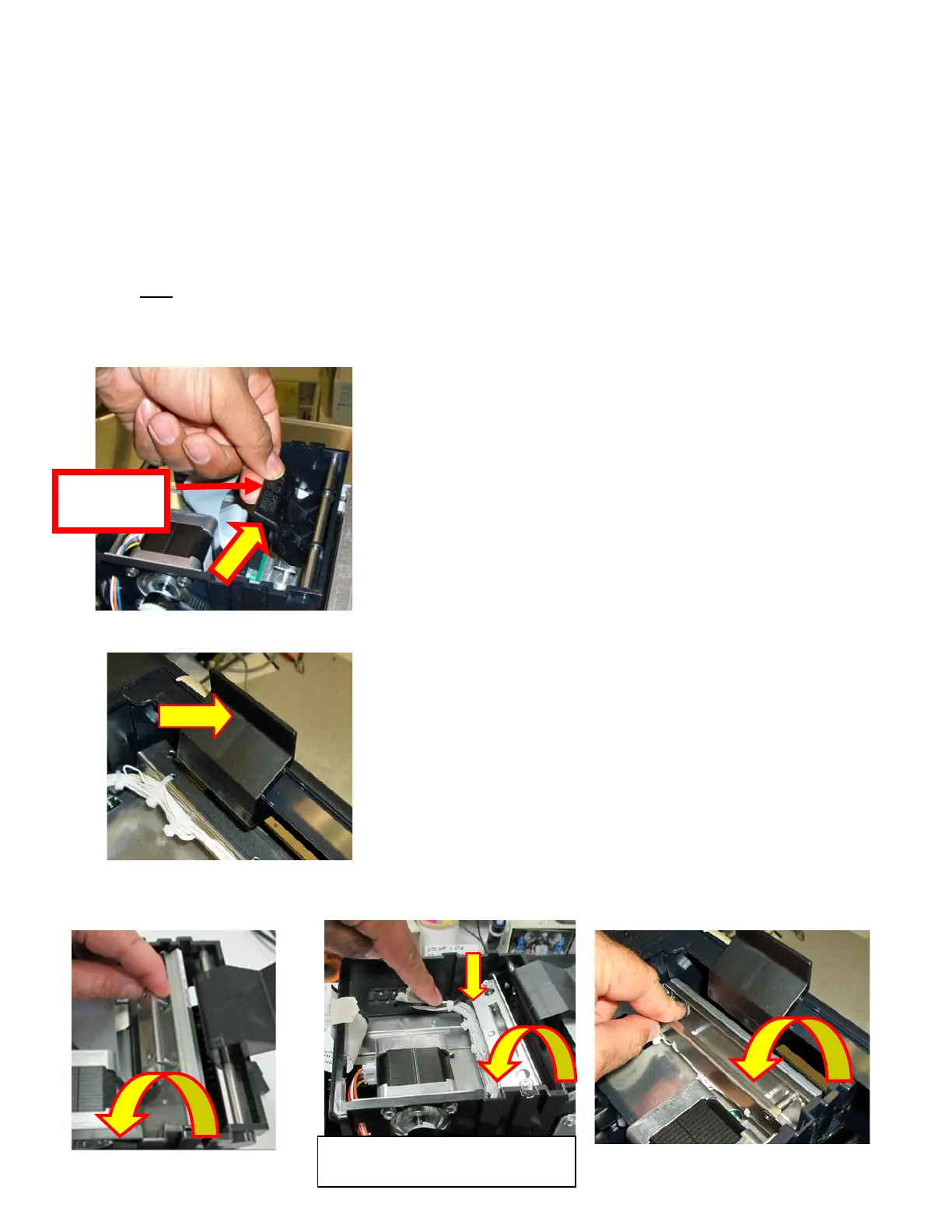
10.1.3 Thermal Print Head
The print head should be cleaned periodically to prevent debris from building up on the print element. The required
cleaning interval varies greatly depending on the quality of the ticket stock and the amount of dust entering the print area.
Excessive dirt buildup on the print head will result in reduced quality. Continuing to run the print head in a dirty condition
will reduce its life expectancy, as it is unable to diffuse its heat properly.
The follow needs to be done with the printer powered off and unplugged from the AC source.
The thermal print head can be removed for cleaning or replacement, as follows:
1. Make sure power is off and the AC cord is disconnected from the printer.
2. DO NOT UNPLUG CABLE FROM PRINT HEAD.
3. Lift up the cam lock assembly (located above the head mounting plate) to remove pressure from the thermal
head.
4. Position the cam lock lever as far forward as possible.
5. Flip the head back toward the rear of the printer. Denote what slot the print head was taken out of. Below photos
show the different types of head mounting plates used through the production history of the Lemur series printers.
6. Lift the print head mounting plate straight out.



 To Next Page