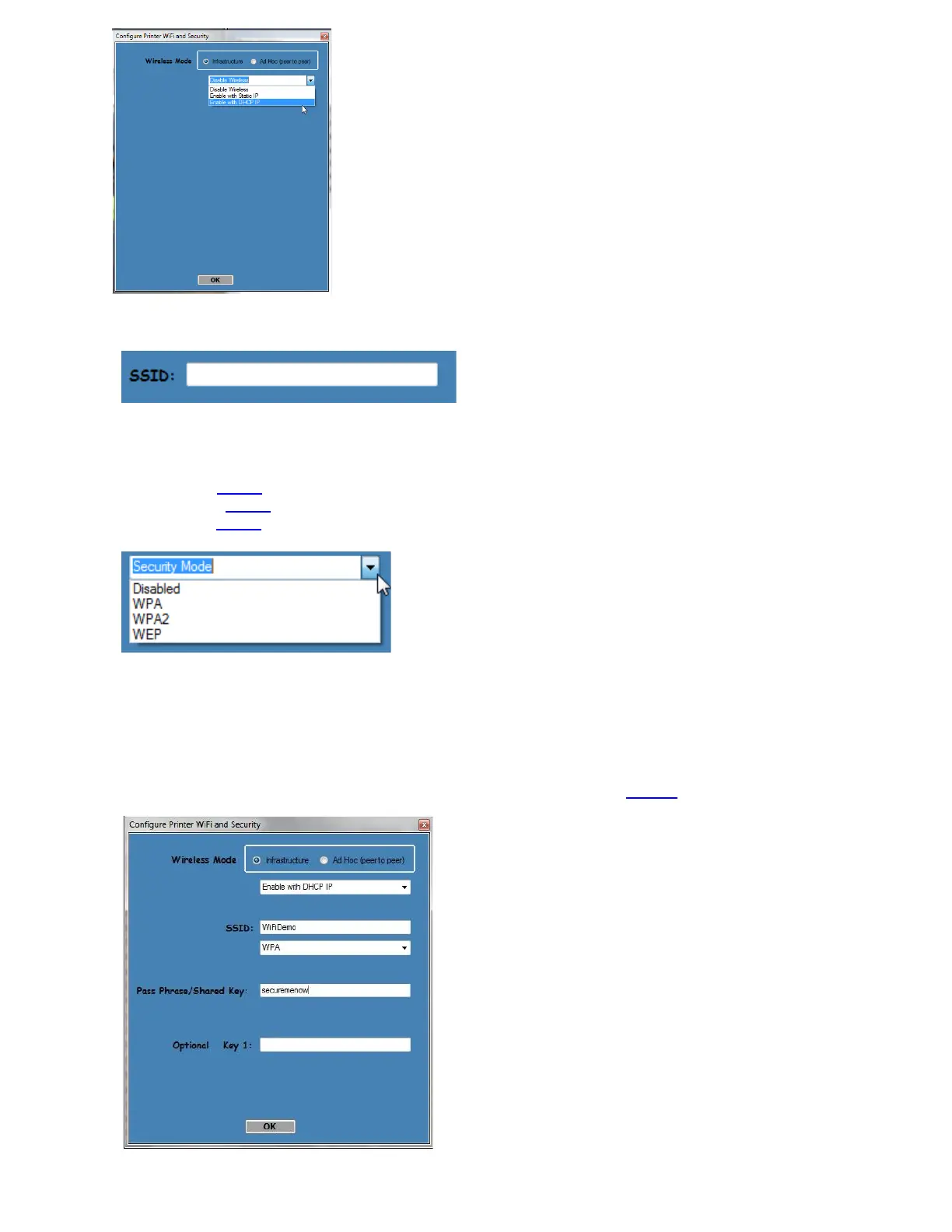
5. You will need to enter the SSID value. The Service Set Identifier is a 1 to 32 byte string. This normally would be
the name of the Wi-Fi router you are connection to. Please note the ID is case sensitive.
6. Security Mode: you will need to choose the security mode that is appropriate for your WiFi router.
Disable – Allows the user to communicate through the wireless network without any security encryption
involved.
WPA – Go to Step 7
WPA2 – Go to Step 7
WEP – Go to Step 8
7. WPA and WPA2 Personal Security Mode – Allows the user to communicate through the network using WPA or
WPA2 Personal wireless encryption. When this security encryption mode is chosen it will be required to enter
the “WPA Shared Key” for the local wireless network. Some networks also enforce the use of an optional key
value. The optional prompt field is provided for those networks. Please note the key is case sensitive.
Finally click on OK to have these values transmitted to the printer (through the cable). The printer will reset and
upon re-initialization it will establish wireless communication with the local network. The handshaking involved
in establishing wireless communication can take up to 30 seconds. Go to step #9.



 To Next Page