10
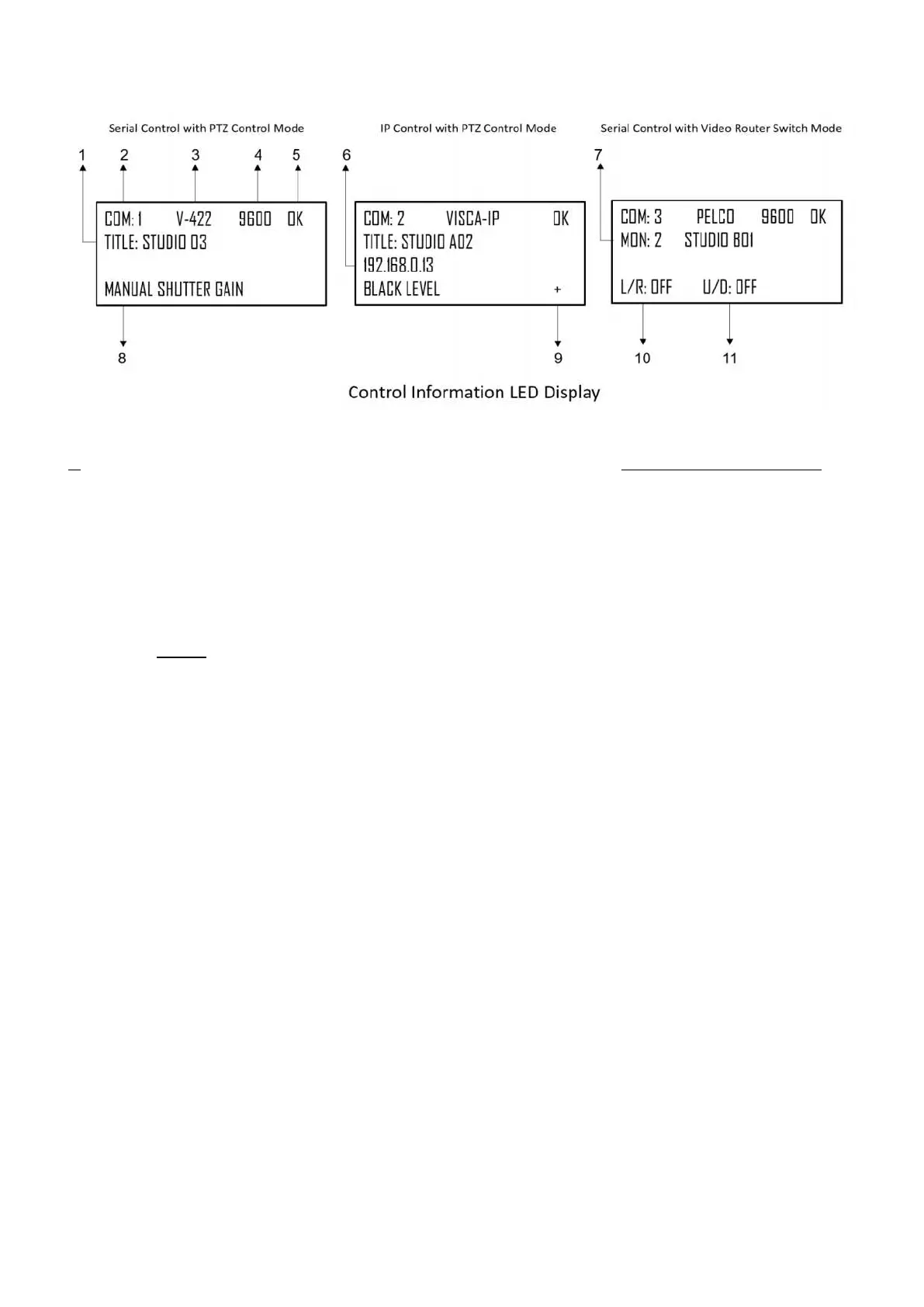
LED Screen Display
1. Camera Title, displays the title is set for the camera being controlled.
2. Camera Identifier – Camera ID, identifies which camera is being controlled, and the protocol being used
3. Protocol, the control protocol that the camera being controlled is using.
4. Baud Rate, the serial control baud rate that the camera being controlled is using.
5. Control status,
a. Showing OK when the connection between the camera and the keyboard is built and the
communication is working properly.
b. Showing NO when the connection or the communication between the camera and the keyboard is not
working properly.
6. IP address of the IP camera is being controller.
7. Monitor Identifier – When VIDEO ROUTER SWITCH mode is selected, identifies which monitor is being
used for display the selected camera video image.
8. Exposure Control Mode, use Auto Exposure knob to select an exposure control mode among Full Auto, Iris
Priority, Shutter Priority, Manual Iris Gain, Manual Shutter Gain, Black Level.
9. Network Connectivity indicator
a. If the “+” appears, this means that the network is successfully connected
b. If the “+” does not appear, this means that the network is not connected
10. Tilt Reversal Indicator
11. Pan Reversal Indicator


 To Next Page