9
Keyboard
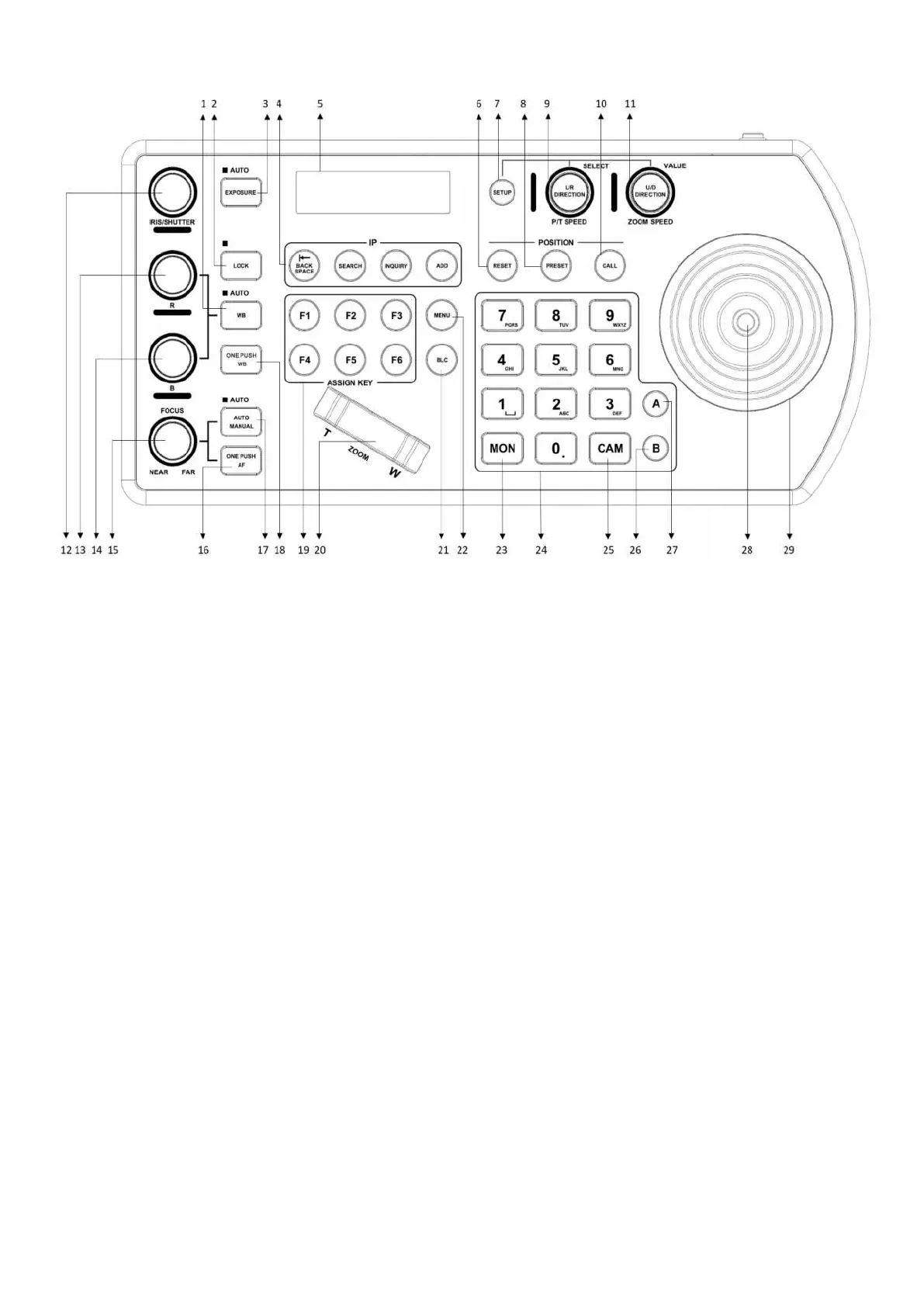
1. White Balance, (Auto, Manual): Press once for Auto, press again to activate manual adjustments
2. Lock – locks all image adjustment buttons and dials
3. Exposure (Full Auto, Iris Priority, Shutter Priority, Manual Iris Gain, Manual Shutter Gain, Black Level.)
4. IP Interface Buttons – used to interact with IP cameras
5. LCD Screen – Display for navigating keyboard settings
6. Reset – used for clearing presets
7. Setup – used for keyboard menu setting
8. Preset – used for saving camera presets
9. Pan Tilt Speed knob
• Rotate: Speed adjustment / Navigate (in menu)
• Press: Select (in menu)
• Long press: Invert L/R direction
10. Call – used for calling camera presets
11. Zoom Speed knob
• Rotate: Zoom speed adjustment / Adjust value (in menu)
• Press: Save (in menu)
• Long press: Invert U/D Direction
12. Manual Adjustment for Exposure- Iris Priority, Shutter Priority, Manual Iris Gain, Manual Shutter Gain,
Black Level.
13. Manual Red Adjustment for White Balance
14. Manual Blue Adjustment for White Balance
15. Manual Focus
16. One-Push Focus
17. Focus Auto/ Manual Toggle
18. OPW (One Push WB) For White Balance
19. Assign Keys – used to assign quick access to commands
20. Zoom Seesaw – For zoom in / zoom out
21. BLC (Back Light Compensation) – Toggles Back Light Compensation setting in camera
22. Menu for pulling out camera OSD menu
23. MON: For calling monitor number
24. Alphanumeric Keypad – used for camera call, preset call, entering data (in menu)
25. CAM: For calling camera number
26. RS422 Group B Selection
27. RS422 Group A Selection
28. Enter Button for menu setting to Enter/Confirm data.
29. PTZ Joystick


 To Next Page