28
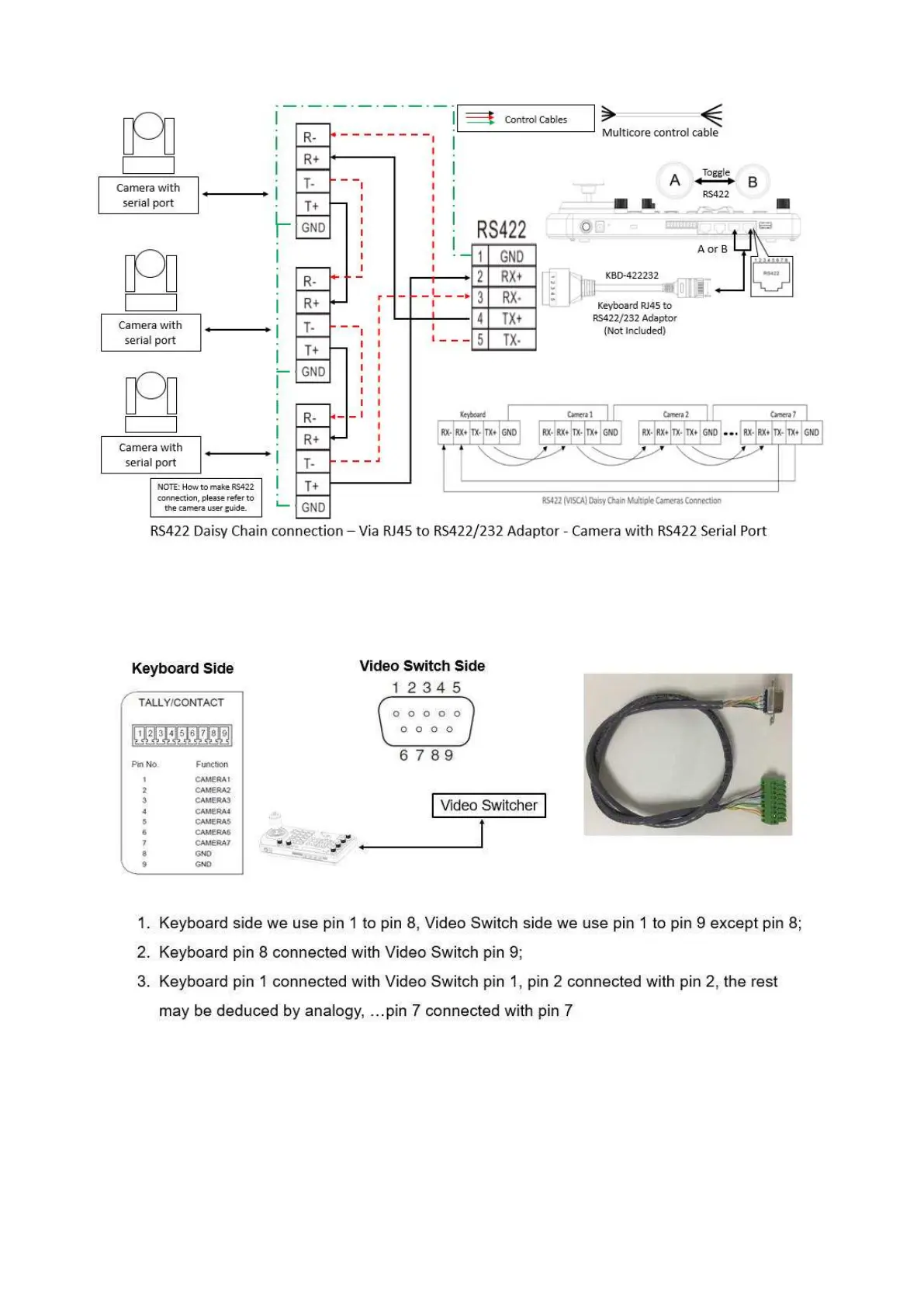
b. Via RJ45 RS422/232 adaptor
2. Built Tally/Contact Function cable connection between the Keyboard Controller and Video
Switcher(Sony)
Set UP
1. GPI I/O Input mode - Tally signal is sent by Video Switch
a. Connect camera with keyboard by standard RS-422 control cable;
b. Connect keyboard with video switch by tally function cable;
c. Access to KEYBOARD SETTING > GPI I/O > Setting, and change it to Input mode, then Exit to
home directory;
d. After done above operations, we can switch to different camera by video switch, for example, if we
switch to camera 1 on video switch, it will send tally signal to keyboard via the tally function cable,
and keyboard will transmit this tally signal to camera 1 via standard RS-422 control cable, so
camera 1 tally light will turn on, and keyboard can control camera 1 pan and zoom;


 To Next Page