31
Figure 3 - When the junction box is powered, it will provide power to the keyboard via any port that it is connected to --RS232, IP, RS422(B).
No additional power supply is required for the keyboard a powered junction box is being used.
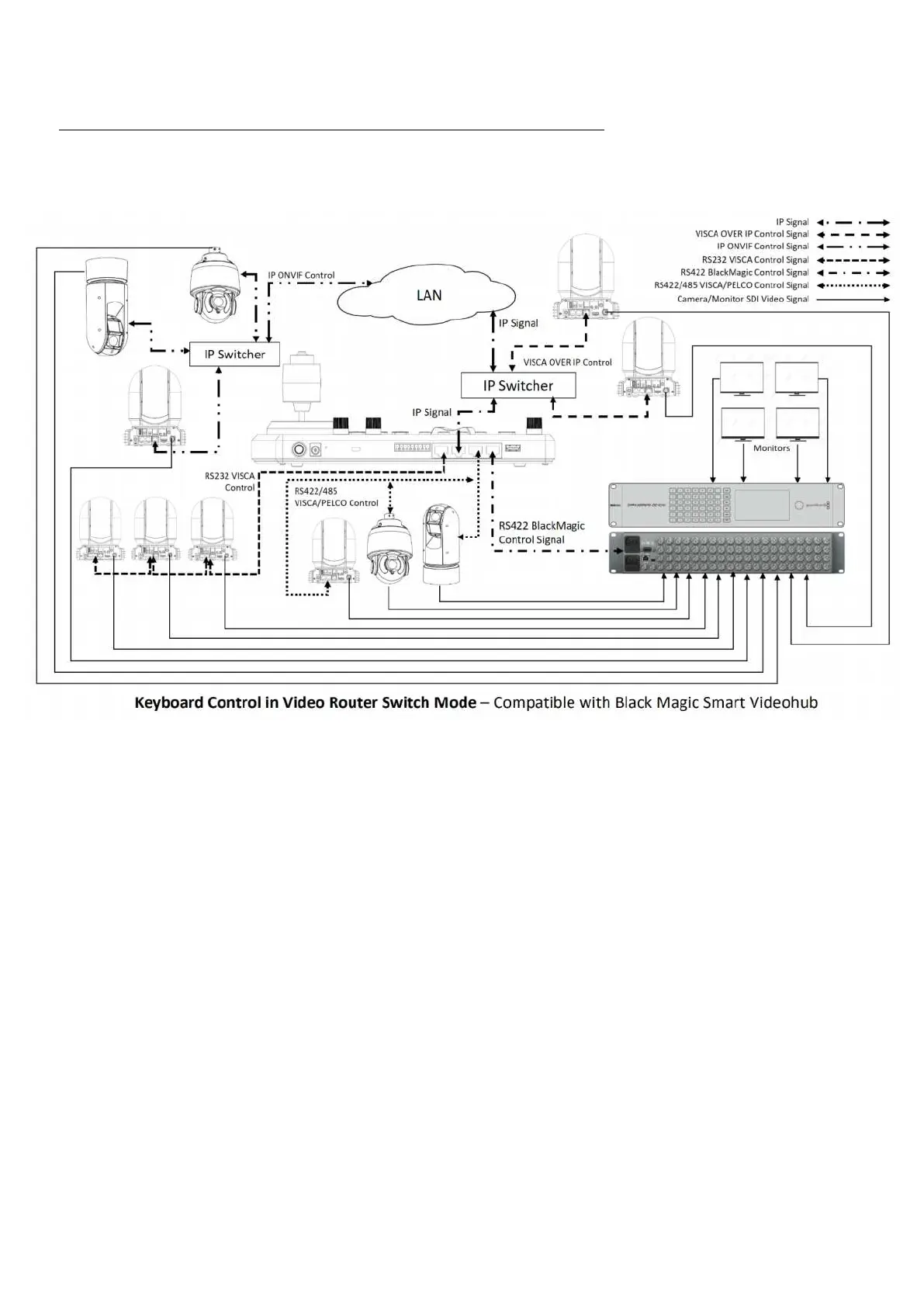
In Video Router Switch control mode, it allows you to use keyboard CAM key and MON key to select any one of the
cameras displaying on any one of the monitors within the video router/matrix system with PTZ camera control.
After the PTZ camera is switched on the monitor, you can right away control the PTZ camera without any extra
keyboard operation.
NOTE: Important
• In order to switch camera on the video router with PTZ camera control together, you need to set the camera
ID on the keyboard as the same as camera input number on the video router.
• For example, on the keyboard, there is the camera 3 (serial control) and camera 12(Visca-Over-IP control).
This camera 3’s SDI signal needs to go into camera input 3 on the video router, camera 12’s SDI signal needs
to go into camera input 12 on the video router.
Current compatible video router supported:
• Black Magic Design-Smart VideoHub
• To Be Continue Added


 To Next Page