Bosch Sensortec"| BST-BMP581-DS004-02 16 | 74
Modifications reserved | Data subject to change
without notice Document number: BST-BMP581-DS004-02
4.3 Power modes
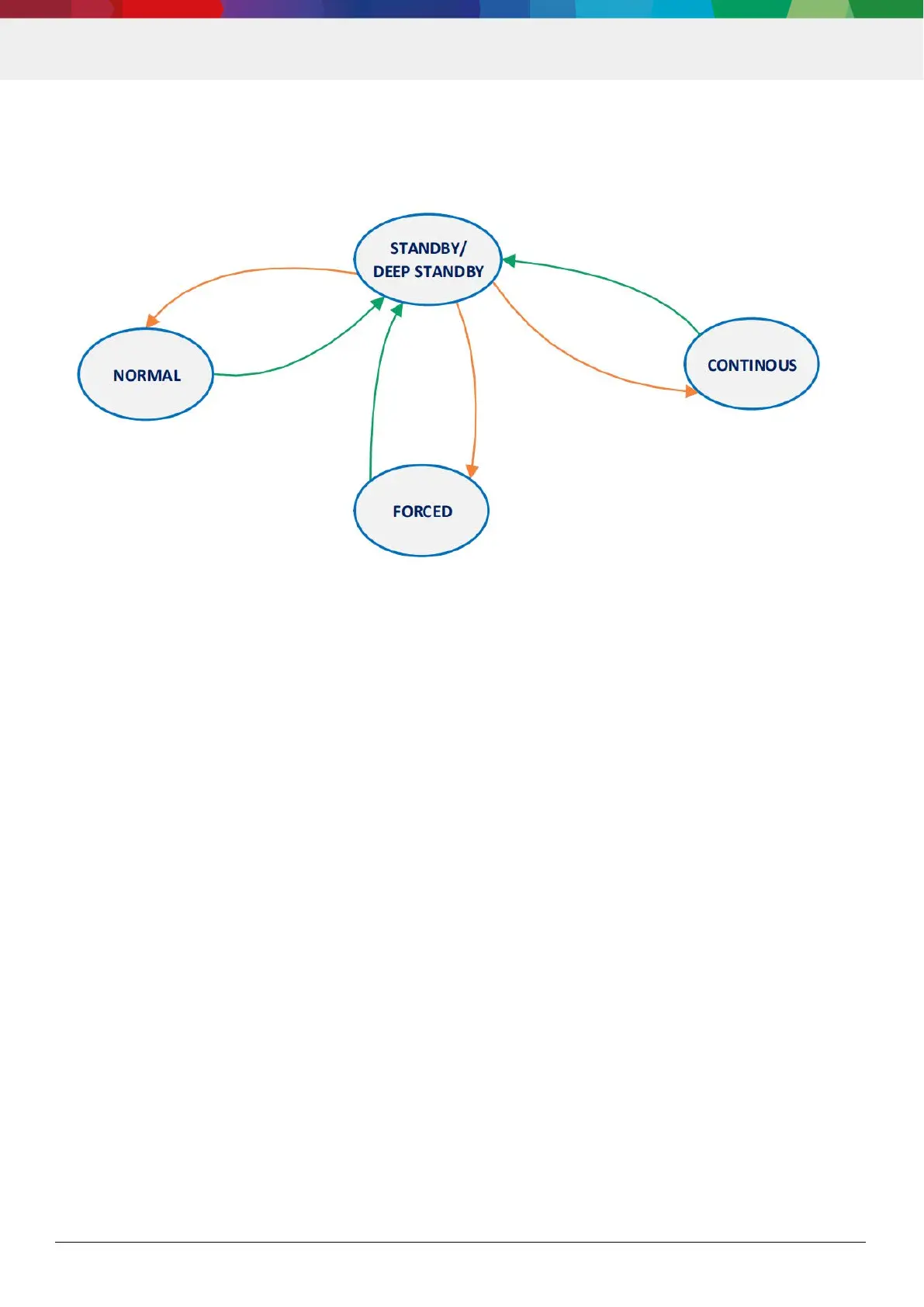
The power modes of BMP581 and transitions in between are depicted in Figure 2. After startup or soft-reset, the BMP581
will be in DEEP STANDBY mode. Transitions from one mode to another are only possible by entering SLEEP mode first.
Figure 2: Power modes diagram
4.3.1 STANDBY mode
In STANDBY mode, no measurements are performed and power consumption is at a minimum. All registers are
accessible for write and read. Mode transitions to other modes are possible. The pressure and temperature data
registers PRESS_DATA_XXX and TEMP_DATA_XXX keep the values of the last measurement executed. The FIFO. if
enabled, also maintains it‘s content and can be read.
4.3.2 DEEP STANDBY
In order to further reduce the power consumption further, the BMP581 offers a DEEP_STANDBY mode. In this case,
power consumption is even lower than in STANDBY mode.
DEEP_STANDBY will only be entered if also the following conditions apply:
ODR_CONFIG.deep_dis = 0
ODR_CONFIG.odr < 5Hz
FIFO_SEL.fifo_frame_sel = DIS
DSP_IIR.set_iir_t = BYPASS
DSP_IIR.set_iir_p = BYPASS
If one of these settings is changed, the BMP581 transitions to STANDBY mode.
4.3.3 FORCED mode
In FORCED mode, a single measurement is performed according to selected measurement and filter options. When
the measurement is finished, the sensor returns to sleep mode and the measurement results can be obtained from the
data registers. For a next measurement, forced mode needs to be selected again. Forced mode is recommended for
applications which require very low sampling rate or host-based synchronization. Forced mode may also be used if an
ODR higher than 240 Hz is needed.





 To Next Page