-13-
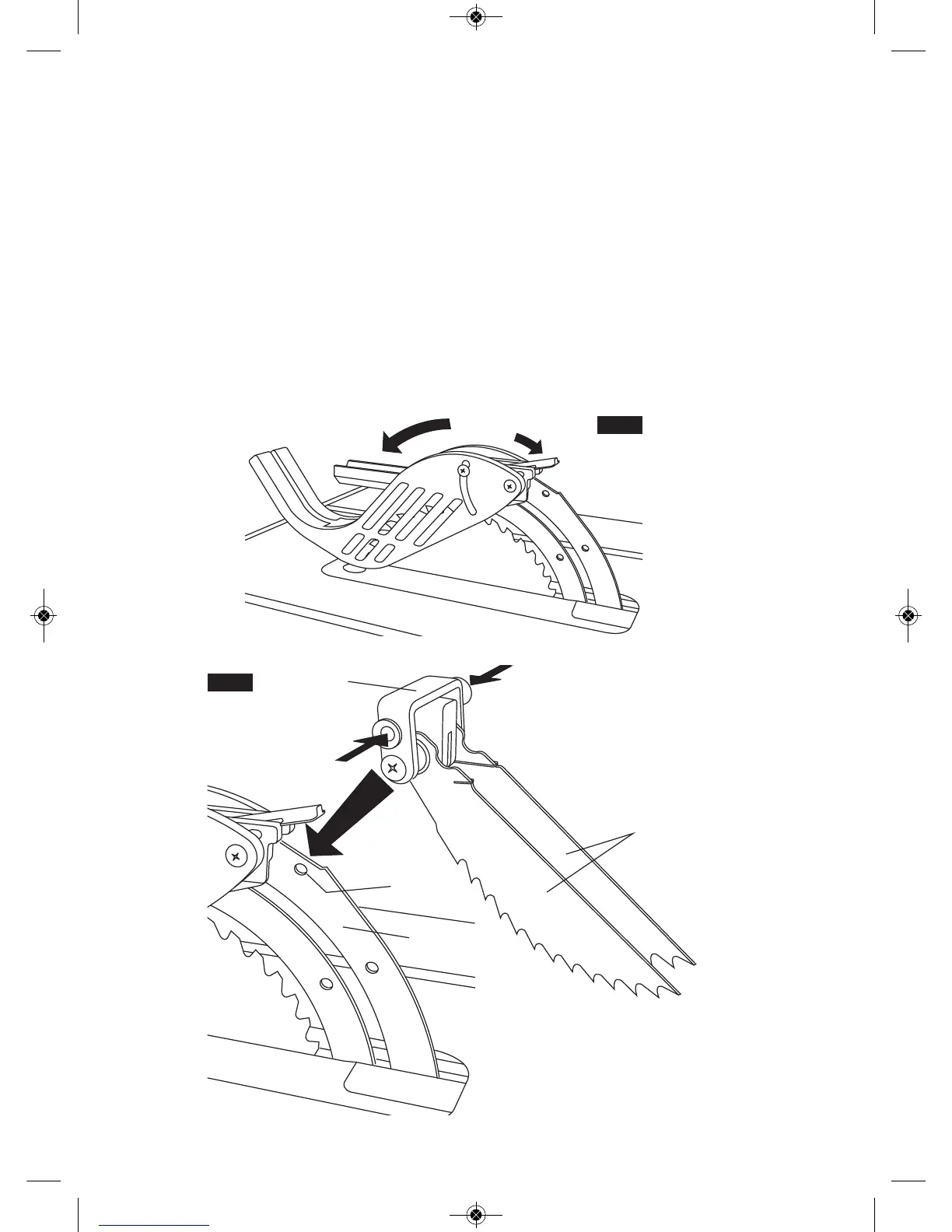
10. Lower the front of the guard assembly until
the metal “fork” is parallel with the table (Fig. 8).
11. Press down on the guard release lever until
y
ou feel and hear it snap into the locking posi-
tion. Check that the guard assembly is securely
connected (Fig. 8).
&& & &(
12. Attach the Anti-Kickback Device into the flat
recessed area of the riving knife (Fig. 9).
13. Squeeze the compression pads while nesting
the device into the flat area (Fig. 9).
14. Release the compression pads such that the
Anti-Kickback Device locks onto the riving knife
immediately behind the guard assembly. Check
that the attachment pin is securely connected
into locking hole. Carefully raise and lower the
pawls – when letting go, the spring-loaded
pawls must come down and contact the table in-
sert (Fig. 9).
5:@ Position the Anti-Kickback Device behind the
flat recessed area and slide it towards the front until
it drops into the recessed area – then release the
compression pins.
;@1 The two attachments are independant of each
other, so the Anti-Kickback Device can be attached
before the Guard Assembly.
FIG. 8
4
5
FIG. 9
7
9
9
10
8
2








 To Next Page