46
Operation
12.2.22 Start-up
The Nyon control computer is shipped with a partially charged
rechargeable battery�
• Charge the rechargeable battery before first use (see chapter
“Operation / Control computer / Charging the control computer”)�
Note: Registration is required to use the functions in their entirety
(see “Login with registration”)�
12.2.22.1 Login without registration
“Nyon” can also be used without the registration� The functions are
available to a limited extent.
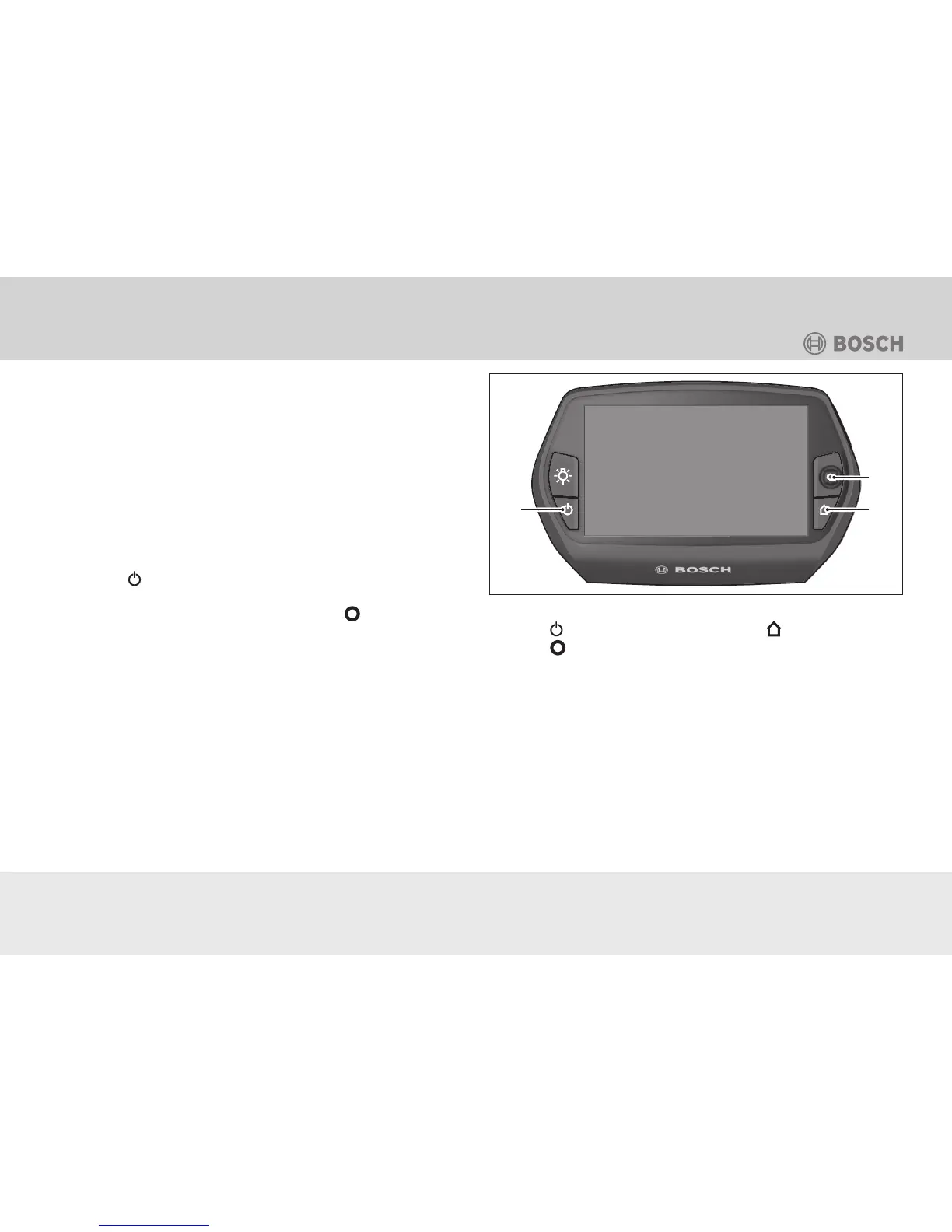
1� Use the
button to switch the control computer on (see
Fig�: “Nyon” control computer)�
2� To select your desired language, push the
joystick and
follow the instructions�
3� For operation, select the type of login from the following pos-
sibilities:
Test ride: For a test ride without the input of data� All cycling data
will be deleted after deactivation�
Start product demo: The most important functions of the “Nyon”
will be automatically cycled through� All values will be simulated�
The product demo restarts after a few minutes�
Fig.: “Nyon” control computer
1 Button
2 Button
3 Button
1
2
3
• Stop the product demo by pushing any button�
Continue without profile: The term “offline” means that your
cycling and user data will only be saved locally on the board com-
puter�
• Follow the instructions or select one of the suggested respons-
es� The data entered will be preserved after the Nyon has been
deactivated, but will not be synchronised with the online portal
or smartphone app�




 To Next Page