32 en | (Optional) Installing a Sunshield MIC IP ultra 7100i │ MIC IP starlight 7100i
2019-12 | 1.2 | Installation Manual Bosch Security Systems
10 (Optional) Installing a Sunshield
Quantity Component
1 Sunshield shell
2 Screws, M4 x 10
2 Flat washers
1 Quick Installation Guide
Additional Tools Required
1 Phillips-head screwdriver, #2, to remove factory-installed plastic screws from
the camera head
1 Torx driver, T20, for M4 Torx head screws
1 Pair of diagonal cutters, to remove the plastic insert for the illuminator from
the sunshield shell, if necessary
Notice!
Install the applicable accessories (illuminator, sunshield) before you cant the camera.
1. If you will install an illuminator on a unit mounted in upright orientation:
Cut out the inset area in the sunshield shell with a pair of diagonal cutters. The inset area
provides space to attach the illuminator. Discard the cut-out plastic.
Note: This step does not apply to cameras mounted in inverted orientation.
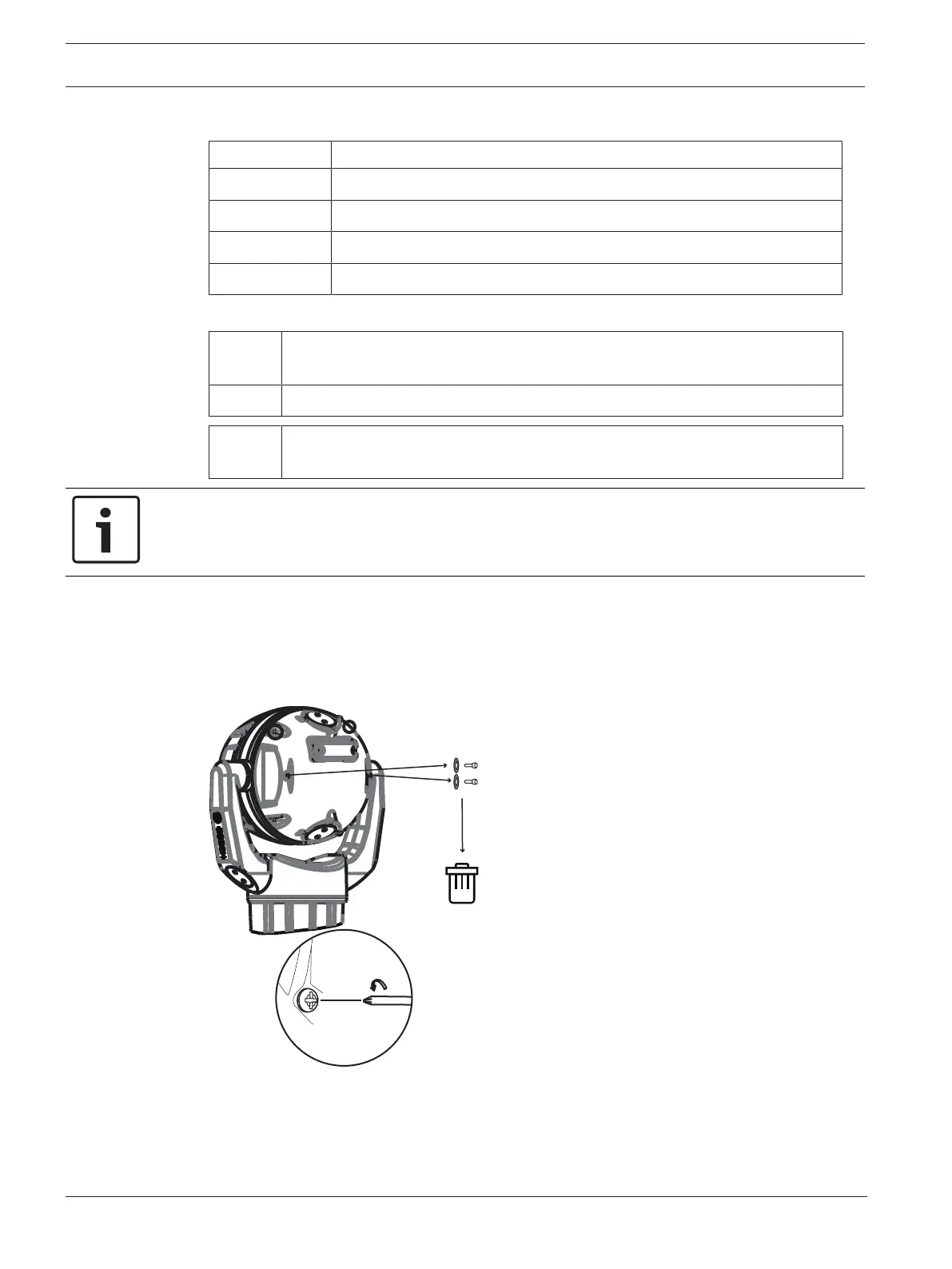
2. Remove the screws from the camera head.
3. Attach the sunshield to the camera head.









 To Next Page