© Bosch Healthcare Solutions GmbH14 Instructions for use
Menu
5.1 Device settings
The greyed-out items are only accessible when logged in as an administrator.
In the menu, select settings, then select device settings.
Select display and set the desired brightness by moving the slider.
Select language and choose the desired language from the list.
Select date and time to change the date and time of the analyser. Select “>>” to continue.
5.2 User accounts and passcode
The greyed-out items are only accessible when logged in as an administrator.
User 1
User 2
User 3
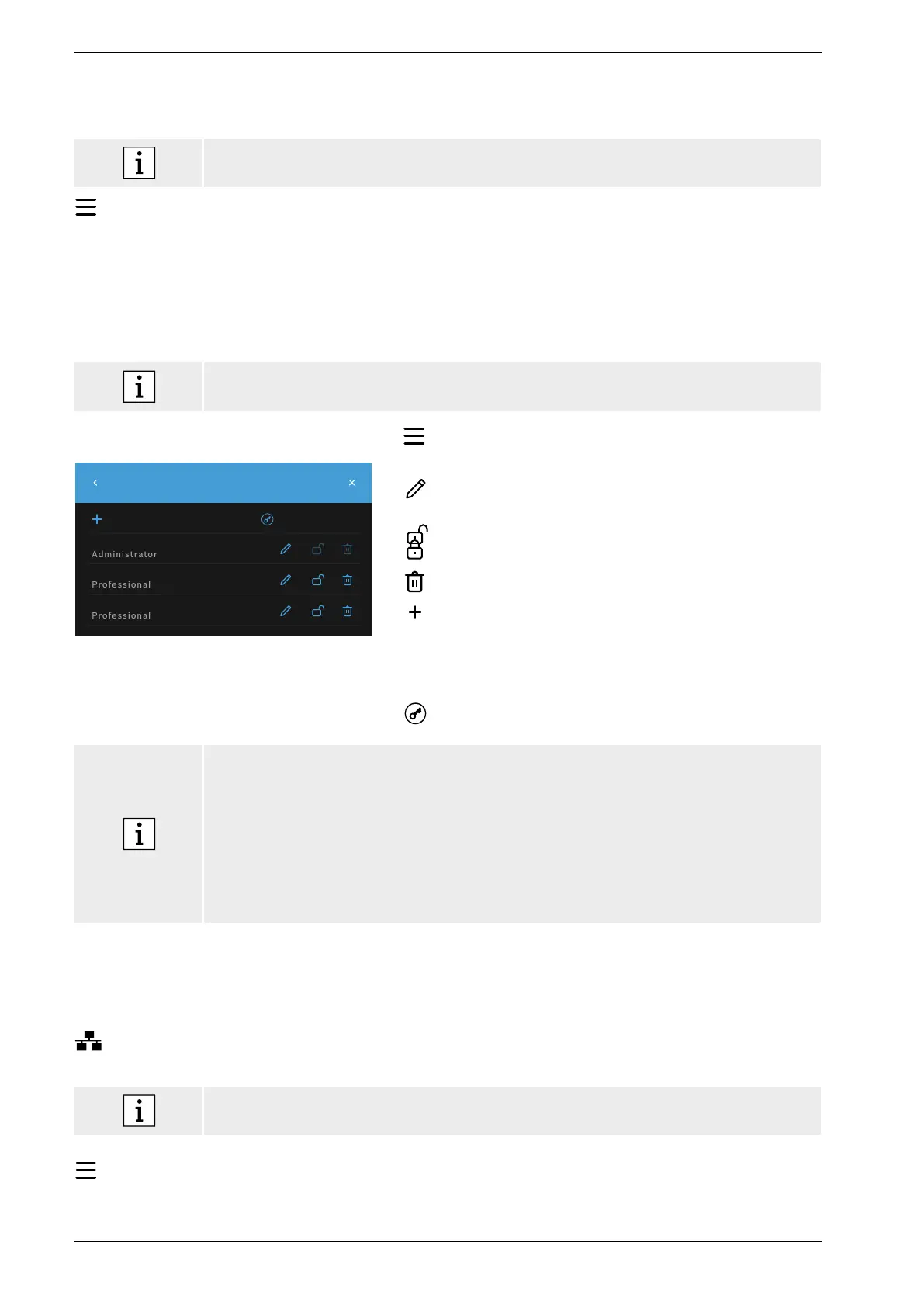
User Accounts
PASSCODE ENABLED
ADD USER
In the menu, select settings then select user accounts.
A list of registered users appears.
Press edit to change name and/or passcode for the selected
account.
Activate
or
deactivate an account.
Press to delete an account.
Press add user to create a new account. Select the type
ofaccount:
• Administrator
• Professional
Afterwards type in a username and a numeric passcode.
Enable or disable passcode protection for professional
accounts.
• Only an administrator user can edit, activate/deactivate or delete the account of another
user. Professional users can only edit their own account.
• At least one administrator account must exist.
• When passcode protection is enabled, access is protected by a username and a numeric
passcode. A passcode is required to access an administrator account, even if passcode
protection is disabled.
• Deactivated accounts cannot be logged in until they have been activated again.
• The passcode consists of 8 digits for an administrator account and 4 digits for a professional
account.
5.3 Network configuration
A local area network can be configured to establish a connection to a HIS/LIS-System or Vivasuite.
The analyser supports two types of network connection:
• Ethernet
Make sure the Ethernet cable is connected to an Ethernet port at the back of the analyser.
• Wireless LAN (WLAN)
Log in as an administrator for access.
In the menu, select settings, select network/interfaces, then select network configuration.


 To Next Page