© Bosch Healthcare Solutions GmbH 3Instructions for use
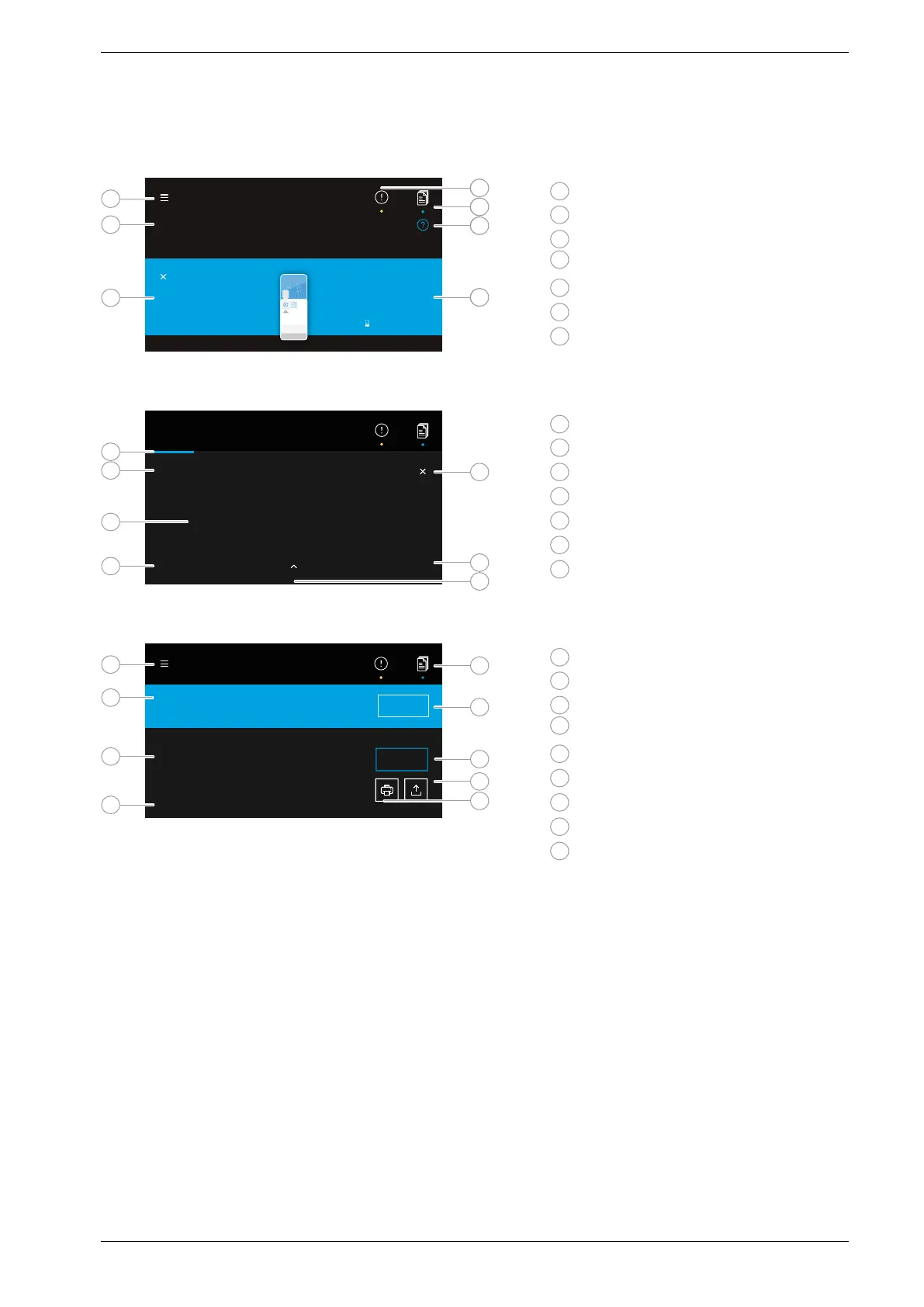
Overview of the user interface
Home screen
Please fill cartridge and insert into slot.
ID 123456789
Patient name
Date of birth
TEST NAME
Test details
Expiry date
1
Menu
2
Information on what to do
3
Sample data
4
Notice
5
Joblist
6
Help
7
Test description
Analyser test screen
SMH
01 16 51
TEST NAME
Detection
Everything is running well.
ID 342 346 23
1
Progress bar
2
Test status information
3
Remaining test time
4
Sample data
5
Cancel test run
6
Test description
7
More detailed information
Analyser result overview screen
Result saved and submitted.
Cartridge is ready to eject.
ID 342 485 58
TEST NAME
FINISH
Test valid
Target 1, Target 2, Target 3, ...
DETAILS
1
Menu
2
Status
3
Information about valid/invalid test
4
Sample data and test description
5
Joblist
6
Finish test run and eject cartridge
7
View details
8
Export
9
Print
6
5
4
7
1
1
1
2
2
2
3
3
3
4
4
4
5
5
6
6
6
5
7
7
7
8
9


 To Next Page