Intelligent dosing system NL
saved even after the device is
switched off.
→
"Keys", Page 24
→
"Keys", Page 24
s Fill the detergent or detergent
softer in the manual dosing
dispenser.
→
"Detergent and laundry care
dosing agent", page 33
s Activate the intelligent dosing system
tem after the program end.
→
"Keys", Page 24
→
"Keys", Page 24
6. The
→
"Take out the laundry", page 34.
15.2 Filling the dosing container
If you want to use the intelligent
dosing system or if the device shows
a message during use, fill the dosing
containers.
Remark: Only fill suitable detergents
and care products →
Page 31
in the
dosing tanks.
If you want to add liquid detergent or
fabric softener to the dosing
container, use the same product. If
you want to replace liquid detergent
or fabric softener in the dosing
container with another product, clean
the detergent drawer first.
→
"Cleaning the detergent
drawer", Page 41
If you want to use both dosing tanks
for liquid detergent, set the Contents
of the dosing tanks →
Page 36
in.
Requirements
s The laundry is prepared.
→
"Preparing the laundry",
Page 31
s The laundry is sorted. Used to be-
sort well
s The laundry has been placed.
→
"Fill the drum with laundry",
Page 33
s The program is set.
→
"Set program",
Page 32
s The intelligent dosing system is
activated.
→
"Keys", Page 24
→
"Display", Page 22
→
"Display", Page 22
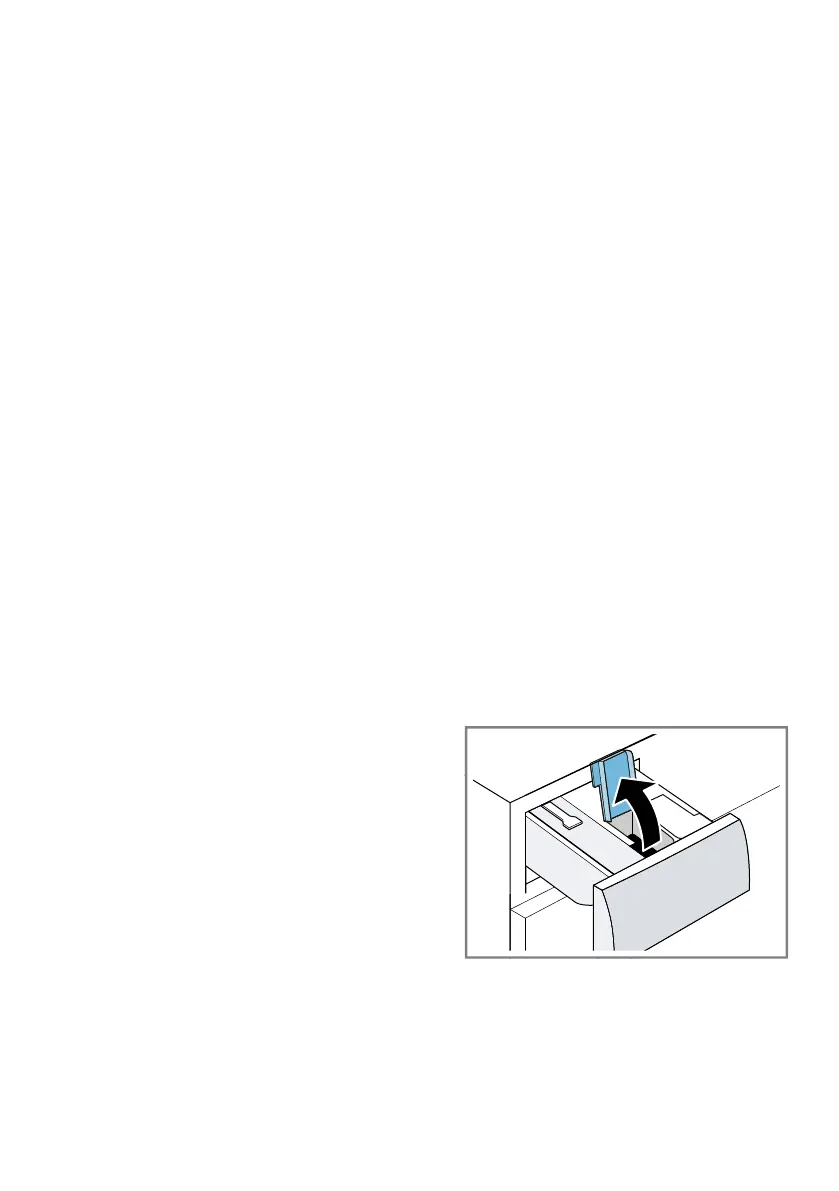
1. Pull out the detergent drawer.
2. Open the filling cover.
1. Filling the dosing container
→
Page 35.
To replace the contents of the
dispensers with another product,
clean the detergent drawer →
Page
41.
2. If necessary, change the contents of the
dosing containers →
Page 36
To adjust.
3. If necessary, the basic dosing
amount →
Page 36
To adjust.
4. Adjust program settings if
necessary →
Page 32.
5. Start the program
→
Page 33.
35



 To Next Page