ADJUST CHANNEL AUDIO
25
|
ENG
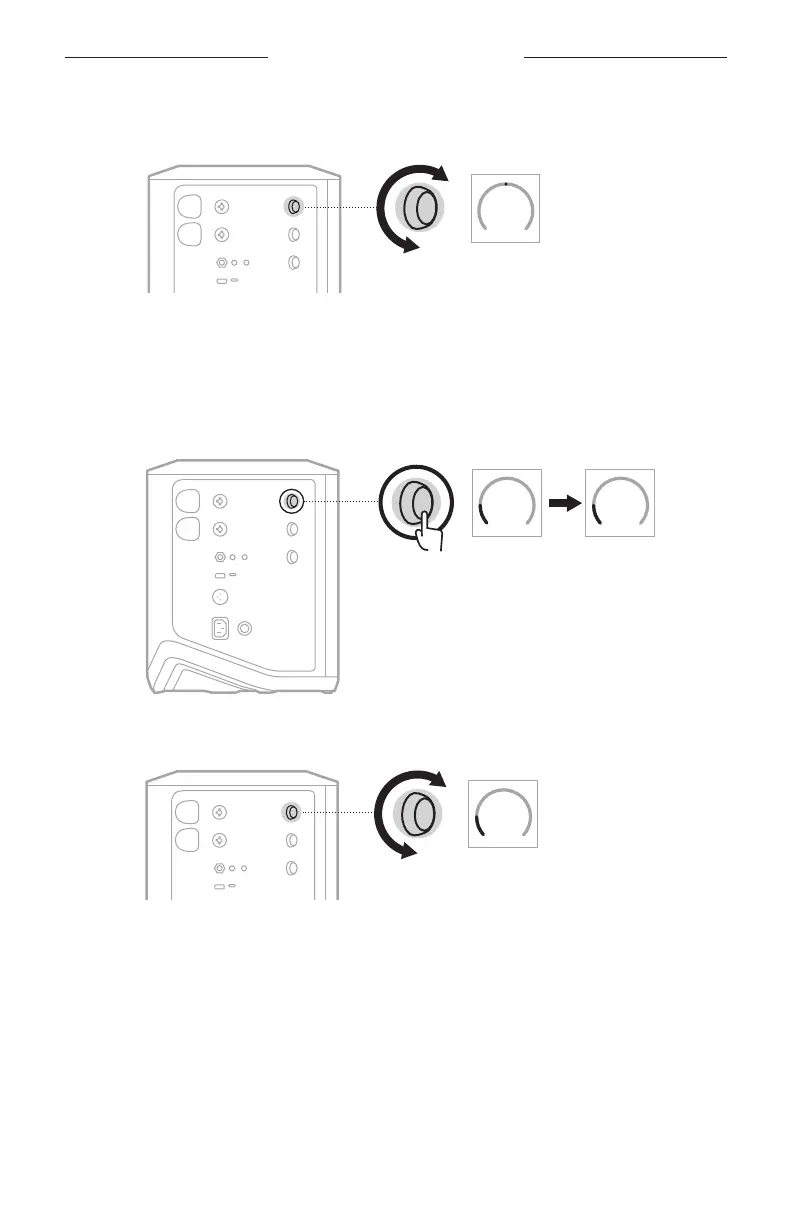
2. Rotate the channel control to either boost or cut the low-frequency balance of
the channel.
BASS
REVERB
TREBLE
NOTE: After 10 seconds of inactivity, the channel display resets to VOLUME.
Adjust reverb (Channels 1 and 2 only)
1. Press and release the channel control until REVERB appears on the
channel display.
VOLUME
TREBLE
REVERB
VOLUME
BASS
2. Rotate the channel control to adjust the amount of reverb applied to the channel.
REVERB
VOLUME
BASS
NOTES:
• After 10 seconds of inactivity, the channel display resets to VOLUME.
• You can also mute reverb eects for a channel using the Bose Music app
(see page 36).



 To Next Page