WIRELESS TRANSMITTER CONTROLS
41
|
ENG
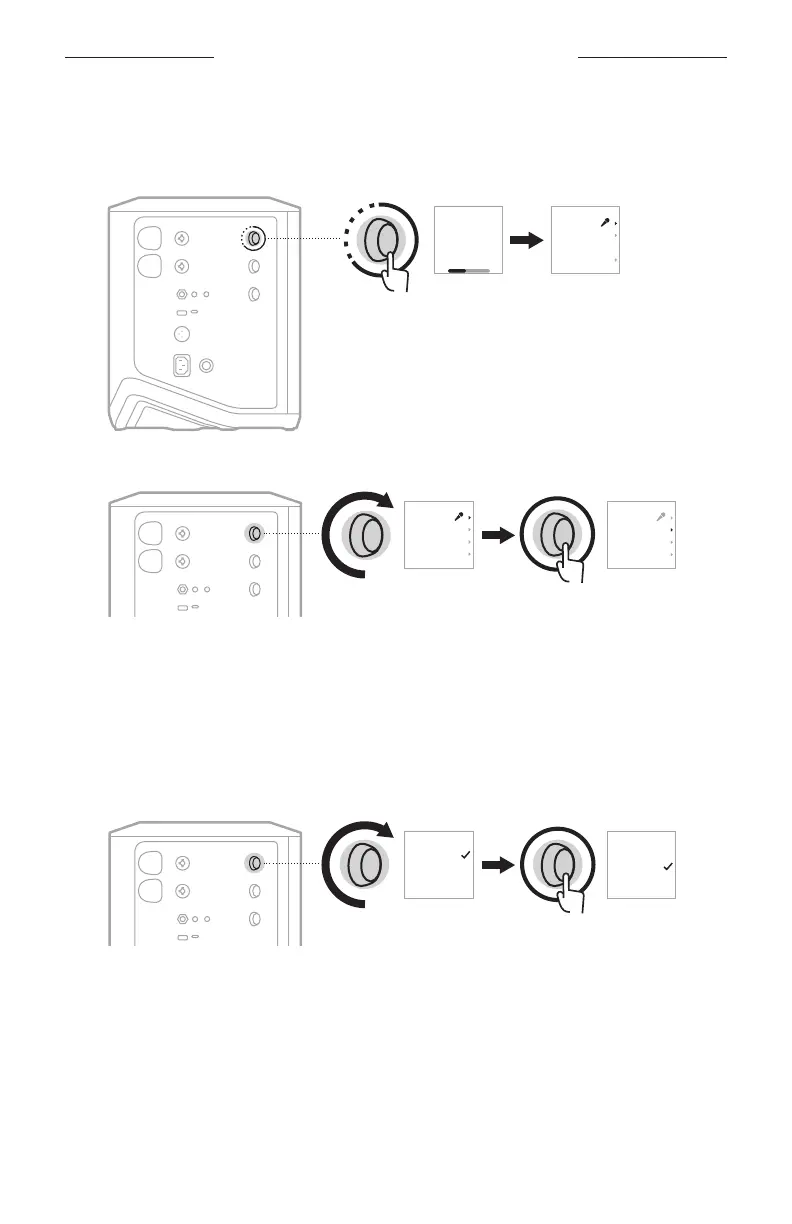
Enable/Disable channel insert functionality
1. Press and hold the channel control for either Channel 1 or 2 until the additional
controls menu appears on the channel display.
Press + Hold
to access
additional
product
controls
ToneMatch
Insert
Wireless
Expanders
Auto
On
2. Rotate the channel control to highlight Insert, then press to select it.
ToneMatch
Insert
Wireless
Expanders
Auto
Auto
On
ToneMatch
Insert
Wireless
Expanders
Auto
Auto
On
3. Rotate the channel control to highlight your preferred setting, then press to
select it:
• Auto (default): When a wireless transmitter is powered on and connected to
this channel, the l (6.35 mm) TRS channel input is converted into a series
eects loop.
• O: When a transmitter is powered on and connected to this channel, the
system ignores signals from the channel input.
Auto
O
Auto
O
4. Press and hold the channel control until the additional controls menu disappears.






 To Next Page