TROUBLESHOOTING
77
|
ENG
RESET THE SYSTEM
Factory reset clears all channel and system settings, Bluetooth connections, and
wireless transmitter connections from the system and returns it to original
factory settings.
NOTE: You can easily restore your channel and system settings after a system reset
using the Bose Music app. To do so, before you reset, save your current
settings as a Scene in the app (see page 36). Once the reset is complete,
select the Scene in the app to restore all settings except for Bluetooth and
wireless transmitter connections.
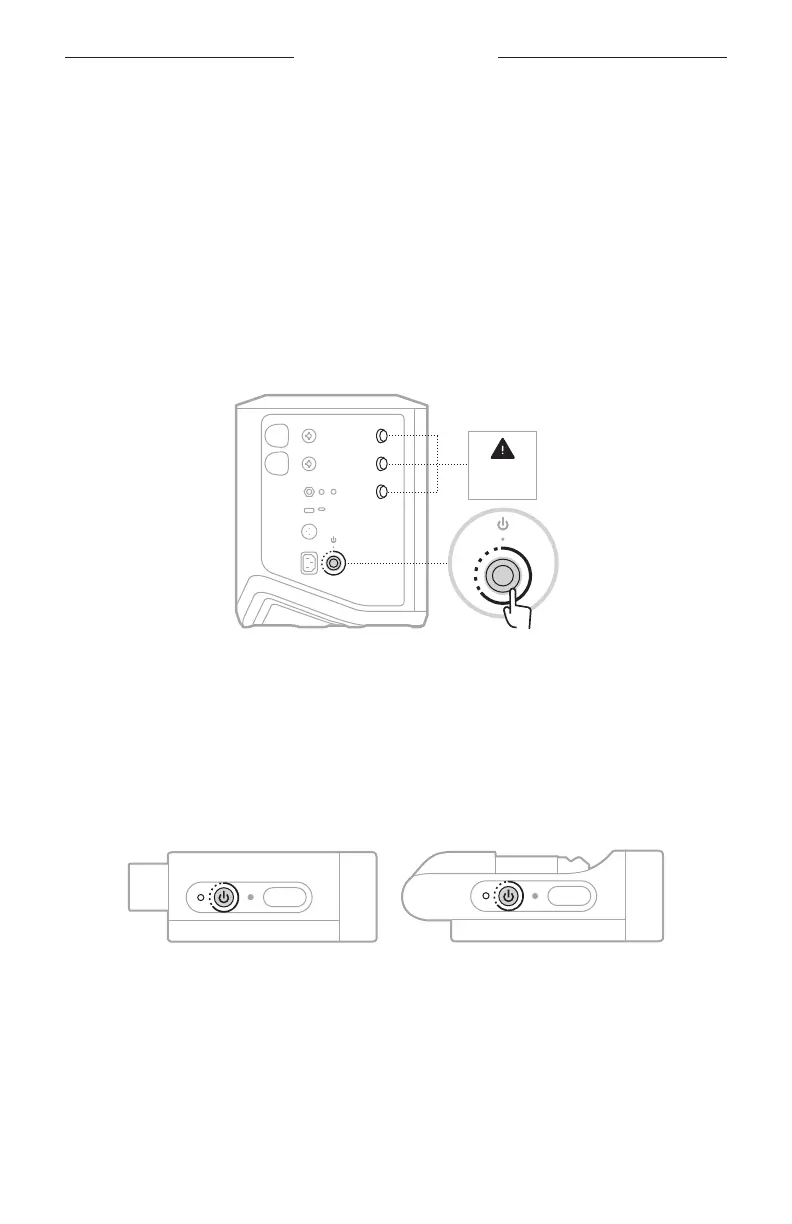
Press and hold the Power button I for 10 seconds until the power light turns o and a
message appears on the channel displays.
Resetting
the system
The system reboots. When the reset is complete, the power light glows solid white.
RESET A WIRELESS TRANSMITTER
Factory resetting a wireless transmitter clears all pairing information and returns it to
original factory settings.
Press and hold the Power button I for 10 seconds until the power light turns o.
MUTE
MUTE



 To Next Page