5
Before Using
Remote Control
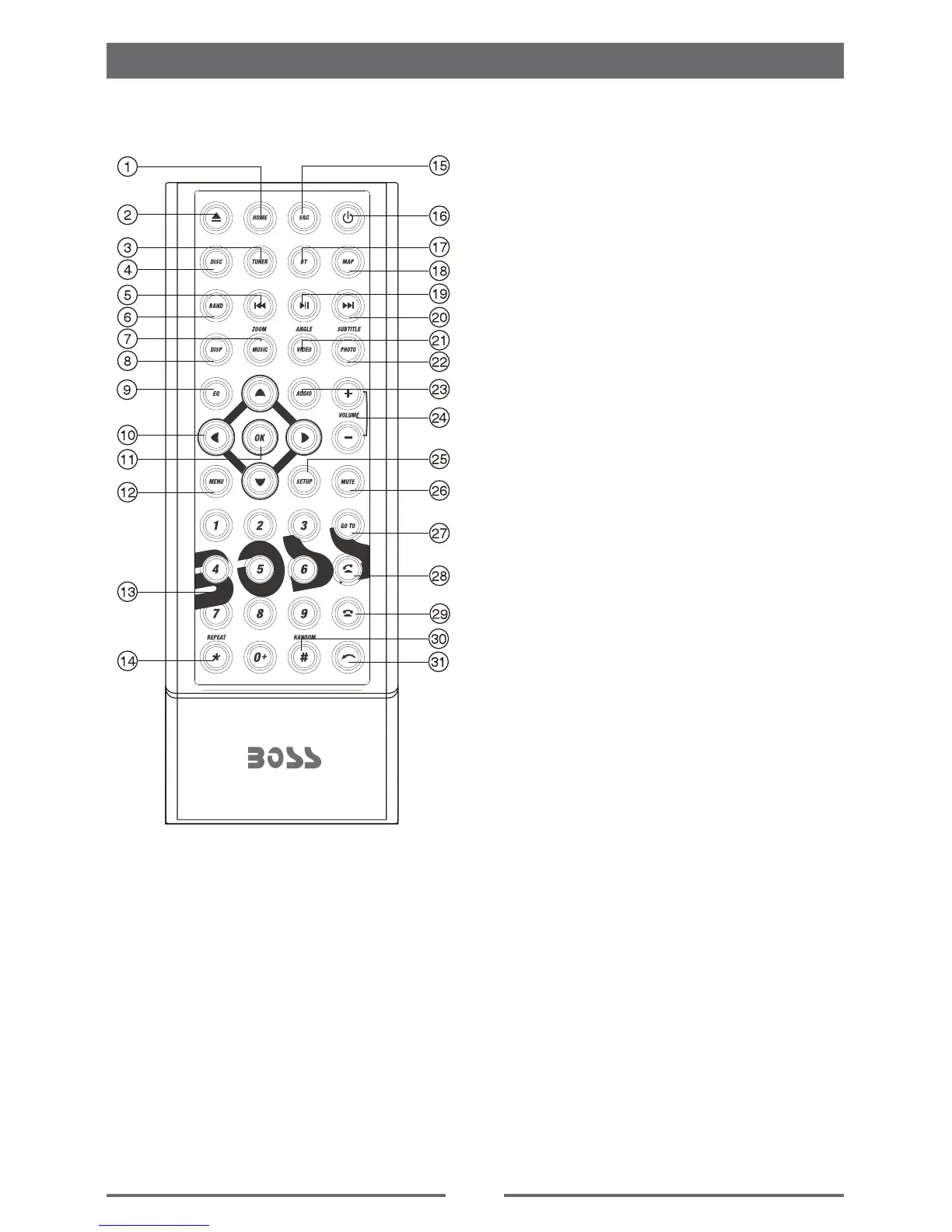
1. Return to the home menu
2. Eject the disc
3. Access to tuner source
4. Access to disc source
5. - Search an available radio station by
decreasing tuning frequency
- Select the previous chapter/track for
playback
6. Select radio band
7. - Zoom in (Video menu )
- Access to music list (Auido menu of
music playing)
8. Adjust screen settings
9. Open Audio menu
10. Menu cursor
11. Enter
12. - Open route menu (DVD)
- Turns on/off PBC (VCD)
13. Digit area
14. Repeat playback
15. Change to next source
16. Power on/off
17. Access to Bluetooth source
18. Access to navigation source
19. Pause playback/Start playback
20. - Search an available radio station by
increasing tuning frequency
- Select the next chapter/track for
playback
21. - Playback disc in different angle for a
scene (DVD)
- Rotate (photo playing)
- Access to video list
22. - Language selection for subtitle (DVD)
- Access to photo list
23. Change the audio language for disc
playback (DVD)
24. Increase/Decrease volume
25. Access to settings source
26. Toggle on/off audio output
27. Activate direct access mode
28. Dial/Receive a call
29. Hang up
30. Play all chapter/tracks in random order
31. - Press to clear the number one by one
- Hold to clear all the numbers



 To Next Page