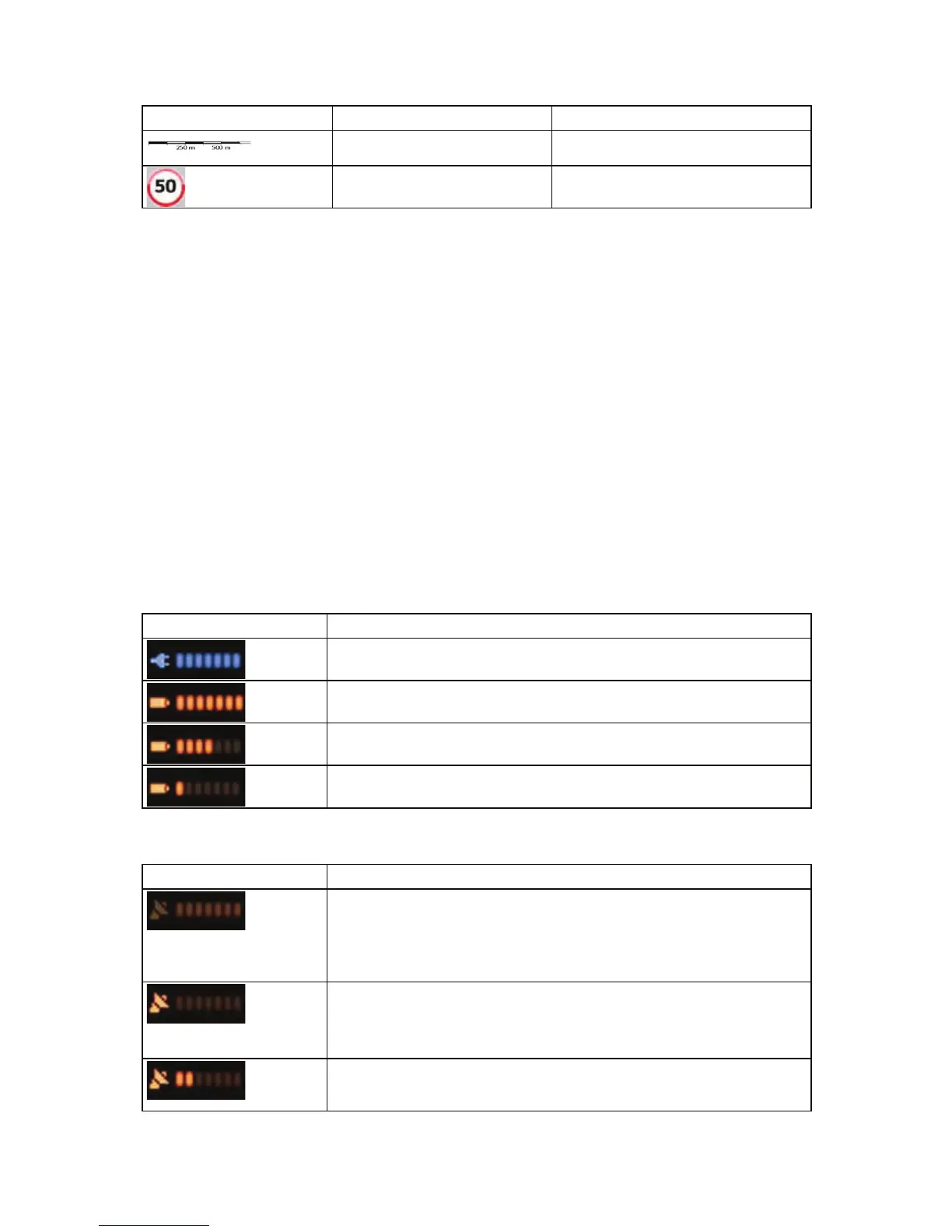
Symbol Name Action
Map scale (2D map only) n/a
Speed limit n/a
4.1.1 Icons on the map
There are several status icons on the map. Most of them also function as a button. The information
they provide is as follows:
x GPS position quality
x Battery status
x Vehicle type used for route calculation
x Sound status (muted or enabled)
x Track log recording status
x TMC reception and processing status
4.1.1.1 Battery, GPS position quality and Vehicle type indicator
This area is a multiple status indicator, and also acts as a button that opens the Quick menu.
The battery part shows information about the rechargeable battery of the device.
Icon Description
The battery is charging. The device runs on external power.
The battery is not charging but it is full.
The battery is not full but it still has enough capacity.
You need to recharge the battery.
GPS reception quality shows the current accuracy of the position information.
Icon Description
iGO8 has no connection to the GPS receiver: GPS navigation is not
possible.
Devices with a built-in GPS receiver are permanently connected. On
such devices, the icon does not appear in normal circumstances.
iGO8 is connected to the GPS receiver, but the signal is too weak and
the receiver cannot determine the GPS position.
GPS navigation is not possible.
Only a few satellites are received. Position information is available, but
elevation (altitude) cannot be calculated.
49



 To Next Page