CAUTIONS
Do not stack equipment on top of the generator or place the generator on top of electrical equipment. These configu-
rations are unstable and/or do not allow adequate cooling.
Provide as much distance as possible between the electrosurgical generator and other electronic equipment (such as
monitors). An activated electrosurgical generator may cause interference with them.
Nonfunction of the generator may cause interruption of surgery. A backup generator should be available for use.
Do not turn the activation tone down to an inaudible level. The activation tone alerts the surgical team when an
accessory is active.
When using a smoke evacuator in conjunction with the electrosurgical generator, place the smoke evacuator a dis-
tance from the generator and set the generator volume control at a level that ensures that the activation tones can
be heard.
NOTICES
If required by local codes, connect the generator to the hospital equalization connector with an equipotential cable.
Connect the power cord to a wall outlet having the correct voltage. Otherwise product damage may result.
SETTING UP
1. If the unit is not already installed refer to Section 3 of this manual for the installation procedure.
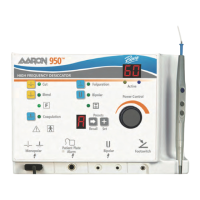
2. Turn on the generator by pressing the power switch ON (|)
(see figure 4-1, letter G). [Figure 4-1 is located at the end of this Section].
Verify the following:
• All visual indicators and displays on the front panel illuminate.
• Activation tones sound to verify that the speaker is working properly.
3. If the self-test is successful, a tone sounds. Verify the following:
• The unit resets to the last activated Preset setting. The Preset display will display a letter from A-F.
Preset letters “b” and “d” will display in lowercase.
• The power display will show the power level for the last used Preset setting.
• The mode for the last activated Preset setting is selected.
If the self-test is not successful, an alarm tone sounds. An error code may appear on the power display, in most
cases, the generator is disabled. Note the error code and refer to Section 6, Troubleshooting.
Once the self-test is successful, connect the accessories and set the generator controls. Refer to Preparing for
Monopolar Surgery or Preparing for Bipolar Surgery later in this section.
4-3
User’s Guide • Aaron 950
™


 To Next Page