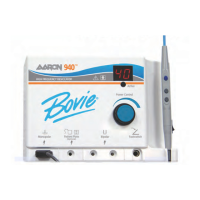
6. Choose the Monopolar mode of operation by pressing the desired membrane switch on the front panel
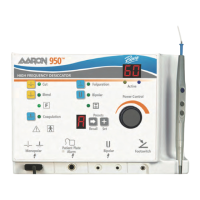
(see figure 4-1, letter A). Monopolar modes include Cut, Blend, Coagulation, and Fulguration.
7. Set the output power either by using the dial on the front of the unit
(see figure 4-1, letter J) or by the up and down but-
tons on the handpiece
(see figure 4-1, letter K). When power level adjustment is being made by the handpiece an audible
tone will sound to indicate that the power level has been changed. Depressing and holding the up or down buttons
will cause the power settings to change more rapidly for quick adjustment of the output power. Power output is dis-
played in one watt increments for Cut, Blend, and Coagulation mode. The maximum power for each of these
modes is 60 watts. Power is displayed in “.1” watt increments below ten watts and in whole numbers from ten to 35
watts.
NOTICE:
The output settings cannot be adjusted when the unit is being activated.
8. The unit is now ready to perform surgery. Refer to Activating the Unit later in this section.
PREPARING FOR BIPOLAR SURGERY
1. Insert the two connectors from the bipolar cable into the bipolar cord receptacles (see figure 4-1, letter D).
2. Connect the desired forcep to the operating end of the bipolar cord.
3. Plug the footswitch cable into the footswitch jack
(see figure 4-1, letter E). A footswitch is required to activate the
Bipolar mode.
NOTICE:
Dispersive electrodes are not utilized during bipolar procedures.
4. Select the Bipolar mode by pressing the membrane switch on the front of the unit (see figure 4-1, letter A).
5. Set the output power either by using the dial on the front of the unit (see figure 4-1, letter J) or by the up and down but-
tons on the handpiece (see figure 4-1, letter K). When power level adjustment is being made by the handpiece an audible
tone will sound to indicate that the power level has been changed. Depressing and holding the up or down buttons
will cause the power settings to change more rapidly for quick adjustment of the output power. Power is displayed
in “.1” watt increments below ten watts and in whole numbers from ten to 30 watts.
NOTICE:
The output settings cannot be adjusted when the unit is being activated.
6. The unit is now ready to perform surgery. Refer to Activating the Unit later in this section.
4-5
User’s Guide • Aaron 950
™


 To Next Page