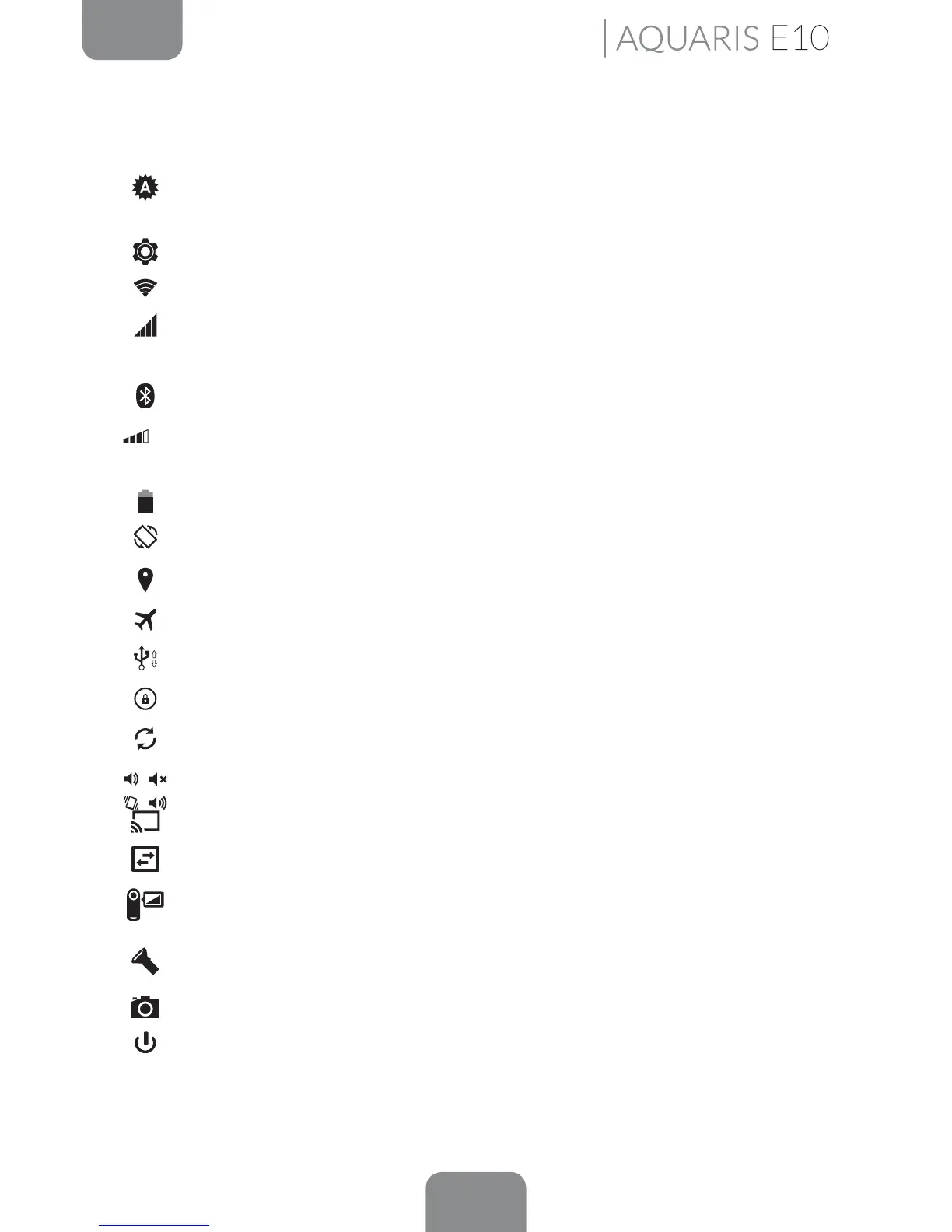
The options that can be enabled and disabled from the Quick Settings menu
(accessed by pulling down the Status bar from the top left) include:
Brightness: You can select from automatic or manual brightness adjustment
and set the desired level.
Settings: Opens the general Settings menu.
Wi-Fi: Enables/disables the Wi-Fi connection.
Coverage bar: Displays the level of network coverage. You can choose to
connect via 2G and/or 3G technology.
Bluetooth: Enables/disables the Bluetooth function.
Volume: Enables control of the audio volume (General, Notications, Multimedia
and Alarms).
Battery: Provides direct access to Settings > Battery.
Auto-Rotation: Enables/disables automatic rotation of the screen.
Location: Enables/disables GPS on your tablet.
Aeroplane mode: Enables/disables the signal.
Tethering: Access to the tethering and Wi-Fi zone settings.
Lock/Sleep: Activates the screen lock.
Sync: Enables/disables automatic syncing of the device.
Audio Proles: Select from General, Silent, Meeting or Outdoor.
Cast screen: Enables detection of remote screens for sending images and sound.
Data connection: Enables/disables your data connection.
Screen record: Enables you to make a real-time video recording of what is
being shown on the screen.
Torch: Enables/disables the torch.
Screenshot: Take a picture of the screen via the pull-down menu.
Shutdown: Enables power-off via the pull-down menu.
Home Screen



 To Next Page