Data Usage: A shortcut to Settings > Data usage.
Sound record: Gives you access to the app for making audio recordings.
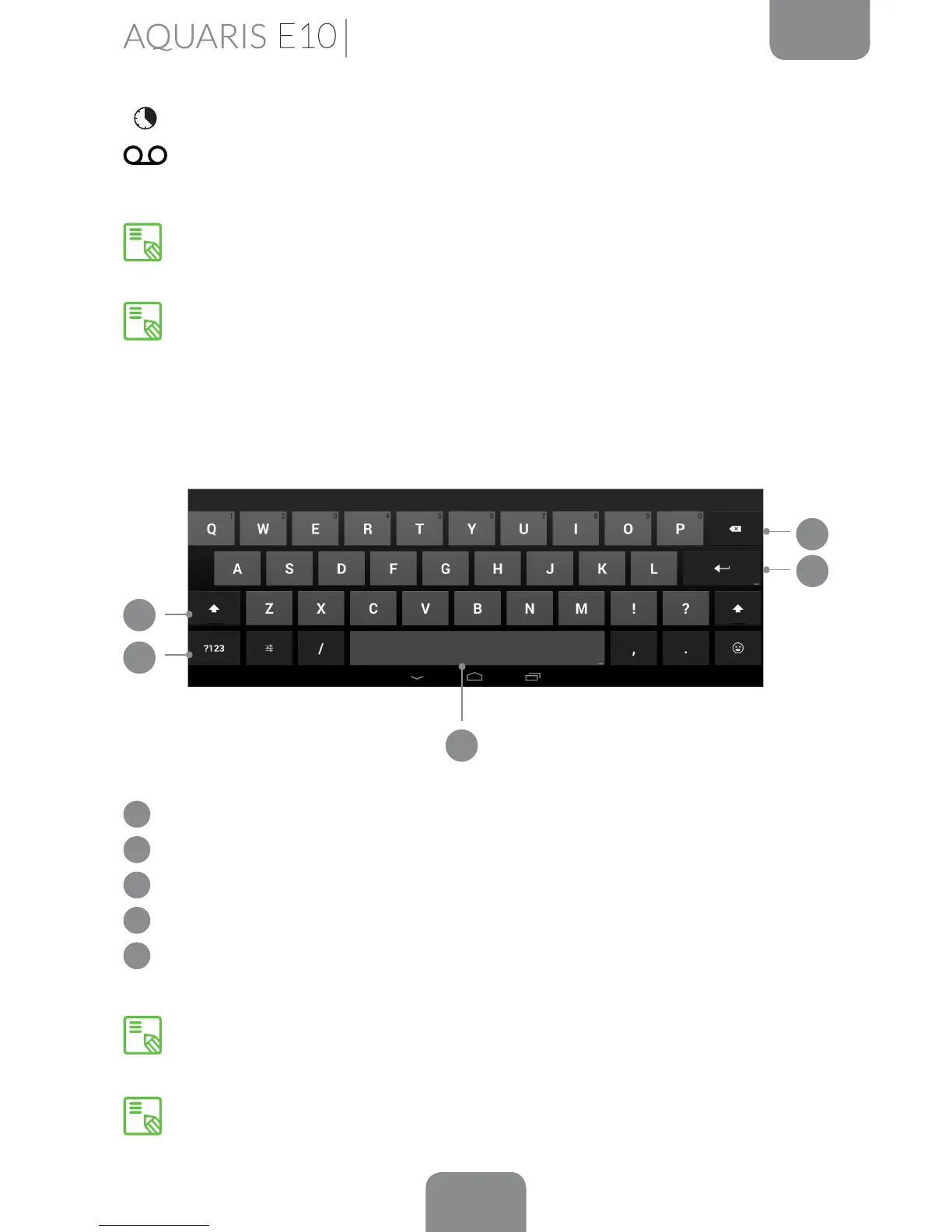
Keyboard
Pressing on any text eld will bring up the virtual keyboard.
1
Enable/disable Caps lock.
2
Open/close the number and symbol keyboard.
3
Space bar.
4
Enter/return.
5
Delete.
The keys with “…” in the bottom right-hand corner provide access to additional
features when you touch and hold them.
You can nd more information on the keyboard settings and languages for text
entry via Settings > Personal > Language & input.
3
5
1
2
4
Home Screen
You can access advanced settings for certain functions such as Wi-Fi and
Bluetooth by touching and holding the corresponding icon on the list.
When automatic brightness is deactivated, you can adjust the brightness level
of the screen by sliding your nger to the left or right.



 To Next Page