100-214-239 Rev. A 5-3
System Performance Benchmark
Digital Sonifier
5.3 System Performance Benchmark
Each application and system configuration is slightly different. System performance will vary
when you change setup parameters and if your horn or tips change, and can affect the results
of your experiments. Creating a benchmark of your initial setup and performance can be useful
at a later date in identifying a change in performance, and can also help in recreating your exact
initial setup.
The following steps are used only to record system performance, not your experiment results.
NOTE
i
Make copies of the following page and keep it on file for future reference.
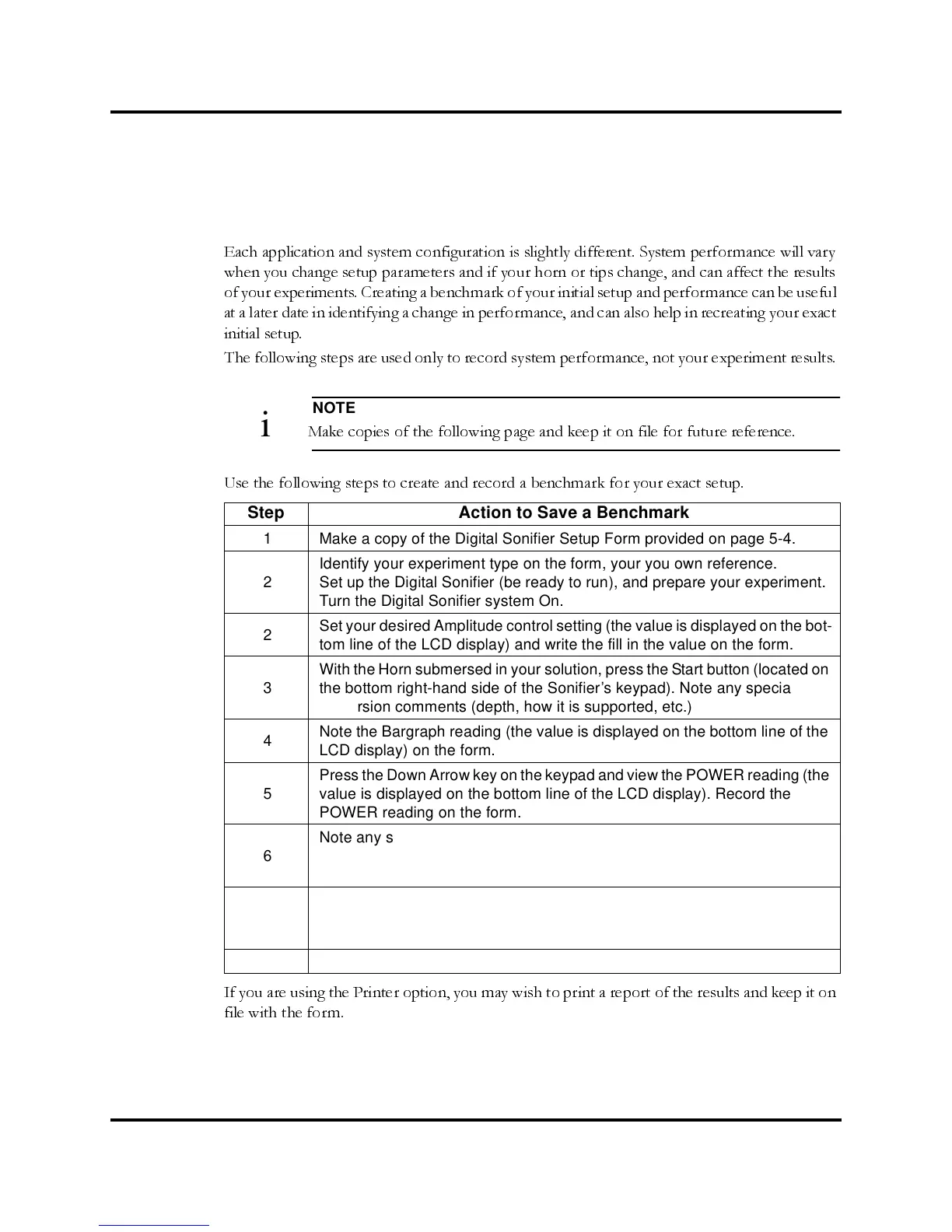
Use the following steps to create and record a benchmark for your exact setup.
If you are using the Printer option, you may wish to print a report of the results and keep it on
file with the form.
Step Action to Save a Benchmark
1 Make a copy of the Digital Sonifier Setup Form provided on page 5-4.
2
Identify your experiment type on the form, your you own reference.
Set up the Digital Sonifier (be ready to run), and prepare your experiment.
Turn the Digital Sonifier system On.
2
Set your desired Amplitude control setting (the value is displayed on the bot-
tom line of the LCD display) and write the fill in the value on the form.
3
With the Horn submersed in your solution, press the Start button (located on
the bottom right-hand side of the Sonifier’s keypad). Note any special
immersion comments (depth, how it is supported, etc.)
4
Note the Bargraph reading (the value is displayed on the bottom line of the
LCD display) on the form.
5
Press the Down Arrow key on the keypad and view the POWER reading (the
value is displayed on the bottom line of the LCD display). Record the
POWER reading on the form.
6
Note any special adjustments, settings, operating modes, or other system
variables that will be helpful at a later time in re-creating your setup. If you
use a Preset, note the Preset ID.
7
Turn the system off. Record the serial numbers and horn information of the
Digital Sonifier unit, Horn, Converter, and any special equipment. Special
information about the Horns is etched into the horn.
8 Place the filled-in form in a safe place for future reference.



 To Next Page