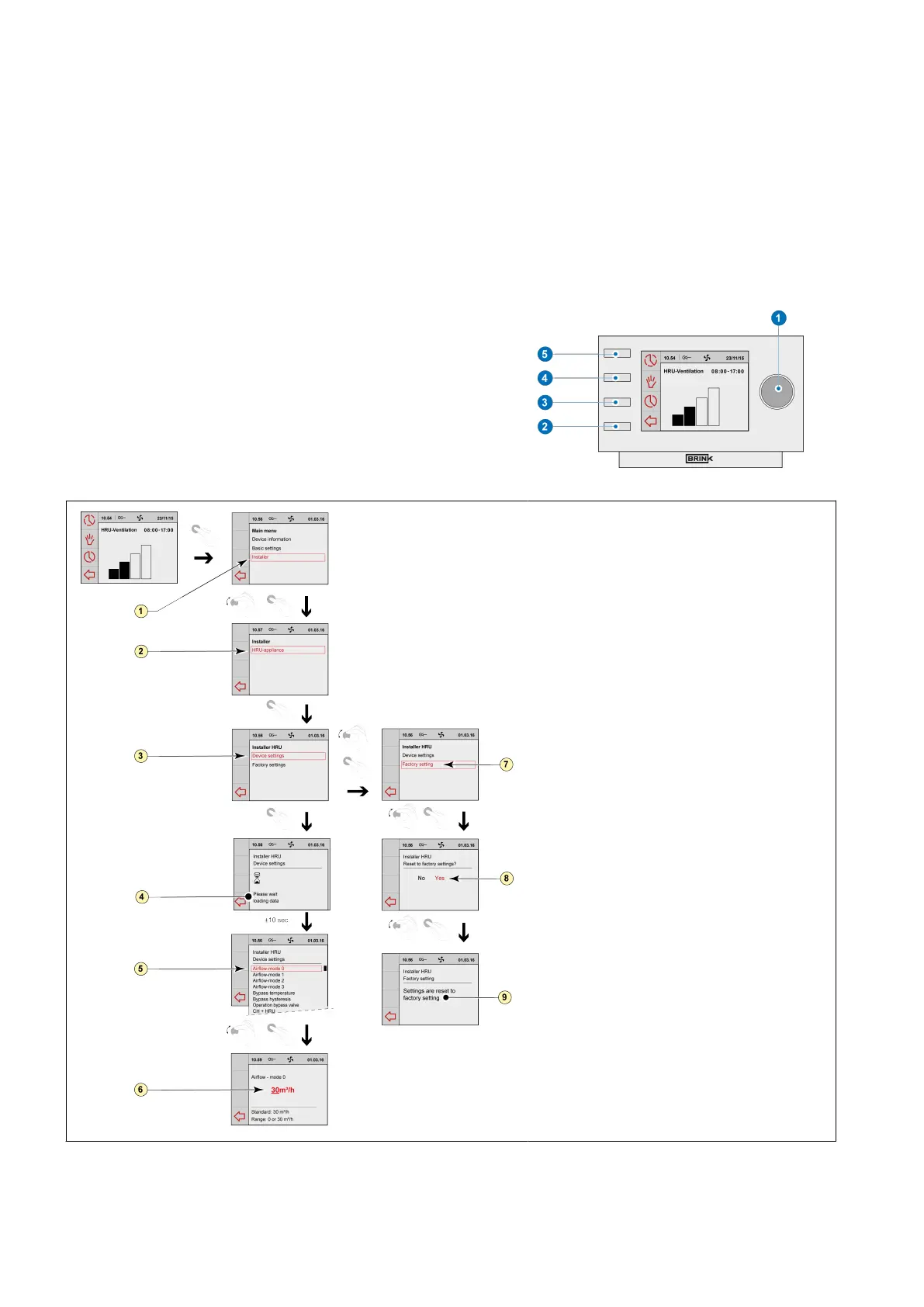
4.2.4 Selecting a device connected to the Brink Air Control- Ventilation
You can choose the device you want to regulate with the control if multiple devices are connected to Brink Air
Control- Ventilation.
Proceed as follows to set the appliance selection:
▪ Press return key "2" as many times as necessary to get to
the main screen,
▪ Press setting knob "1"; ‘Main Menu’ opens,,
▪ Select ‘Installer’ by turning setting knob "1",
▪ Press setting knob "1";‘Installer’ opens,
▪ Select ‘Device’ by turning setting knob "1",
▪ Press setting knob "1" to confirm selected device.If only one
appliance is connected, no choice is offered and only Heat
Recovery Unit appliance is displayed.
1 = Installer
2 = HRU-appliance
3 = Device settings
4 = Please wait: Loading data
5 = Airflow-mode 1
6 = Airflow 30 m
3
/h
7 = Factory setting
8 = Yes
9 = Settings are reset to factory setting
Brink Air Control- Ventilation 614884-B


 To Next Page