5.2 Weekly programmes P1, P2 and P3
You can choose from 3 heating programs P1, P2 and P3 and 3 cooling programs P1, P2 and P3.
The time programme allows you to decide whether you programme switching times for the day ranges Mo-Su,
Mo-Fr and Sa-Su, or for every day separately. You can choose from programs P1, P2 and P3.
Program P1
With this you create a day program for every day of the week.
Program P2
With this you create two day programs. One day program for weekdays ‘mo-fri’ and one day program for the
weekend ‘sa-su’.
Program P3
With this you create seven day programs. Separately for every day of the week.
5.2.1 Activating program type (P1, P2 or P3)
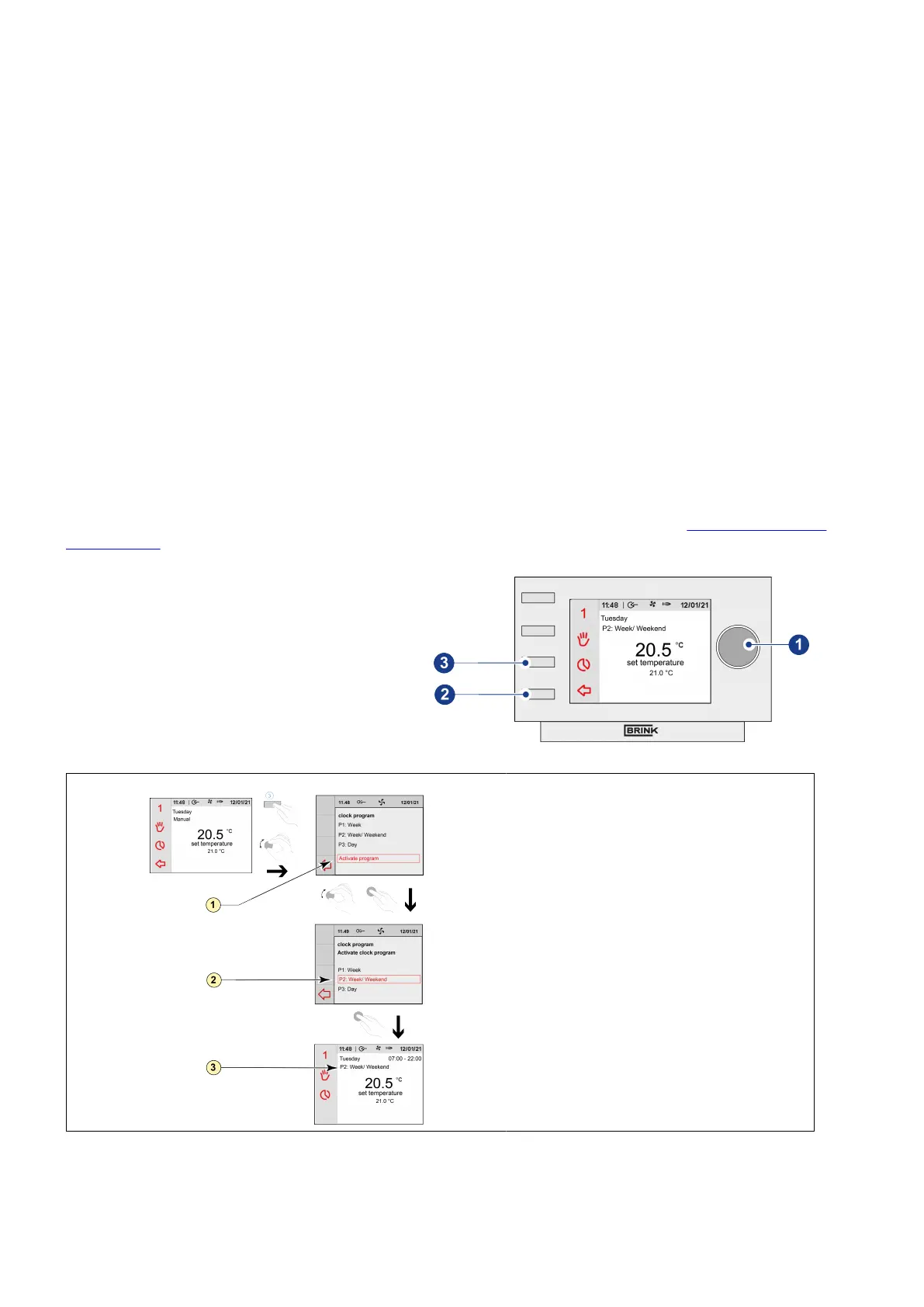
The Air Control - Allure clock thermostat has three types of weekly (heating) programs P1, P2 and P3. You can
program the weekly (heating) programs by yourself, for more information see paragraph ®
Weekly programmes
P1, P2 and P3 page 18. Perform the following actions if you wish to program one of the weekly programs:
▪ Press return key "2" as many times as necessary
to get to the main screen,
▪ Press setting & activating time program knob
"3"; ‘Setting & activating timer programme’
opens,
▪ Select ‘Activate program’ by turning setting knob
"1",
▪ Press setting knob "1"; ‘Active program’ opens,
▪ Select ‘P1, P2 or P3’ by turning setting knob "1",
▪ Press setting knob "1" to activate P1, P2 or P3.
1 = Activate program
2 = Selected program
3 = Active program
Air Control - Allure clock thermostat 616720-A


 To Next Page