4.2 Installation
4.2.1 Setting language
You can set the language in which the menus are presented.
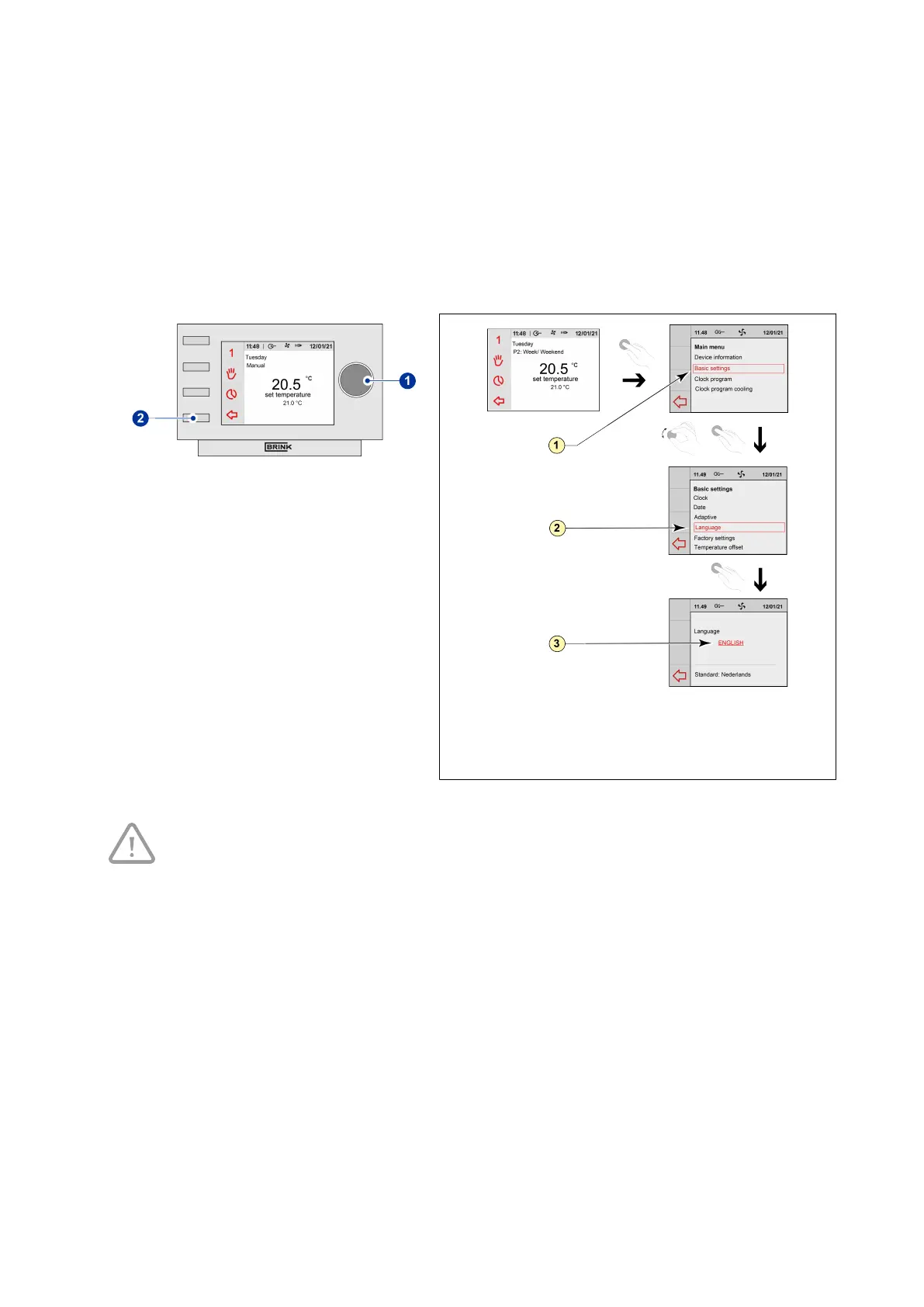
Perform the following actions to set the language:
▪ Press return key "2" as many times as
necessary to get to the main screen,
▪ Press setting knob "1"; ‘Main Menu’ opens,
▪ Select ‘Basic Settings’ by turning setting knob
"1",
▪ Press setting knob "1";‘Basic Settings’ opens,
▪ Select ‘Language’ by turning setting knob "1",
▪ Press setting knob "1"; ‘Language’ opens,
▪ Select the desired language by turning setting
knob "1",
▪ Press setting knob "1" to set the selected
language,
▪
Press return key "2" as many times as
necessary to get to the main screen.
1 = Basic settings
2 =
Language
3 =
English
Take note!
The names of the described menu items will not correspond with this user manual’s menu
items if the Air Control - Allure clock thermostat is set to a language other than Englisch.
Air Control - Allure clock thermostat 616720-A Brink / 11


 To Next Page