5.2.2 Activating cooling program type (P1, P2 or P3)
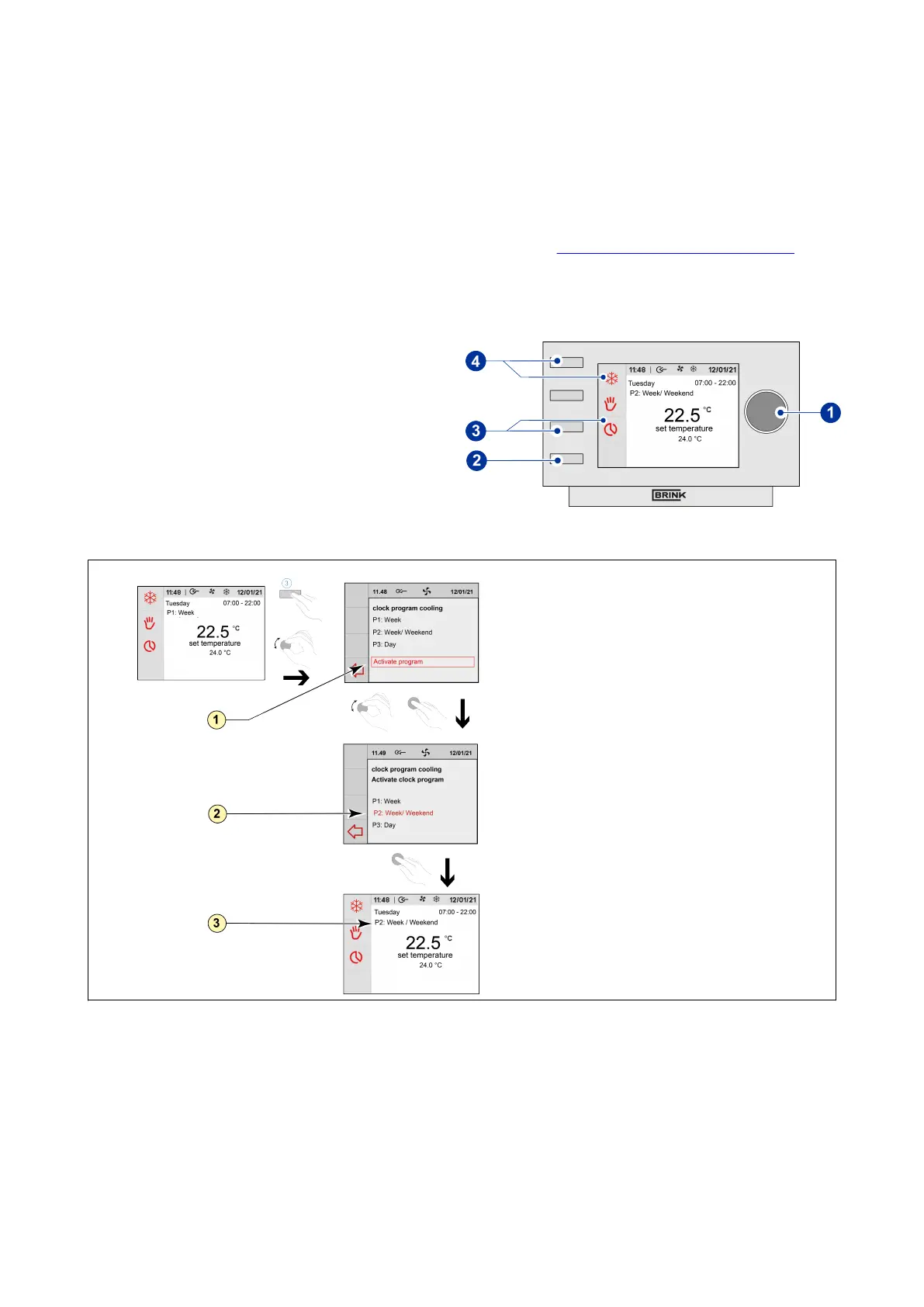
The Air Control - Allure clock thermostat has three types of weekly programs P1, P2 and P3. You can program the
weekly programs by yourself, for more information see paragraph ® Weekly programmes P1, P2 and P3 page 18.
Perform the following actions if you wish to program one of the weekly programs:
▪ Press return key "2" as many times as necessary
to get to the main screen,
▪ Press setting knob "4" unil cooling symbol
appears on display. The thermostat runs
automatically than a cooling timer programme’.
▪ Changing the cooling ‘timer program’ by pressing
knob "3"; clock program cooling opens,
▪ Turn and press knob "1" to open ‘Activate
program’
▪ Select cooling program‘P1, P2 or P3’ by turning
setting knob "1",
▪ Press setting knob "1" to activatecooling program
P1, P2 or P3.
1 = Activate program
2 = Selected cool program
3 = Active cool program
Air Control - Allure clock thermostat 616720-A Brink / 19


 To Next Page