© 2022 Brivo Systems LLC. All rights reserved. PUB-Brivo ACS6100 Installation Manual
16
Brivo ACS6100 Installation Manual
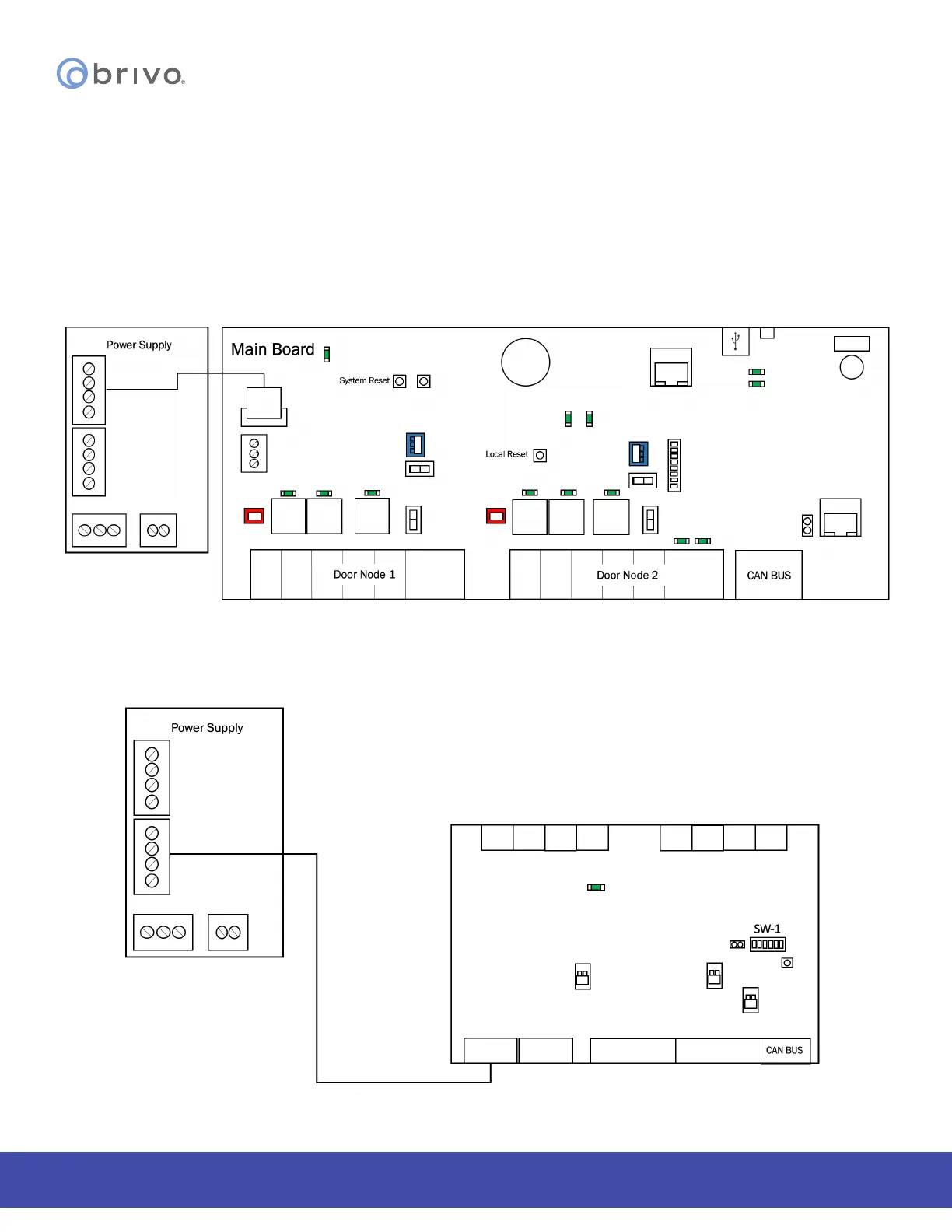
Connect the MAIN CONTROL BOARD and all expansion boards to a power supply board
IMPORTANT NOTE: If you are mounting the new B-ACS6100-DB DOOR BOARDs or B-ACS6100-IO INPUT/OUTPUT
BOARDs in an ACS6000 or ACS6008 chassis, an adapter plate (B-ACS6100-ADPL) is required.
IMPORTANT NOTE: If you are mounting the new B-ACS6100-DB DOOR BOARDs or B-ACS6100-IO INPUT/OUTPUT
BOARDs in the larger ACS6008 chassis, the POWER SUPPLY BOARD is only capable of supporting FOUR boards in
total. If you mount more than four boards, you need to use a new B-ACS6100L-EXP chassis, which provides two
POWER SUPPLY BOARDs.
1. Connect the MAIN CONTROL BOARD in the control chassis to the power supply board.
Figure 6 - Connect MAIN CONTROL BOARD to Power Supply
2. If there are DOOR BOARDs or INPUT OUTPUT BOARDs in the control chassis, connect that to the power
supply board.
Figure 7 - Connect Expansion Board to Power Supply



 To Next Page