© 2022 Brivo Systems LLC. All rights reserved. PUB-Brivo ACS6100 Installation Manual
38
Brivo ACS6100 Installation Manual
Conguration Procedures
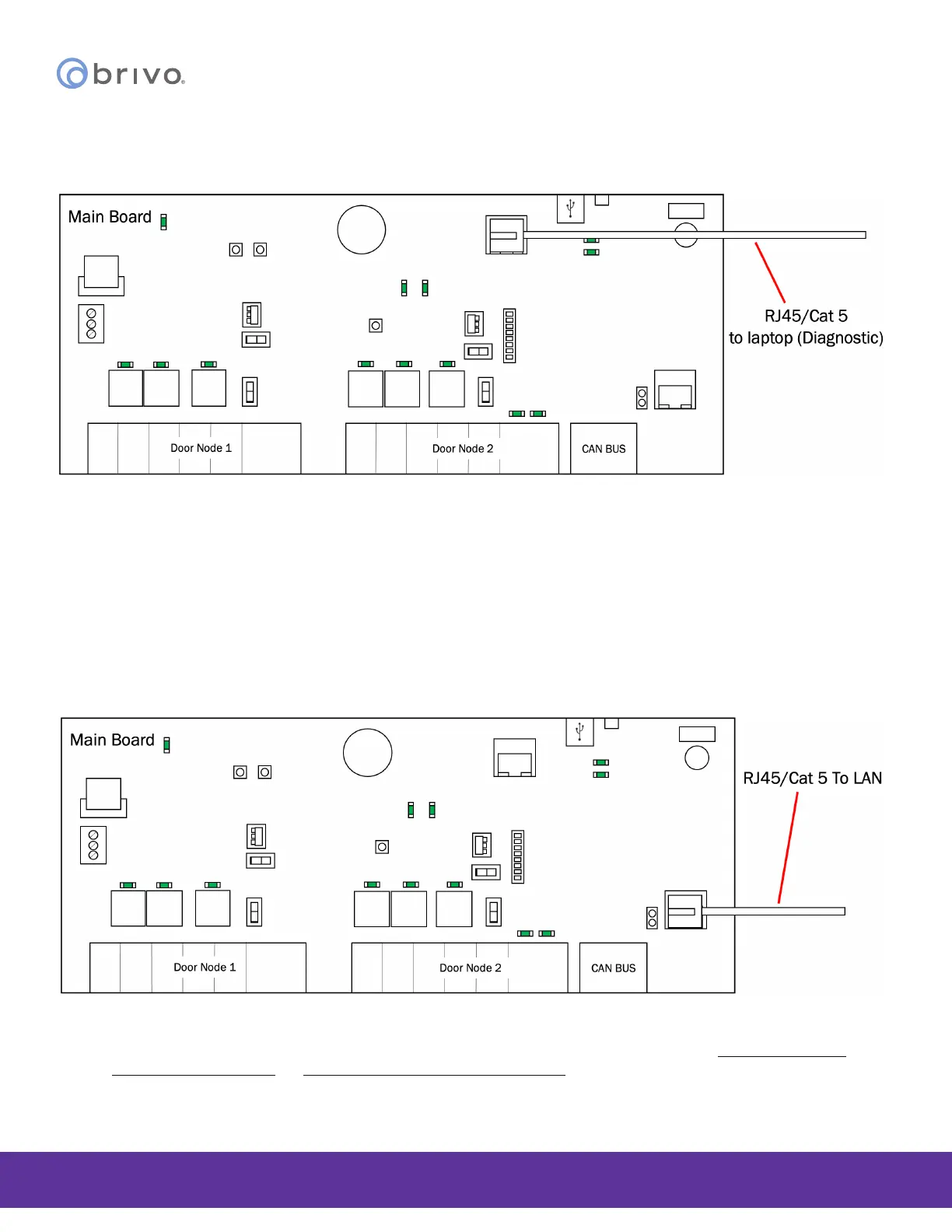
Connect a laptop to the MAIN CONTROL BOARD’s ADMIN Port (if required)
Figure 33 - Connect Laptop to MAIN CONTROL BOARD
1. Connect a laptop to the ADMIN port on the MAIN CONTROL BOARD using a standard Ethernet cable or a
patch cable.
a) The ADMIN port is a 10/100 Ethernet interface with RJ45 jack for connecting the MAIN
BOARD to a laptop or PC to gain access to the local administrative interface for debug and
manual conguration utilities.
b) The port uses auto-sensing technology to determine polarity, which permits either a straight
or crossover cable to be used between the board and the computer.
Connect the LAN to the MAIN CONTROL BOARD (if required)
Figure 34 - Connect LAN to MAIN CONTROL BOARD
1. Connect the LAN to the MAIN CONTROL BOARD according to the instructions in the Panel Networking
Admin Interface Guide (or Brivo Onsite Administrator’s Manual).
a) The LAN port is a 10/100/1000 Ethernet interface with an RJ45 jack for connecting the
MAIN CONTROL BOARD to a Local Area Network in order for it to gain connectivity to



 To Next Page