© 2022 Brivo Systems LLC. All rights reserved. PUB-Brivo ACS6100 Installation Manual
24
Brivo ACS6100 Installation Manual
WARNING: CAN BUS Wiring and Addressing
The CAN BUS ADDRESS switch (SW1) is used to set the address of each board on the CAN BUS. DO NOT ASSIGN
TWO BOARDS THE SAME ADDRESS, OR THE BUS WILL NOT FUNCTION PROPERLY.
CAN BUS addressing starts sequentially with board 2 as the rst expansion board address; address 1 is always the
MAIN CONTROL BOARD. These switch settings will map to board numbers when the control panel is congured via
the application.
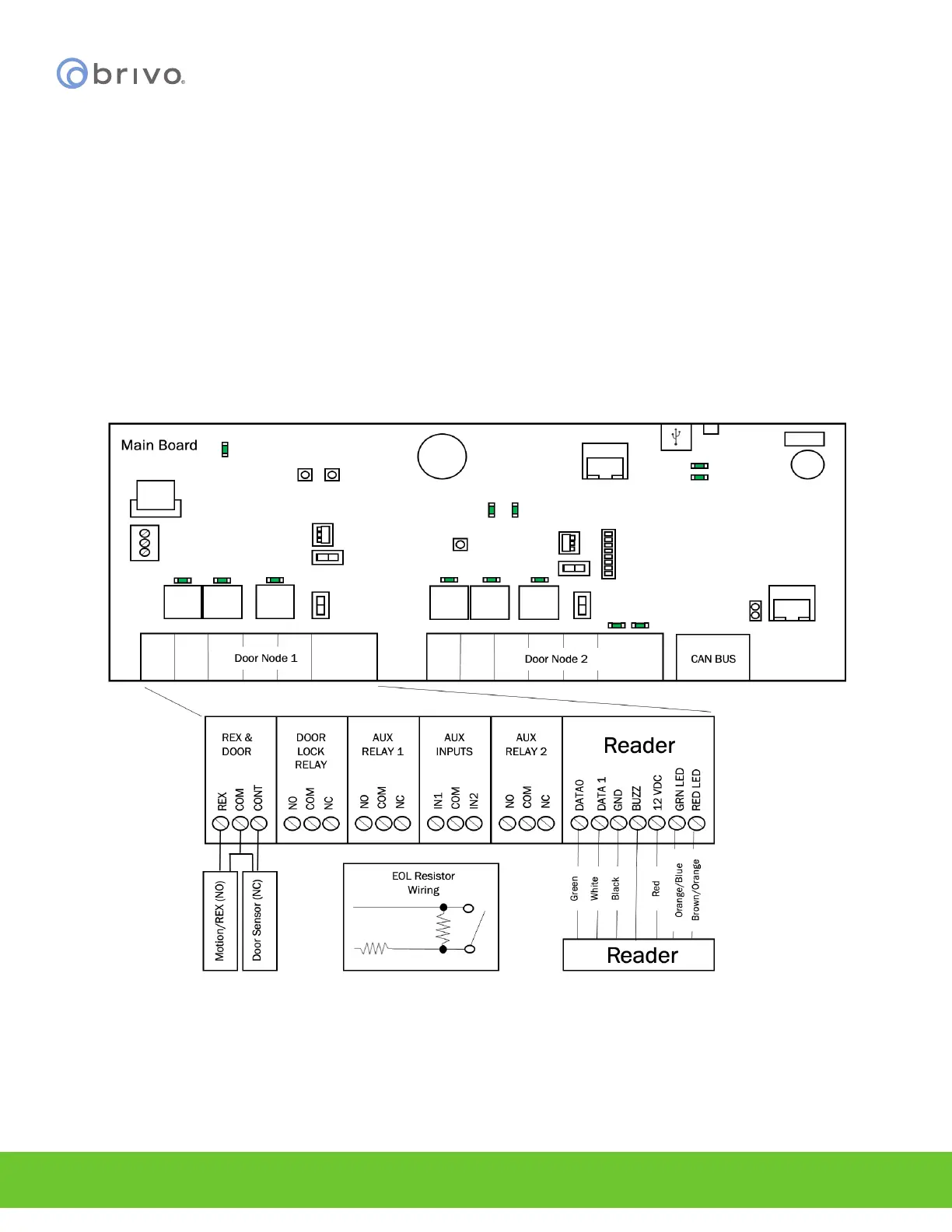
Wire Doors
For each board node to be used for controlling a door, as indicated in the completed Installation Worksheet, make
the following connections.
NOTE: Doors can be wired to the MAIN CONTROL BOARD or to expansion boards, including both DOOR BOARDs
and INPUT OUTPUT BOARDS.
Figure 17 - Wire Doors for Wiegand Readers
NOTE: Output Ratings for the B-ACS6000-MBE/MBS MAIN CONTROL BOARD
• Two (2) reader ports, 12V, 350mA each
• Two (2) selectable wet contacts, 12VDC, 350mA each
• Four (4) dry contacts are 28VDC, 6A each



 To Next Page