6 - SOLID STATE CONTROL PANEL
6-1
SMART TOUCH FAMILIARIZATION
You will then see a display asking you to
verify the serial number of your fryer. Enter
the serial number using the keyboard and
press enter.
The date/time display and
the serial number display
will not appear again when the power
switch is turned off and back on.
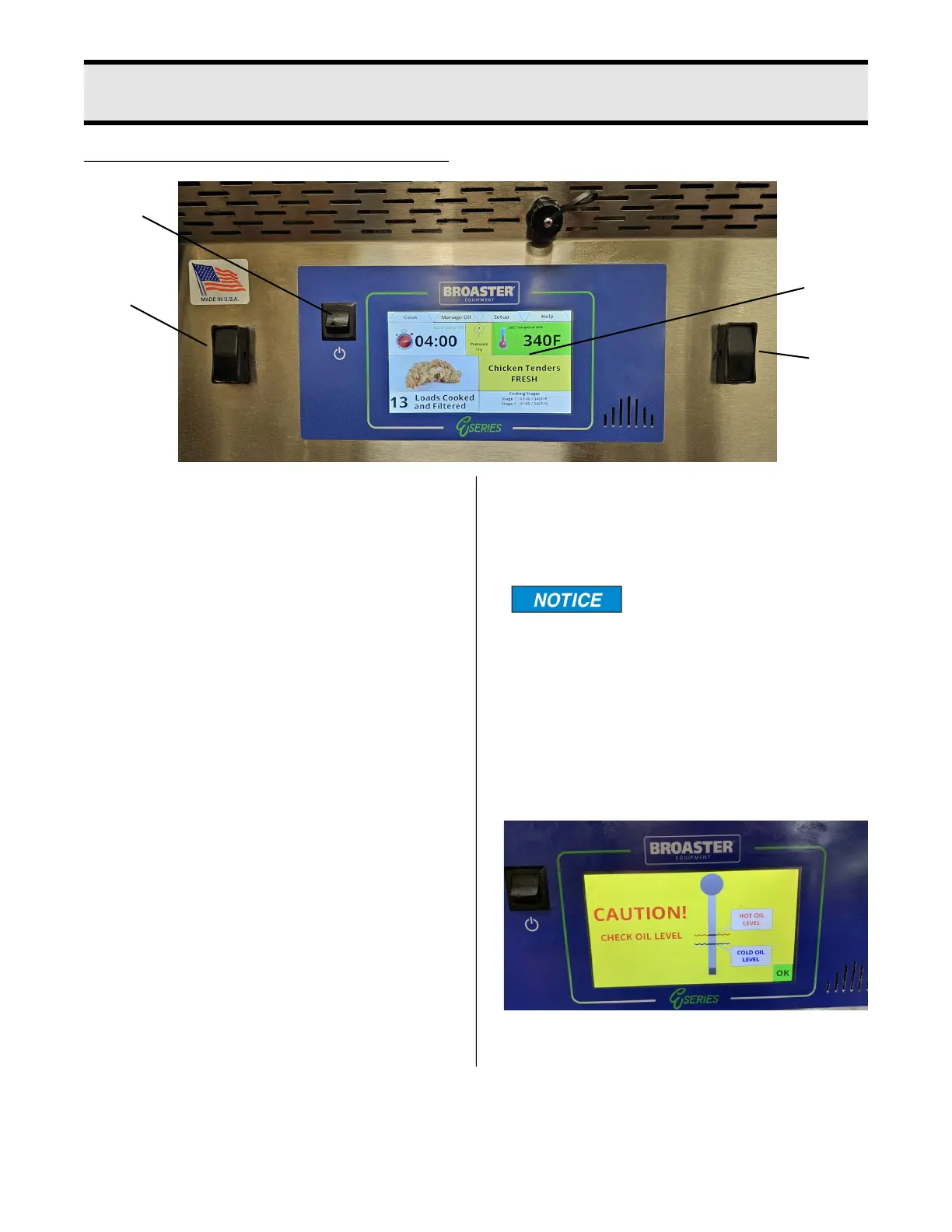
A CAUTION screen will appear to remind
you to check the oil level before the heating
elements or burner are activated. If the oil is
at the proper level, press the green OK but-
ton in the bottom right corner of the screen.
1
2
3
3
1. Power Switch: This switch has two posi-
tions: ON (UP) or OFF (DOWN).
2.Touch Control Screen: Touching this
screen controls the many options of the
fryer.
3. Dual Cover Lift Switches: These
switches control the cooking well cover.
Both for down, one for up.
INITIAL SETUP:
On initial power up you may be asked to
enter the current date and time, and verify
the Serial Number. Or the screen will have
the word CAUTION flashing on the screen.
If the date and time entry screen appears
press the box after “Month” and a keypad
will appear. Enter the number of the month
and press the enter key. Repeat this action
for the Day, Year, Hours, Minutes, AM and
PM boxes. When finished press the green
OK button in the bottom right corner of the
screen. The next display will ask you if this
date should be used to establish the war-
ranty start date. Press the green OK button.
broaster.com Manual #21469 621 rev 11/23



 To Next Page