EasyManua.ls Logo

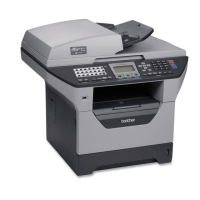
Brother MFC-8510DW - User Manual

Brother MFC-8510DW
76 pages
Print Icon
To Next Page IconTo Next Page
Loading...
Advanced User’s Guide
MFC-8510DN
MFC-8910DW
Not all models are available in all countries.
Version 0
SAF/GLF

Table of Contents

Questions and Answers

  • J
    Janet RamirezSep 3, 2025
    How to fix 'Cartridge Error Put the Toner Cartridge back in' on Brother All in One Printer?
    • D
      Dustin ParkerSep 3, 2025
      If your Brother All in One Printer displays 'Cartridge Error Put the Toner Cartridge back in.', it means the toner cartridge is not installed correctly. Pull out the drum unit and toner cartridge assembly, remove the toner cartridge, and put it back into the drum unit again. Then, put the drum unit and toner cartridge assembly back into the machine.
  • A
    Amanda HamiltonAug 25, 2025
    What to do if my Brother Printer says 'Connection Fail'?
    • N
      nlopezAug 25, 2025
      If you see a 'Connection Fail' message on your Brother printer, it means the printer and your mobile device aren't communicating properly during setup. To fix this: * Move your mobile device closer to the Brother printer. * Ensure there are no obstructions between the printer and the mobile device. * If using the PIN Method of WPS, verify that you've entered the correct PIN code.
  • T
    Tiffany WoodAug 25, 2025
    How to fix Brother Printer when wireless network setup configuration cannot be completed?
    • J
      John FlemingAug 26, 2025
      If you cannot complete the wireless network setup configuration on your Brother Printer, here are a few things to try: First, turn your wireless router off and then back on, and try configuring the wireless settings again. Second, double-check and make sure you're choosing the correct security settings. You might find these settings on your WLAN access point/router or by contacting your Internet provider or network administrator. Third, confirm that the MAC address of your Brother machine is allowed in the filter; you can usually find this on the printer's control panel. Also, make sure you're typing the correct SSID name or Network Key manually. Lastly, try using the Network Connection Repair Tool.
  • S
    Samuel RogersSep 10, 2025
    Why does my Brother MFC-8510DW say 'Disconnected'?
    • C
      conwaymichelleSep 10, 2025
      If your Brother All in One Printer displays 'Disconnected', the other person or other person’s fax machine stopped the call. Try to send or receive again.
  • O
    owenskimberlySep 16, 2025
    Why does my Brother MFC-8510DW All in One Printer say 'Unusable Device Remove the Device'?
    • A
      allenchristineSep 17, 2025
      If your Brother All in One Printer displays 'Unusable Device Remove the Device. Turn the power off and back on again.', a defective USB device or a high power consumption USB device has been connected to the USB direct interface. Unplug the device from the USB direct interface. Turn the machine off and then on again.
  • D
    David DeckerSep 6, 2025
    How to fix 'No Toner' error on Brother All in One Printer?
    • R
      Renee RodriguezSep 7, 2025
      If your Brother All in One Printer displays 'No Toner', the toner cartridge or the drum unit and toner cartridge assembly is not installed correctly. Remove the drum unit and toner cartridge assembly, remove the toner cartridge from the drum unit, and re-install the toner cartridge back into the drum unit again. Re-install the drum unit and toner cartridge assembly back in the machine. If the problem continues, replace the toner cartridge.
  • J
    Jill SotoAug 31, 2025
    Why am I getting error messages using the Brother Software Scan to FTP feature?
    • K
      kalexanderAug 31, 2025
      If you receive error messages using the Brother Software Scan to FTP feature, it could be due to several reasons. First, verify the FTP server's IP address or the DNS server address. If the issue persists, double-check your username and password for the FTP server. Another potential cause is an incorrect destination folder setting on the FTP server. Lastly, it may be due to a lack of access rights. If this is the case, contact your network administrator.
  • M
    msteeleSep 22, 2025
    What should I do if my Brother All in One Printer says 'No Toner'?
    • L
      Lance WalkerSep 23, 2025
      If your Brother All in One Printer displays 'No Toner', remove the drum unit and toner cartridge assembly, remove the toner cartridge from the drum unit, and re-install the toner cartridge back into the drum unit again. Re-install the drum unit and toner cartridge assembly back in the machine. This issue occurs when the toner cartridge or the drum unit and toner cartridge assembly is not installed correctly.
  • C
    Charles BishopSep 13, 2025
    Why does my Brother MFC-8510DW display 'No Response/Busy'?
    • K
      Karen MirandaSep 13, 2025
      If your Brother All in One Printer displays 'No Response/Busy', the number you dialled does not answer or is busy. Verify the number and try again.
  • J
    Julie FrederickAug 27, 2025
    How to fix 'Replace Parts Drum' message on Brother All in One Printer?
    • R
      renee80Aug 28, 2025
      If your Brother All in One Printer displays 'Replace Parts Drum', it is time to replace the drum unit or the drum unit counter was not reset when a new drum was installed. Replace the drum unit or reset the drum unit counter.

Brother MFC-8510DW Specifications

General IconGeneral
Print TechnologyLaser
FunctionalityPrint, Copy, Scan, Fax
Print Resolution1200 x 1200 dpi
ConnectivityUSB, Ethernet, Wi-Fi
Automatic Duplex PrintingYes
Paper Capacity250 sheets
Automatic Document Feeder (ADF)Yes
ADF Capacity50 sheets
Scanning Resolution1200 x 1200 dpi
Fax Speed33.6 Kbps
Operating SystemsWindows, macOS, Linux
Mobile PrintingBrother iPrint&Scan, Google Cloud Print, AirPrint
Maximum Paper SizeLegal
Scan TypeFlatbed

Related product manuals