Home > Fax > PC-FAX > PC-FAX for Windows > Receive Faxes on Your Computer (Windows) > Receive
Faxes Using PC-FAX Receive (Windows) > View Received PC-FAX Messages (Windows)
View Received PC-FAX Messages (Windows)
Receiving Status
Icon
Indicated Status
Standby mode
No unread messages
Receiving messages
Messages received
Unread messages
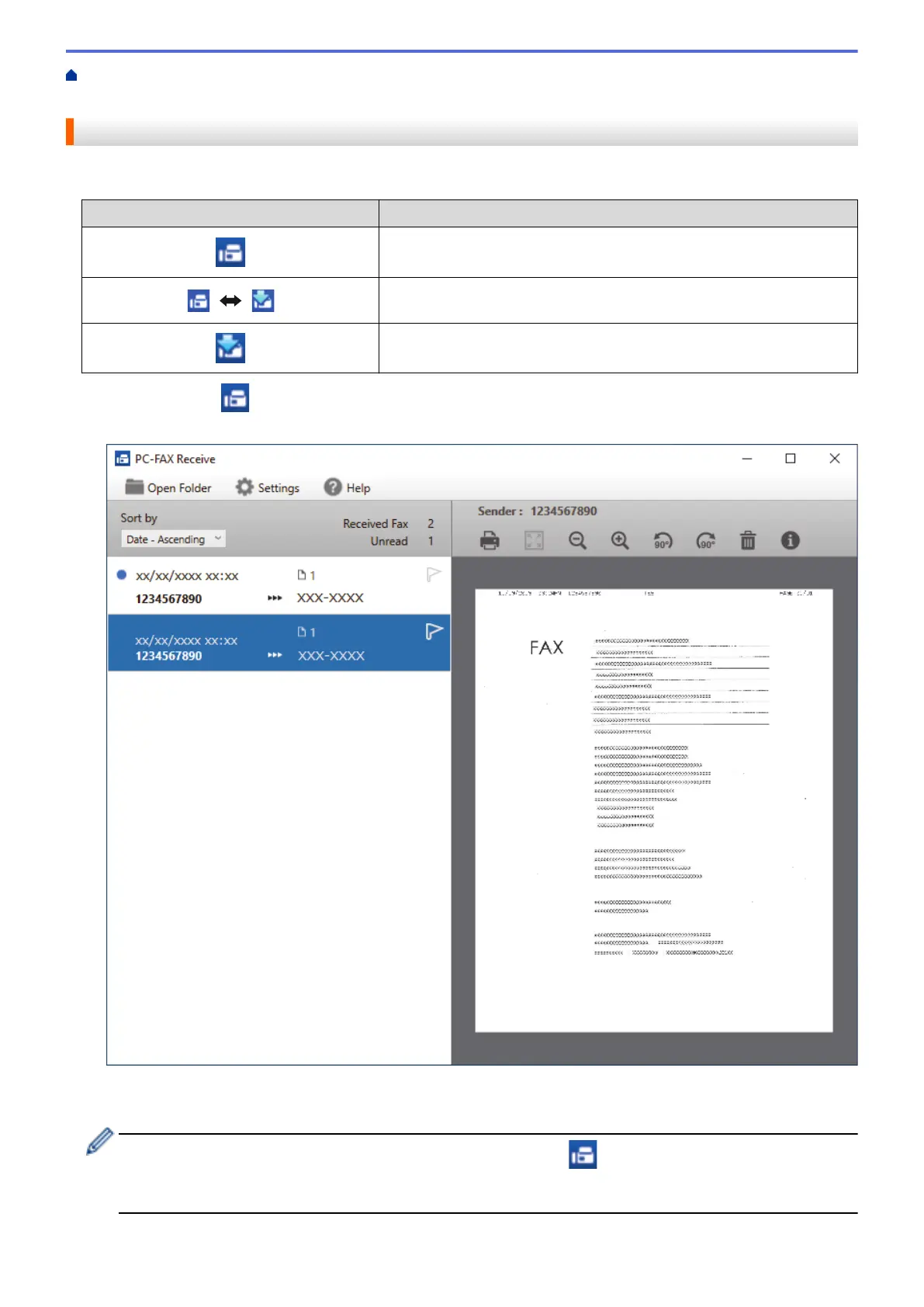
1. Double-click the (PC-FAX Receive) icon in your computer task tray.
The PC-FAX Receive window appears.
2. Click any faxes in the list to view them.
3. When finished, close the window.
Even after closing the window, PC-FAX Receive is active and the (PC-FAX Receive) icon will remain
in your computer task tray. To close PC-FAX Receive, click the icon in the computer task tray and click
Close.
276



 To Next Page
 Loading...