Home > Routine Maintenance > Clean Your Brother Machine > Clean the Paper Pick-up Rollers for Paper
Tray #2
Clean the Paper Pick-up Rollers for Paper Tray #2
Related Models: MFC-J4540DW
1. Unplug the machine from the electrical socket.
2. If the paper support flap is open, close it, and then close the paper support.
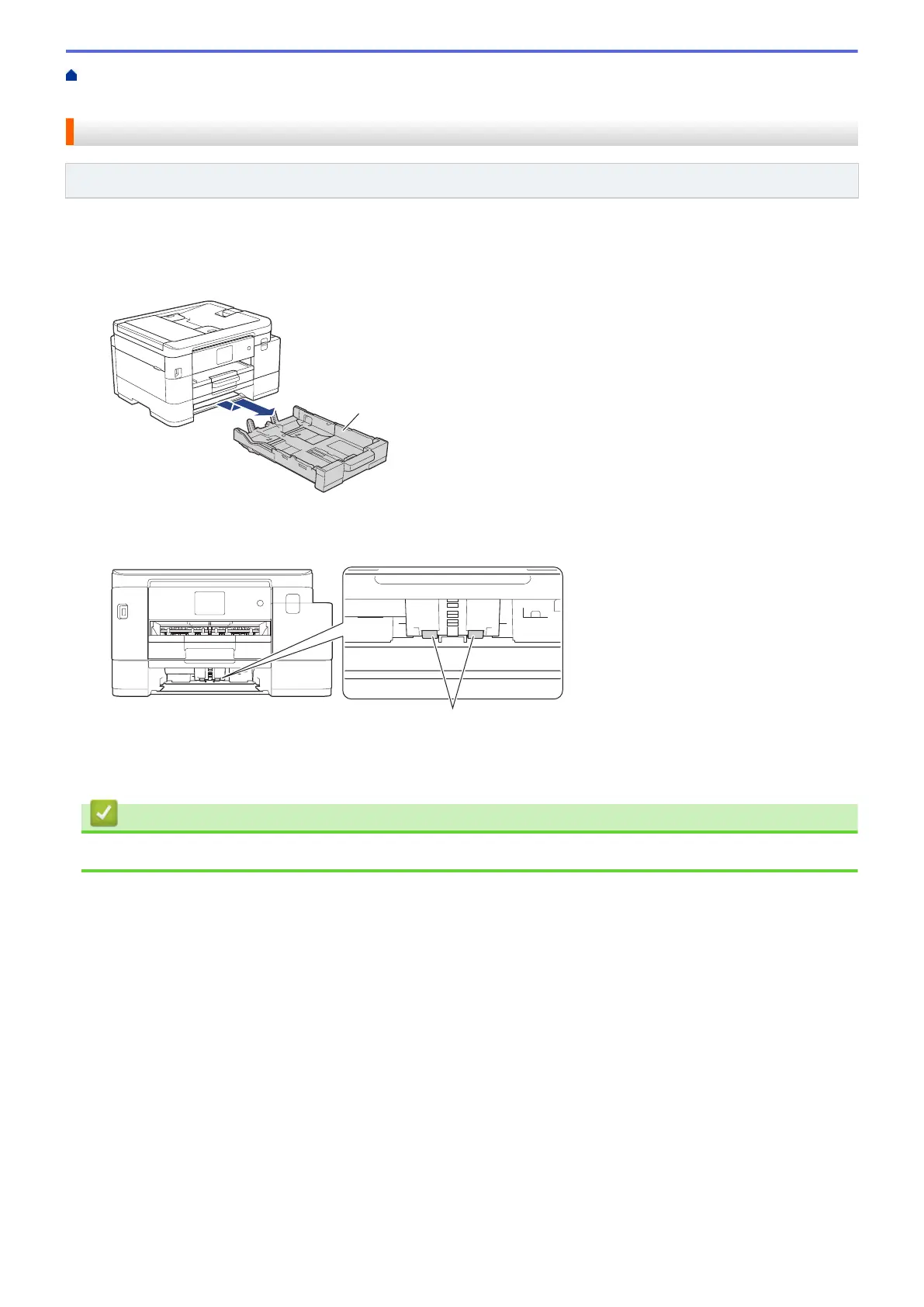
3. Pull Tray #2 (1) completely out of the machine as shown by the arrow.
4. Clean the paper pick-up rollers for Tray #2 (1) with a soft lint-free cloth moistened with water. Slowly turn the
rollers so that the whole surface is cleaned. After cleaning, wipe the rollers with a dry, soft lint-free cloth to
remove all moisture.
5. Slowly push the paper tray completely into the machine.
6. Reconnect the power cord.
Related Information
• Clean Your Brother Machine
525



 To Next Page
 Loading...