Home > Machine Settings > Change Machine Settings from the Control Panel > Settings and Features
Tables > Features Tables (1.8"(44.9 mm) Colour LCD)
Features Tables (1.8"(44.9 mm) Colour LCD)
Related Models: MFC-J4340DW
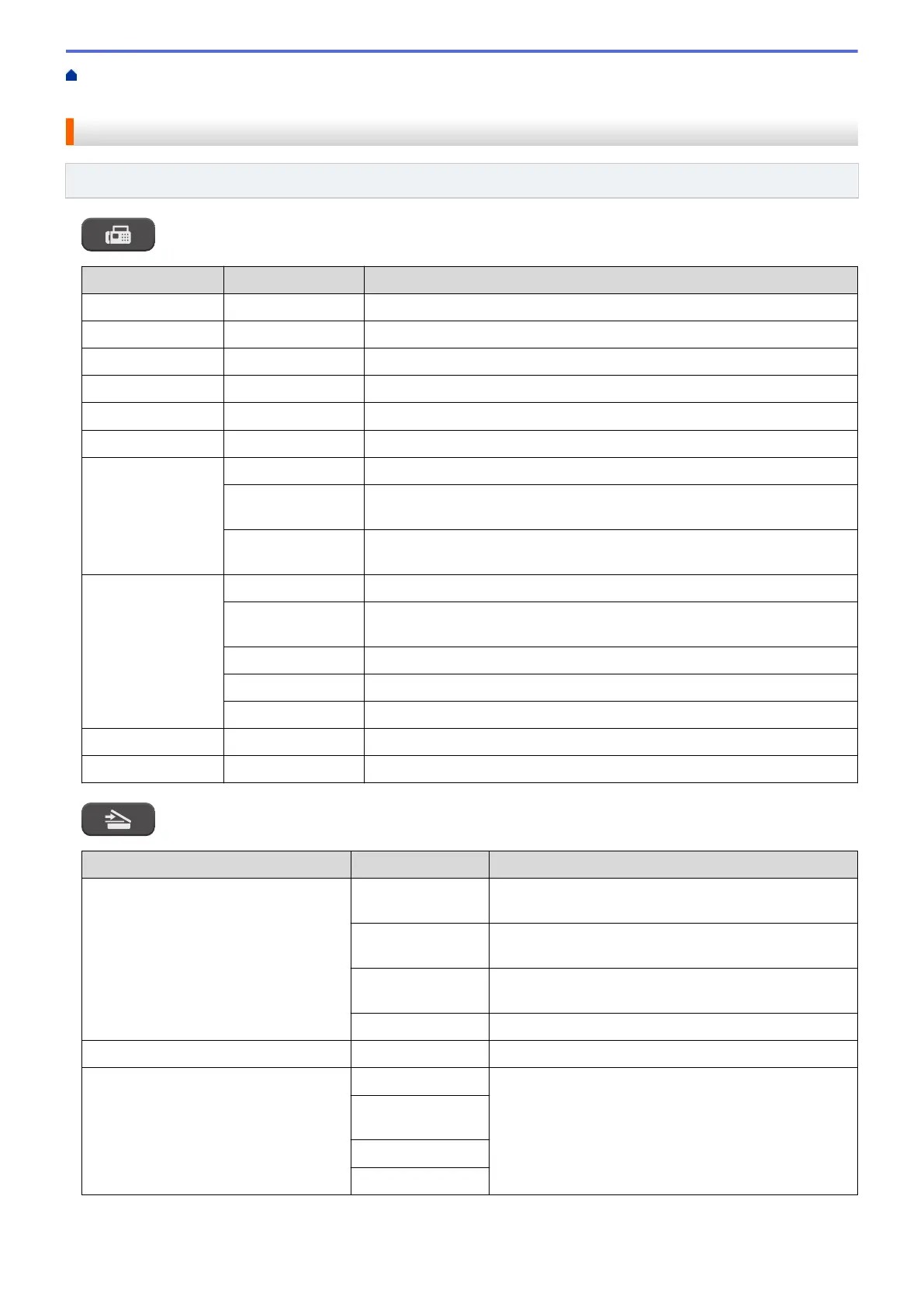
FAX
Level 3 Level 4 Descriptions
Fax Resolution
- Set the resolution for outgoing faxes.
Contrast
- Adjust the contrast.
Glass Scan Size
- Adjust the scan area of the scanner glass to the size of the document.
Broadcasting
- Send the same fax message to more than one fax number.
Real Time TX
- Send a fax without using the memory.
Overseas Mode
- Set to On if you have difficulty sending faxes overseas.
Call History Redial
Send a fax to the last number you called.
Outgoing Call
Select a number from the Outgoing Call history and then send a fax to it,
add it to the Address Book, or delete it.
Caller ID
History
Select a number from the Caller ID History and then send a fax to it, add it
to the Address Book, or delete it.
Address Book Search
Dial by pressing only a few buttons.
Set Speed Dial
Store Speed Dial numbers, so you can dial by pressing only a few
buttons.
Setup Groups
Set up Group numbers for broadcasting.
Change
Change Address Book numbers.
Delete
Delete Address Book numbers.
Set New Default
- Save your settings as the default.
Factory Reset
- Restore all settings back to the factory settings.
SCAN
Level 3
Level 4 Descriptions
to PC to File
Scan documents and save them to a folder on your
computer.
to OCR
Convert your scanned document to an editable text
file.
to Image
Scan photos or graphics into your graphics
applications.
to E-mail
Send a scanned document as an email attachment.
to Web
- Upload the scanned data to an Internet service.
WS Scan
(Appears when you install a Web
Services Scanner.)
Scan
Scan data using the Web Service protocol.
Scan for E-
mail
Scan for Fax
Scan for Print
578



 To Next Page
 Loading...