MULTIFUNCTION GAUGE
Select the appropriate value in main
unit or setting.
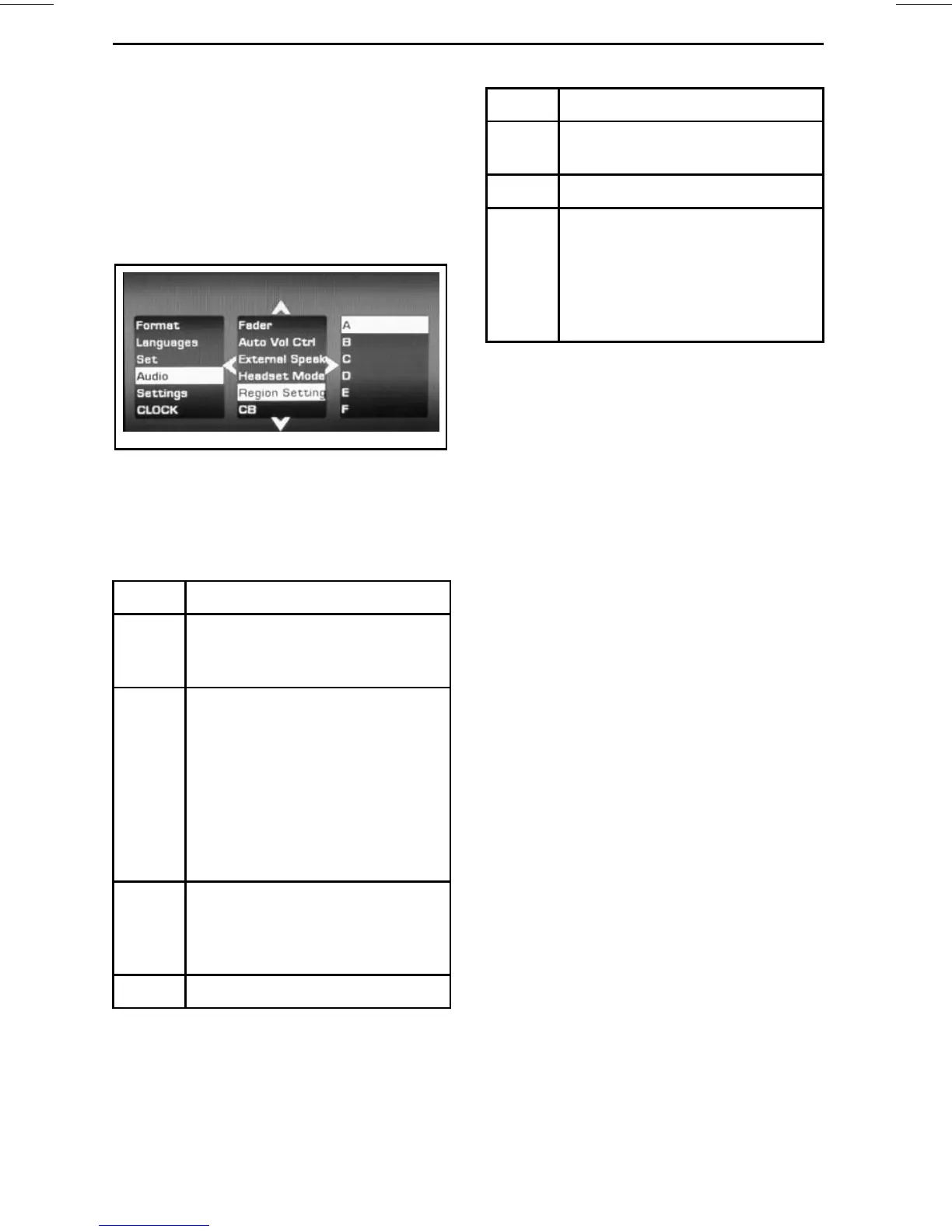
Selecting the Region Setting (Audio)
To select the region setting:
Select AUDIO in main category of Pref-
erences Screen.
rmo2011-001-200_a
Select REGION SETTING in secondary
category.
Select the appropriate region accord-
ing to the table below in main unit or
setting.
REGION COUNTRIES
A
-USA
- Canada
- South Africa
B
-Austria
- Bulgaria
-Denmark
-France
-Iceland
-Israel
-Kuwait
-Norway
-Romania
- Slovakia
-Slovenia
-Spain
- Switzerland
-Turkey
-UAE
- UK/Ireland
- Ukraine
C
- Benelux
- Germany
-Greece
-Italy
- Poland
- Portugal
-Russia
D - Japan
REGION COUNTRIES
E
- Australia
- China
- Malaysia
- New Zealand
F-Taiwan
G
- Argentina
-Brazil
-Cayman
- Chile
- Columbia
-CostaRica
- Curacao
- Dominican Rep.
- Guadeloupe
-Mexico
-PuertoRico
- Venezuela
Restartthe vehicle in order for changes
to take effect.
38
______________





 To Next Page