21
automation purposes. The Evolution Connex control must have at least Version 8
software or newer to be compatible with the SAM.
NOTE: For more information regarding the SAM Module, reference the latest
version of the application specification entitled “SAM Remote Access Application
Specification, ASCII Protocol Information”, available on HVACpartners.com, or
the System Access Module Installation Instructions.
5.6. Searching for Zones (If Applicable)
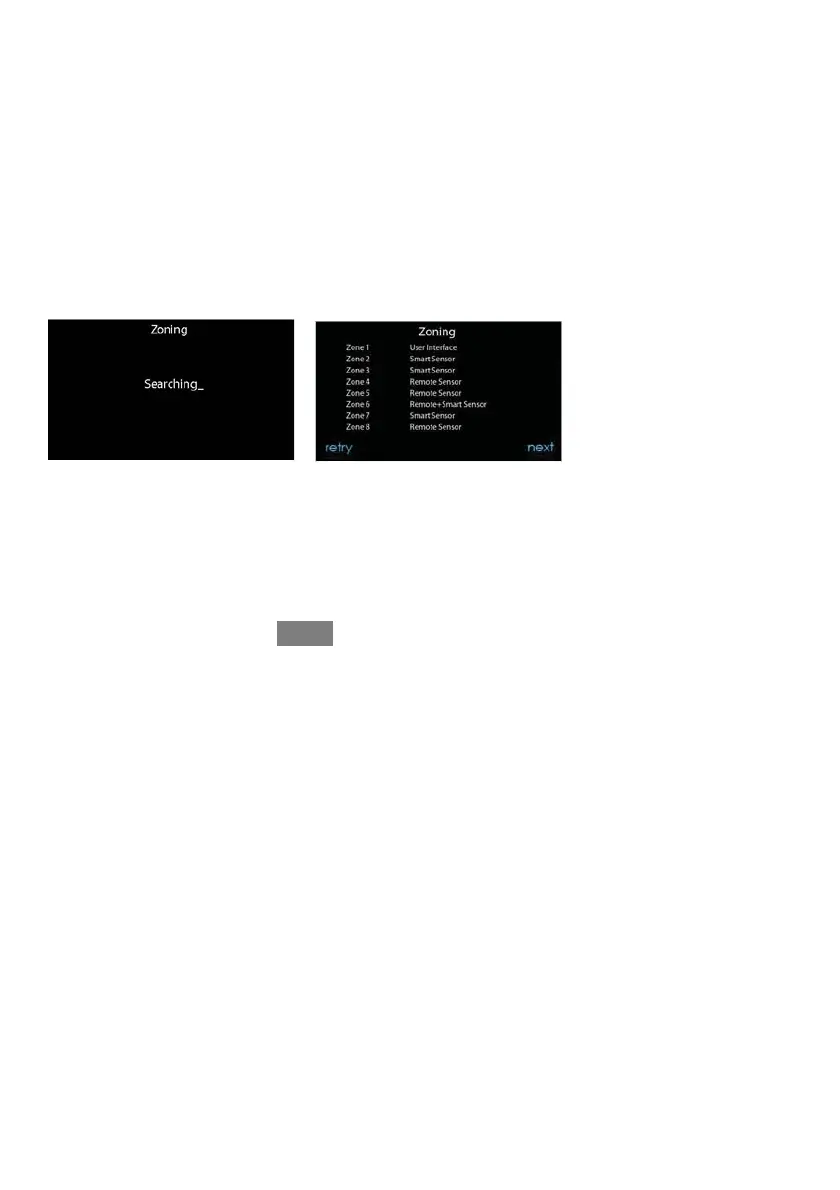
“Zoning -- Searching” will appear on the screen to determine if any zones are
present. The screen will show Zone 1, Zone 2, etc. and indicate all zones h aving
either a Remote Room Sensor, or smart sensors associated with them. If the system
contains smart sensors, they must be assigned a zone number before continuing.
See the Smart Sensor Installation Instructions on how to assign Smart Sensors to
their respectiv e zones. After each zone has been identified, touch NEXT.
A12185
5.7. Filter Type Selection
The installer will next be prompted to select the air filter type installed with the
Evolution System. After the selection is made, touch NEXT.
S Air Filter: 1--in. to 4--in. media filter
S EAC: high voltage electronic air cleaner










 To Next Page