Quick Reference Guide QRG
Quick Reference Guide EDV no.: MD.337.01.04
ekrPro Com60 with CLS Pro 600 Issue Date: 30.06.2011 Seite: 11/22
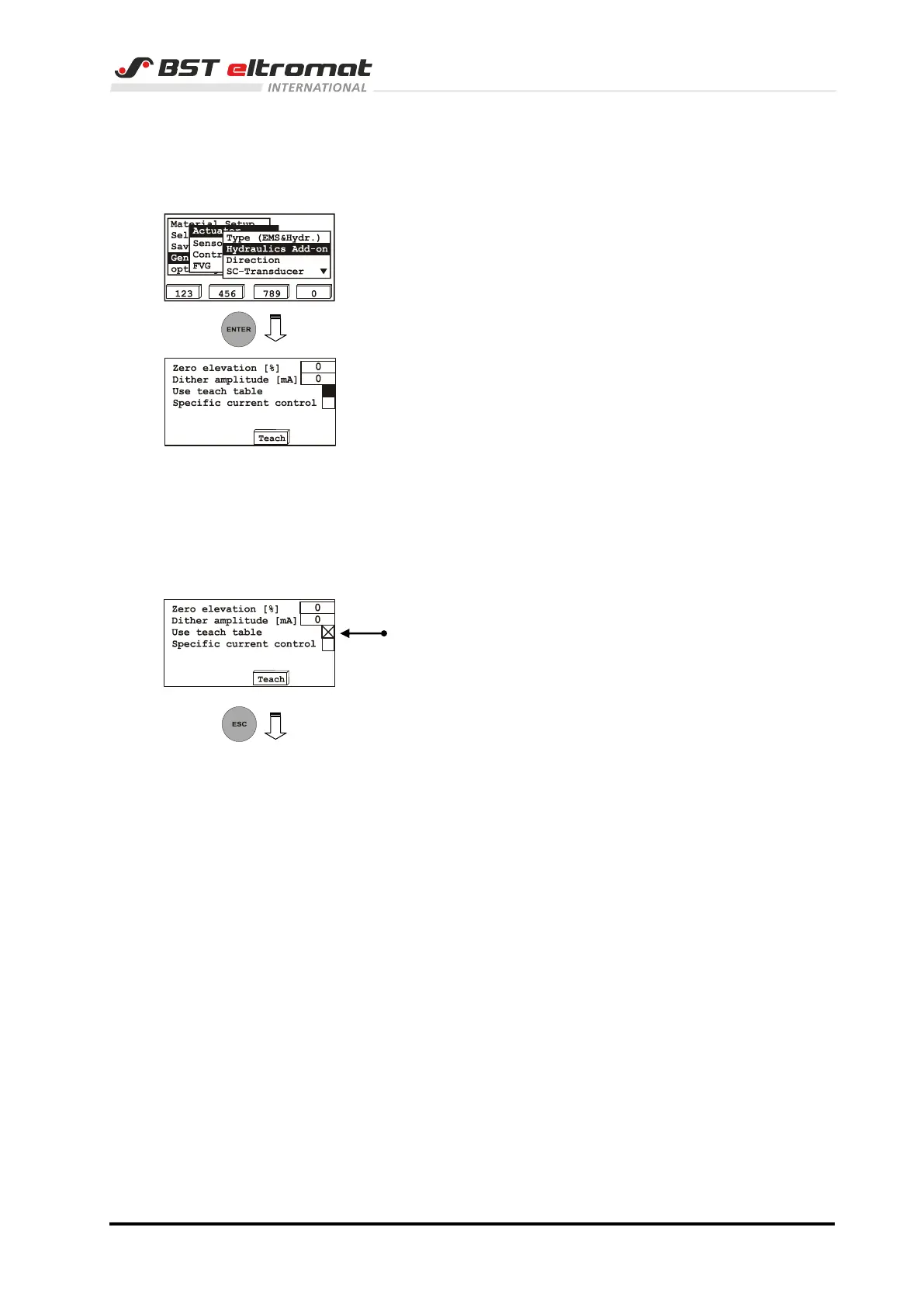
If a hydraulic actuator is used, then additional hydraulic settings
must be made in the menu Hydraulics Add On.
1. Switch to the sub-directory Hydraulics Add-on.
Confirm the respective selection by pressing ENTER.
2. This will open an inputting window, in which the settings for
the connected hydraulic actuator have to be made.
We recommend not to change the default settings for Zero
elevation and Dither amplitude.
The system must be optimized to the actual settings after
the parameters have been entered. This is realized by an
integrated self-teach function.
Press the F3 key to start this function. This will take the flow
curve for the hydraulic actuator. The measured values are
saved in table as non-volatile settings.
Attention: The hydraulic actuator moves in one direction
getting faster up to the stop and afterwards into
the opposite direction as well.
3. Activate the function Use teach table following the
determination of the flow curve.
4. Press the ESC button to exit the inputing window.



 To Next Page