Quick Reference Guide QRG
Quick Reference Guide EDV no.: MD.337.01.04
ekrPro Com60 with CLS Pro 600 Issue Date: 30.06.2011 Seite: 2/22
Afterwards proceed as follows:
1. Wire in and switch on the ekrPro Com60 controller as stipulated
in the operating manual of the controller.
2. Configure the ekrPro Com
60
controller.
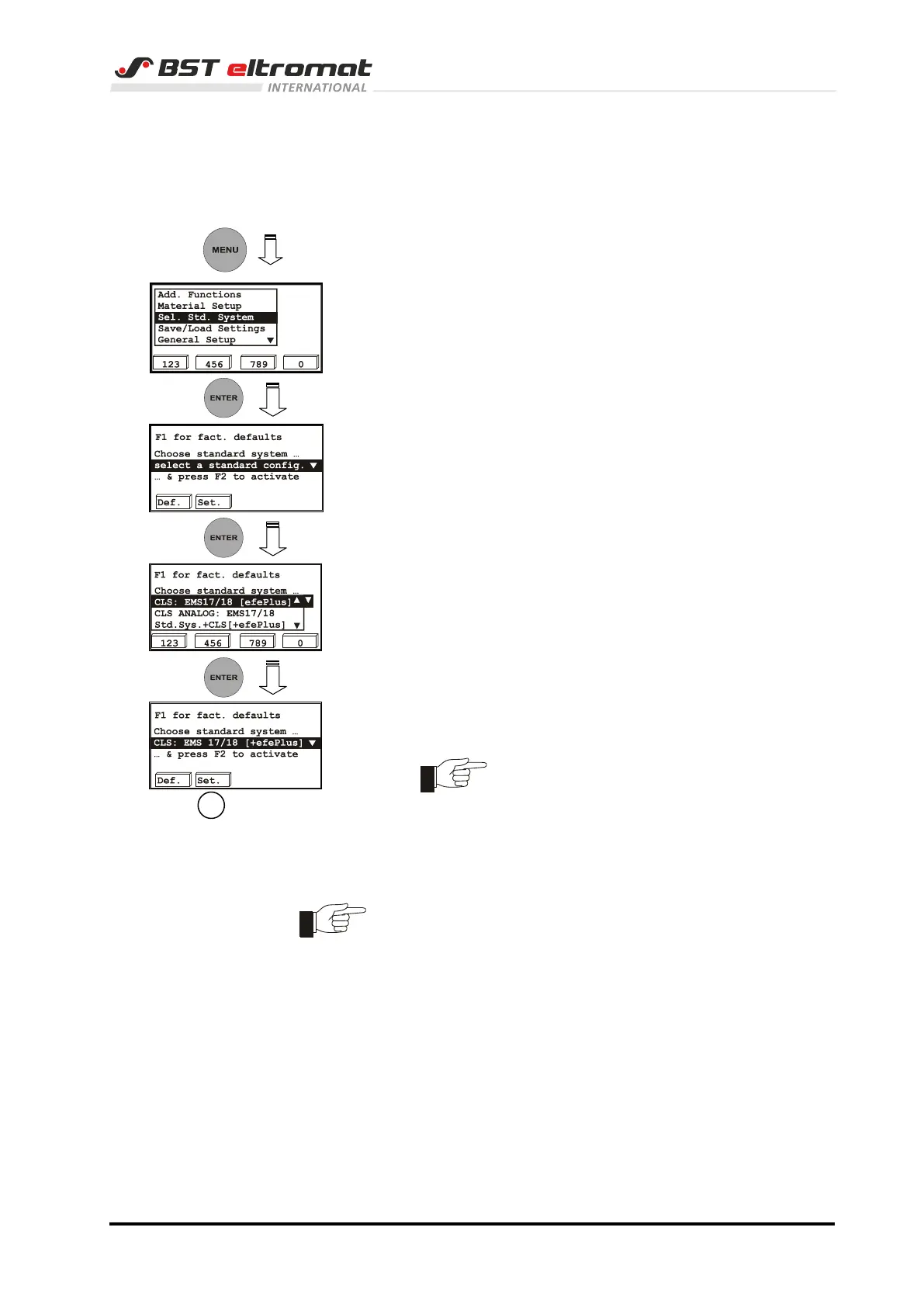
For it select the standard system for use with the CLS Pro 600
as follows.
a) Press the MENU key on the controller. The set-up menu will
be displayed on the screen.
b) Select Sel.Std. System and then press ENTER.
c) The selection window for standard system appears.
Press the ENTER key.
d) The option list opens with the most common standard
systems.
e) Now select the CLS : EMS 17/18 [+efePlus] entry and
confirm the selection by pressing ENTER.
Use this entry with all applications that
use the CLS Pro 600.
f) Press the function key F2 (Set).
Now the system will request a restart. For this purpose, turn off the
supply voltage for the controller and shortly afterwards, turn it back
on.
Further procedures depend on which actuator is connected to the
system that you use.
In the following, you will find an overview of the actuators that can
be connected and the further procedures.



 To Next Page