Gemini Series Electroporator User’s Manual
toll free 800.272.2775 • 508.893.8999 • www.btxonline.com
22
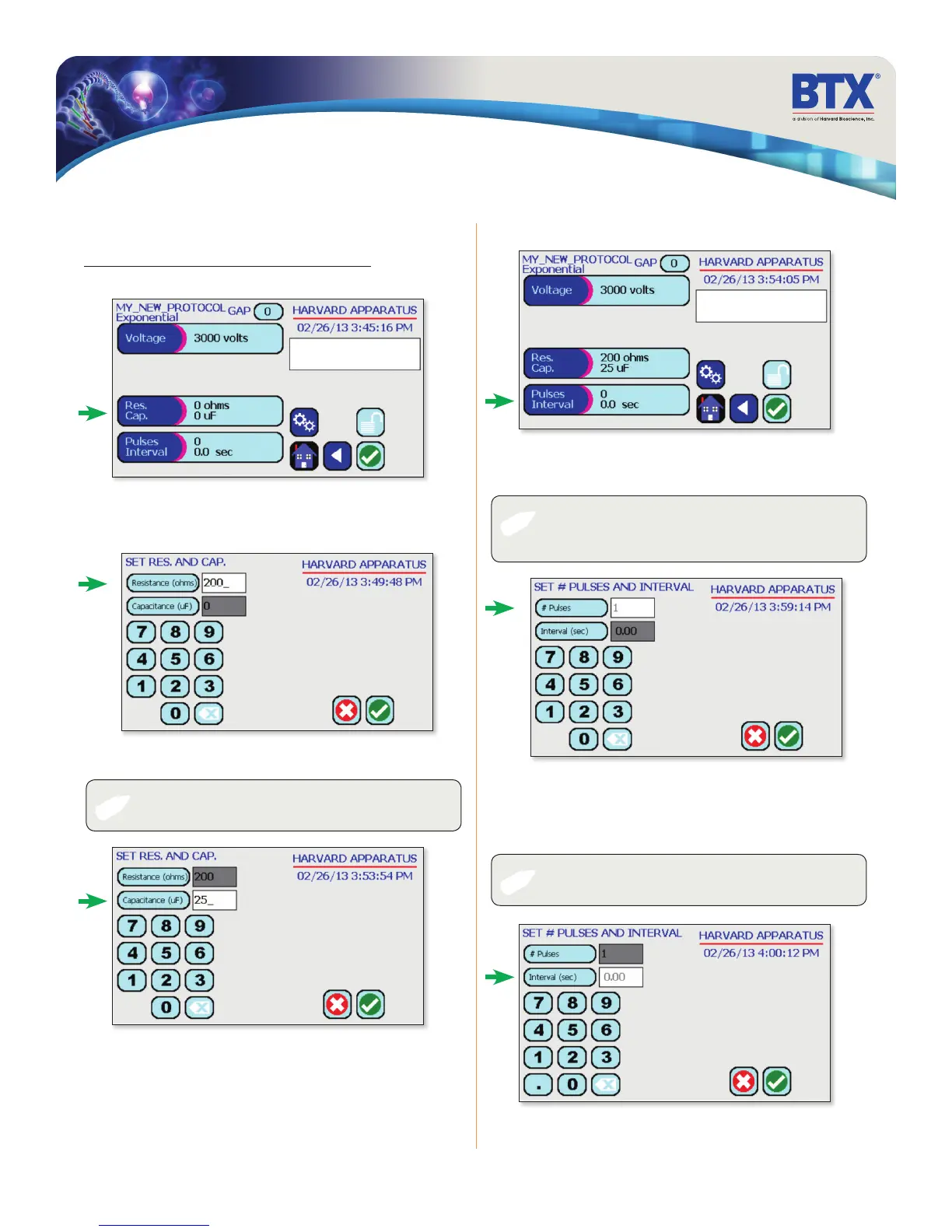
Tap the Resistance (ohms) icon.
Use the numeric keypad to set resistance value.
Tap the Capacitance (uF) icon.
Tap the Pulses Interval icon.
Tap the # Pulses icon.
Use the numeric keypad to set the # of pulses.
Performing Experiments
Creating New Protocols (continued)
Creating an Exponential Decay Wave Protocol (continued)
Tap the Res. Cap. icon.
✐
✐
✐
NOTE: LV and HV mode capacitance values differ. Use the
numeric keypad to set resistance value.
NOTE: Intervals must only be set when performing
multiple pulsing.
NOTE: Only the BTX Gemini X2 can perform multiple pulsing
with Exponential Decay Wave, the BTX Gemini SC cannot
perform multiple pulsing with Exponential decay waves.
Tap the Interval (sec) icon.
Use the numeric keypad to set the interval between pulses.
Tap the Green Check icon to save.
EDIT SCREEN
SET RES CAP
EDIT SCREEN
SET PULSES INTVL


 To Next Page