Gemini Series Electroporator User’s Manual
toll free 800.272.2775 • 508.893.8999 • www.btxonline.com
23
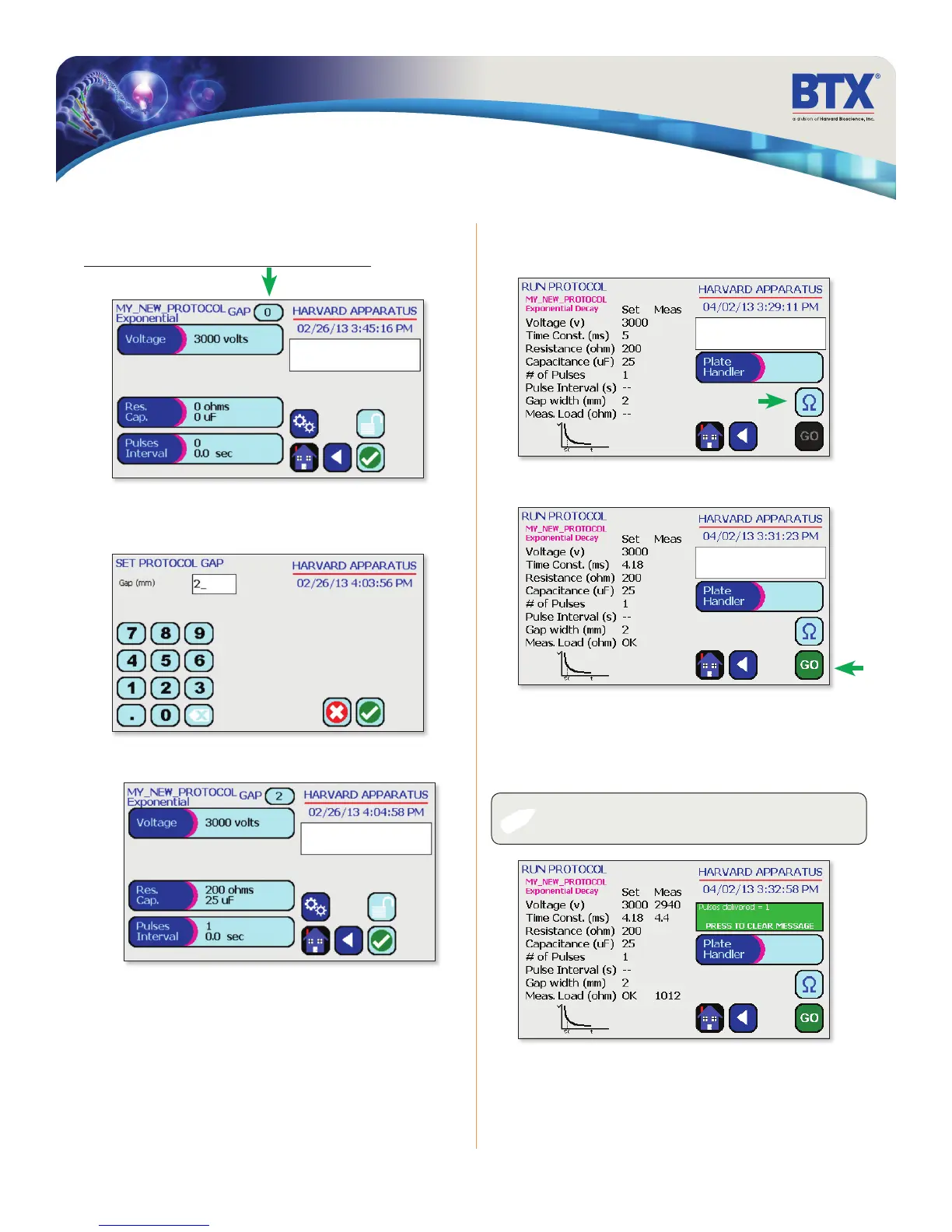
Use the numeric keypad to set the gap between electrodes.
Tap the Green Check icon to save.
Performing Experiments
Creating New Protocols (continued)
Creating an Exponential Decay Wave Protocol (continued)
Tap the Gap icon.
View your protocol.
To run, tap the Omega icon.
Tap the Green Check icon to proceed to the run screen.
With load measurement OK, press the Go icon to run protocol.
Once protocol is complete, data regarding your pulse is displayed
and stored in the systems logs (BTX Gemini X
2
only) for future use.
You may continue pulsing, go back to set-up screen, or to the
home screen.
✐
NOTE: See the Protocol Manager user manual for instructions
on viewing and downloading log data.
EDIT SCREEN
SET PROTO GAP


 To Next Page