Gemini Series Electroporator User’s Manual
toll free 800.272.2775 • 508.893.8999 • www.btxonline.com
33
Installation
Insert the generator CD into the CDROM, a file containing the
CD’s contents will open automatically. Navigate to the Protocol
Manager folder, under Applications. Right click on “Protocol
Manager”. Select “Send To” then “Desktop” to create a shortcut
on your desktop.
✐
NOTE: Compatible with Windows XP & Windows 7.
1. Connect the generator to the PC using a USB cable.
2. Turn generator on.
3. Start Protocol Manager.
4. Select the proper COM port.
Overview
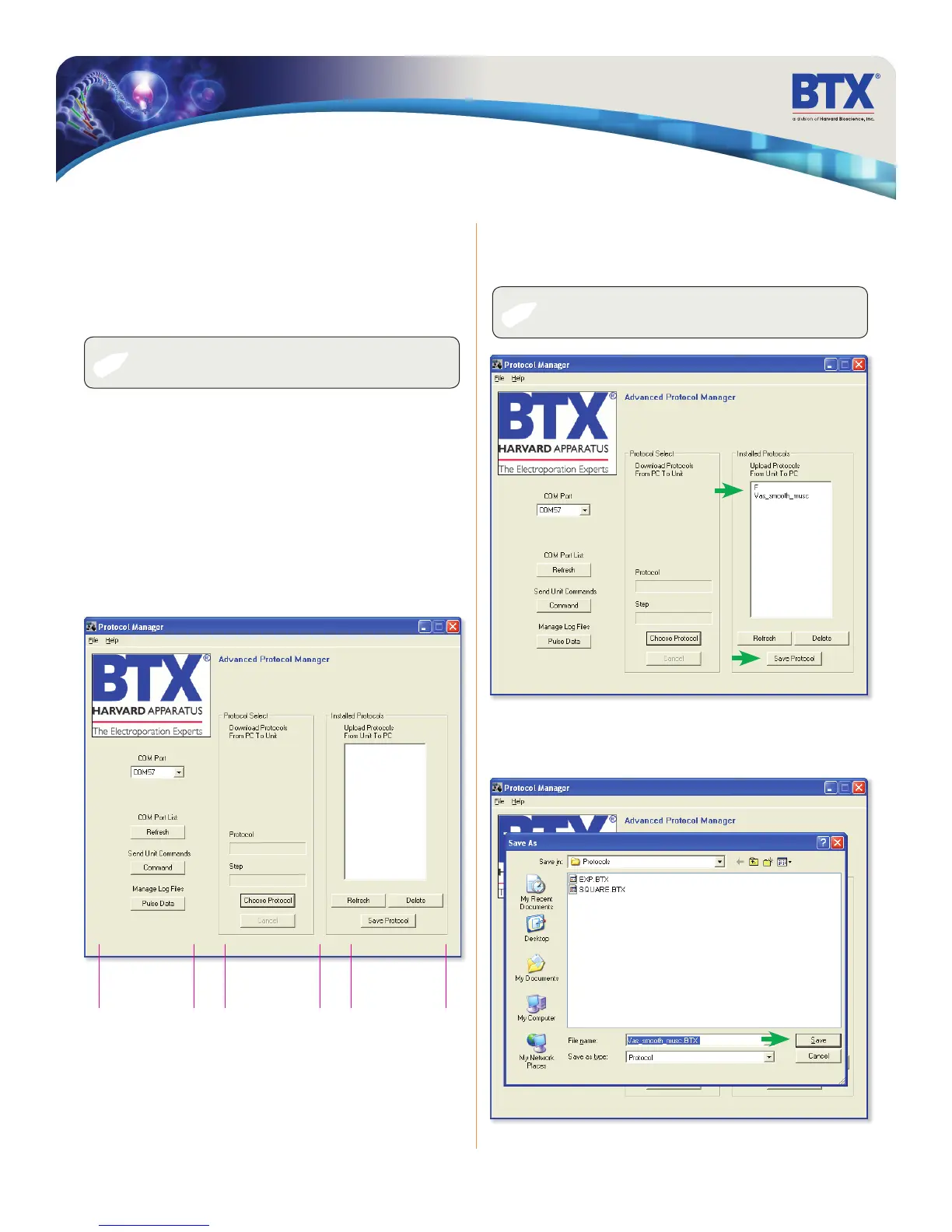
Protocol Manager allows the user to:
• Upload protocols from the Gemini X2 generator to a PC.
• Download protocols from PC to the Gemini X2 generator.
• Upload log files from the Gemini X2 generator to PC.
Log File
Control
PC to Generator
Protocol Control
Generator to PC
Protocol Control
Protocol Manager Software
Upload– Generator to PC
1. Select Protocol(s)
2. Click ‘Save Protocol’
✐
NOTE: Hit ‘Refresh’ to update the list after creating or editing
protocols on the Gemini X2 generator.
3. Select the drive and folder location
4. Click ‘Save’


 To Next Page