WCR-GN User Manual 32
Chapter 4 Conguration
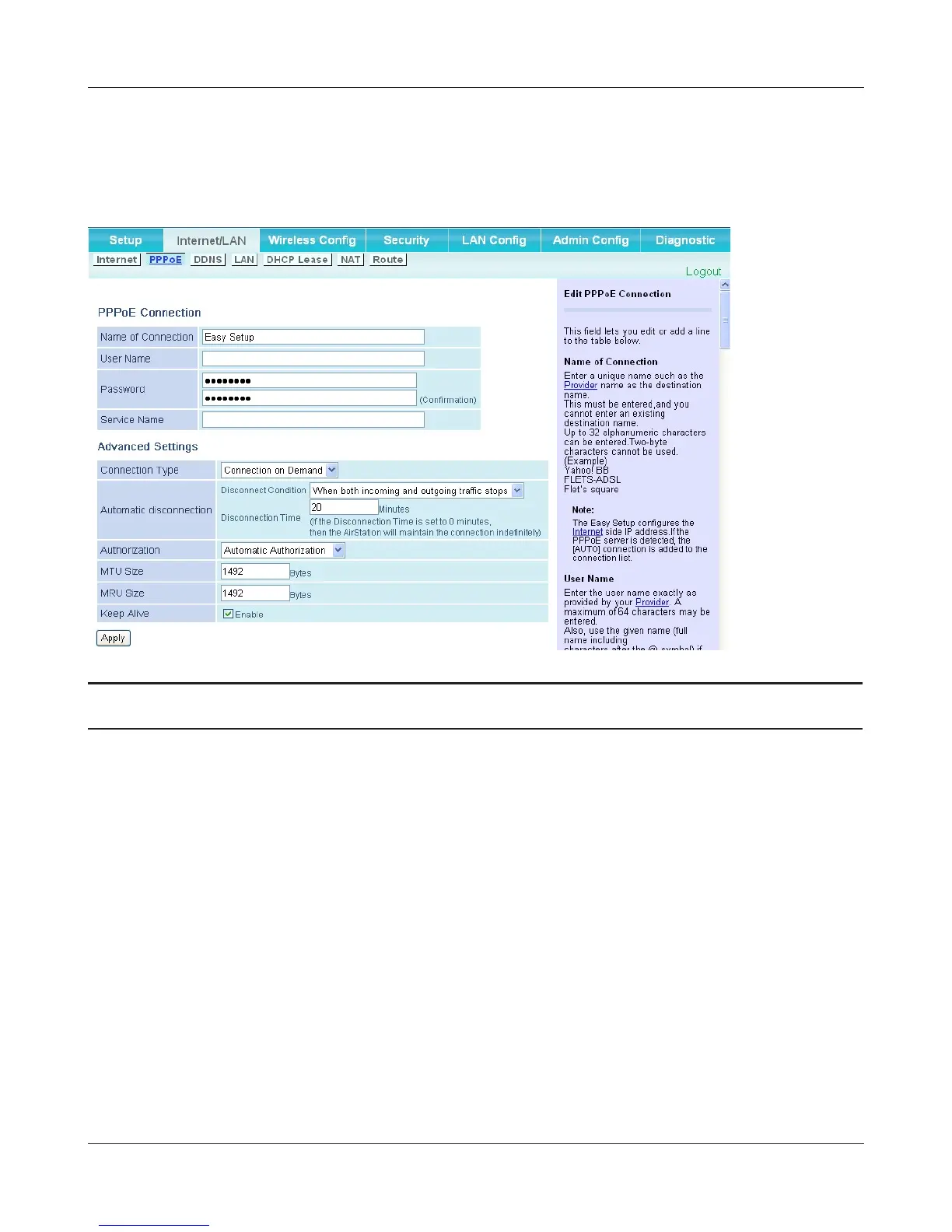
PPPoE (Router Mode only)
ThescreentocongurePPPoEsettings.
Parameter Meaning
NameofConnection Enter the name to identify the connected destination. You may
enter up to 32 alphanumerical characters and symbols.
User Name Settheusernamewhichisspeciedbyyourprovider,usedfor
aPPPoEcertication.Youmayenterupto32alphanumerical
characters and symbols.
Password SetthepasswordspeciedbyyourproviderforPPPoEcertication.
You may enter up to 32 alphanumerical characters and symbols.
Service Name FillinthiseldonlywhenyourproviderspeciesaServiceName.
Leaveblankotherwise.Youmayenterupto32alphanumerical
characters and symbols.
ConnectionType SpeciesthetimingfortheAirStationtoconnecttoyourprovider.





 To Next Page