WCR-GN User Manual 36
Chapter 4 Conguration
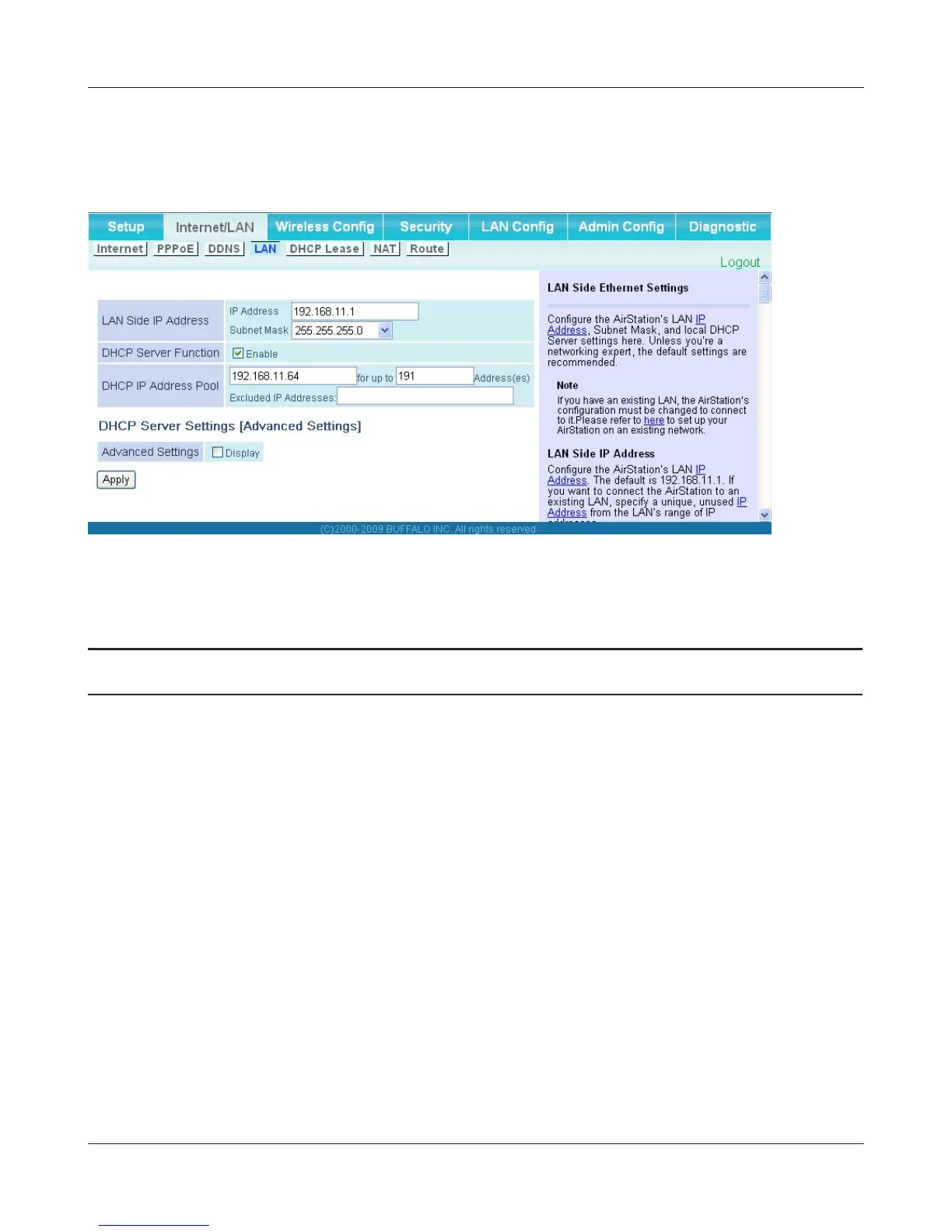
LAN
ConguretheLANsideportandDHCPserversettings.
Parameter Meaning
LANSideIPAddress SetaLANsideIPaddressandsubnetmask.
DHCPServerFunction
* Router Mode only
EnableordisabletheDHCPserver,whichassignsIPaddresses
automatically.
DHCPIPAddressPool
* Router Mode only
ConguretherangeofIPaddressestobeassignedbytheDHCP
serverandIPaddressestobeexcludedfromthatrange.Valuesfrom
0-253 may be entered.
Advanced Settings
* Router Mode only
Select Display to display the advanced settings options for the
DHCPserver.
LeasePeriod
* Router Mode only
SettheeectiveperiodofanIPaddressassignedbytheDHCP
server.Upto999hoursmaybeentered.
Default Gateway
* Router Mode only
SetthedefaultgatewayIPaddressfortheDHCPservertoissueto
clients.



 To Next Page