WCR-GN User Manual 78
Chapter 5 Connect to a Wireless Network
1
2
Clicktheiconinthesystemtray,ornavigatethrough“Start”menu>All Programs>
BUFFALO>AirStation Utility>ClientManagerV.
Windows 7/Vista (Client Manager V)
IfyouareusingWindows7/Vista,usetheincludedClientManagerVsoftwaretoconnectwirelessly
withAOSS/WPS.
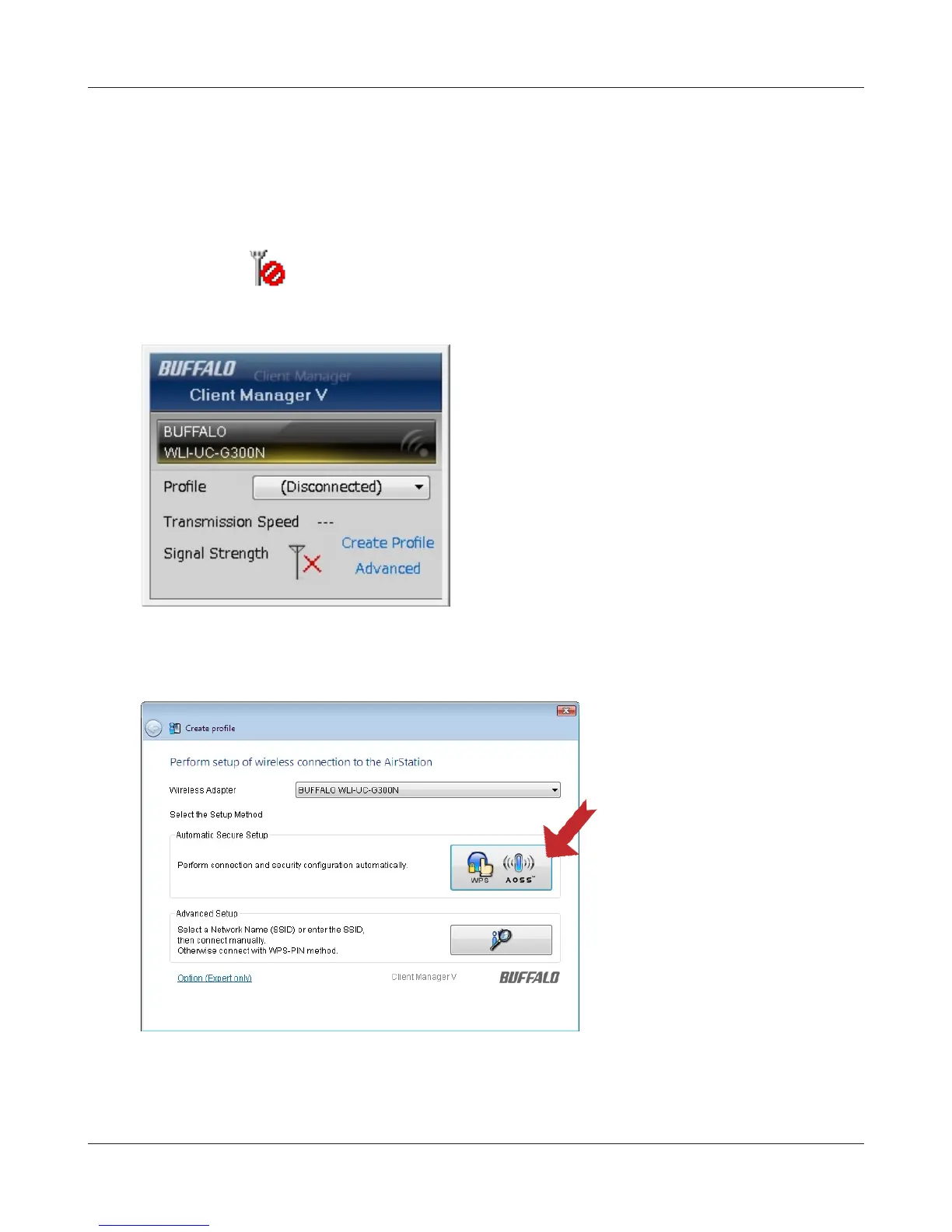
Whenthescreenatleftisdisplayed,click“Create
Prole”.
Followtheinstructionsdisplayedonthescreen.AfteryoucongurethesettingsandtheSecurity
LED(page8)stopsashingandislit,theAOSS/WPSconnectioniscompleted.
3
Whenthemessage"A Program needs your permission to continue"appears,click“Continue”.
4
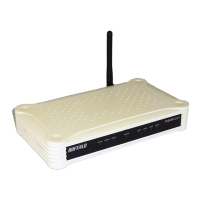
When the screen shown at left is
displayed,clickthe“WPS AOSS“
button.





 To Next Page