WCR-GN User Manual 66
Chapter 4 Conguration
Access
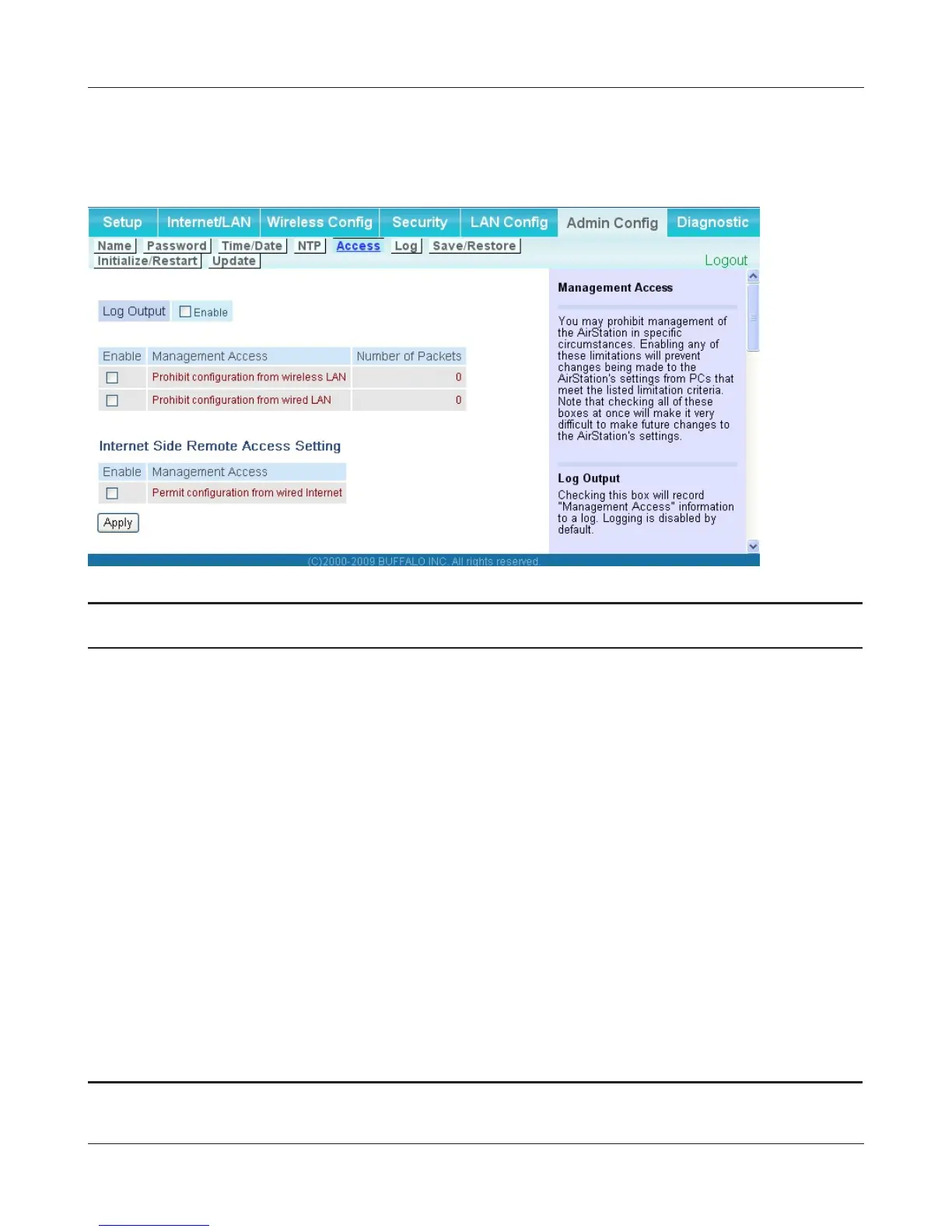
The screen to restrict access to the AirStation’s settings screens.
Parameter Meaning
LogOutput Enabling outputs a log of changes to access settings.
Prohibitcongurationfromwireless
LAN
Ifenabled,preventsaccesstosettingsscreensfromwirelessly
connecteddevices(onlywireddevicesmaycongure).
Prohibitcongurationfromwired
LAN
Ifenabled,preventsaccesstosettingsscreensfromwireddevices
(onlywirelesslyconnecteddevicesmaycongure).
Permitcongurationfromwired
Internet
*Router mode only
Ifenabled,allowsaccesstosettingsscreensfromnetworkdevices
ontheInternetside.
PermittedIPaddress
*Router mode only
DisplayedonlyifInternetsidecongurationisenabled.EntertheIP
addressofthedevicethatispermittedtoconguretheAirStation
remotelyfromtheInternetside.
Permitted Port
*Router mode only
DisplayedonlyifInternetsidecongurationisenabled.Setaport
number(1-65535)ifconguringtheAirStationfromtheInternet
side.



 To Next Page