WCR-GN User Manual 34
Chapter 4 Conguration
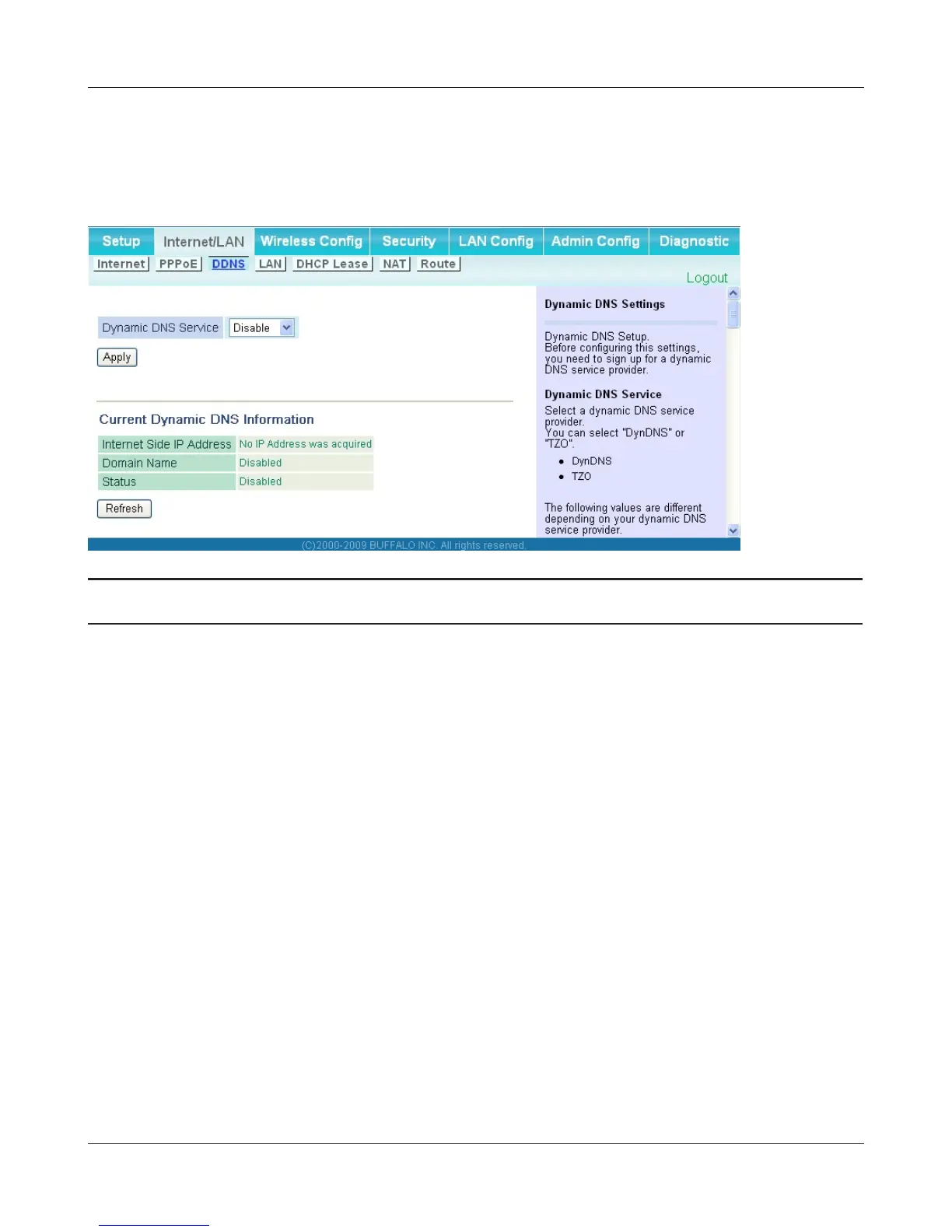
DDNS (Router Mode only)
ThescreentocongureDynamicDNSsettings.
Parameter Meaning
Dynamic DNS Service Select a provider (DynDNS or TZO) for Dynamic DNS.
User Name
* Only when DynDNS is selected
Enter the user name which is registered to the Dynamic DNS
service.Youmayenterupto64alphanumericalcharactersand
symbols.
Password
* Only when DynDNS is selected
Enter the user name which is registered to the Dynamic DNS
service.Youmayenterupto64alphanumericalcharactersand
symbols.
Host Name
* Only when DynDNS is selected
Enter the host name which is registered to the Dynamic DNS
service. You may enter up to 255 alphanumerical characters,
hyphens, and periods.
Email Address
* Only when selecting TZO
Enter the email address which is registered to the Dynamic DNS
service.Youmayenterupto64alphanumericalcharactersand
symbols.
TZOKey
* Only when selecting TZO
EntertheTZOKeywhichisregisteredtotheDynamicDNSservice.
Youmayenterupto64alphanumericalcharactersandsymbols.



 To Next Page