32
Installation
Type 3280, 3285
7.4 Accepting and saving SIM card data (digital
version only)
The optionally available SIM card can be used to save and transfer device-specific values and user settings to a different
device.
A SIM card which has just been inserted is checked for existing data during device restart. Where applicable, this data
is accepted or overwritten:
• The SIM card does not contain any data.
The existing device-specific values and user settings are saved on the SIM card.
• The SIM card contains data which is compatible with the device.
The SIM card data is accepted by the device. The existing device-specific values and user settings are
overwritten.
• The SIM card contains data which is not compatible with the device.
The device overwrites the data on the SIM card with its own, device-specific values and user settings.
NOTE!
Do not use any commercially available SIM cards for the device.
The inserted SIM card is a special industrial version which is particularly durable and temperature-resistant.
Order the SIM card via your Bürkert sales department only.
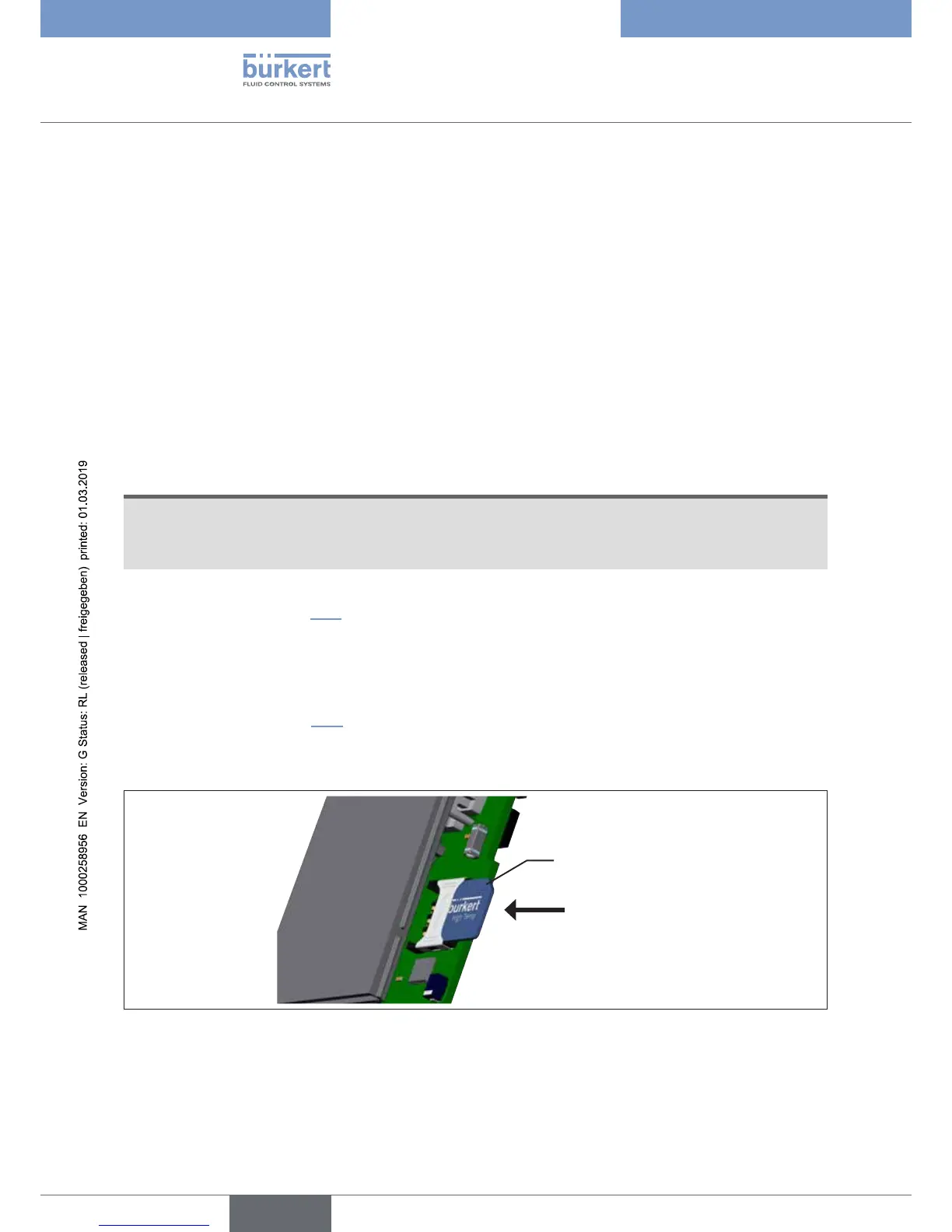
Inserting the SIM card:
→ Open device (see chapter “7.3”).
→ Carefully push SIM card into the device.
→ Overcome the opposing force of the spring contact and insert all the way. Bürkert lettering on the side facing
away from the printed circuit board and beveled side upwards.
→ Close device (see chapter “7.3”).
→ Restart device.
The new data are transferred.
SIM card
Figure 21: Inserting the SIM card



 To Next Page