38
Start-up
Type 3280, 3285
8.3 Setting options
The Bürkert Communicator software enables communication with valves 3280 and 3285.
The operating instructions for the Bürkert Communicator can be found at www.burkert.com.
8.3.1 Setting options for running positioner and process
controller
INPUT/OUTPUT
Selected standard signal
Under this menu option, enter the signal used for the set-point value or actual value
- Current 4...20 mA (for digital version only actual value)
- Current 0...20 mA (for digital version only actual value)
- Voltage 0...10 V (for digital version only actual value)
- Voltage 0...5 V (for digital version only actual value)
- CANopen/büS (digital version only)
- Frequency (digital version only)
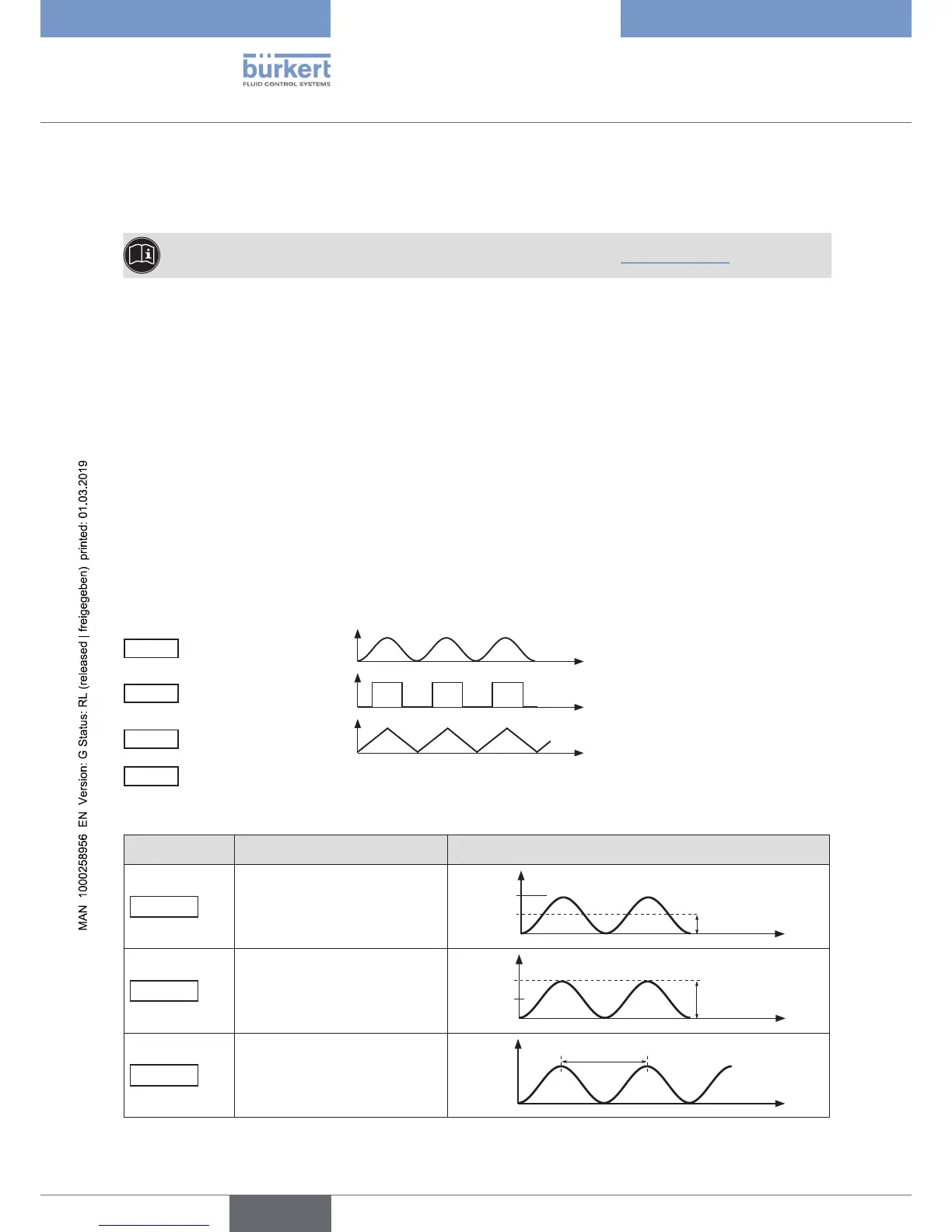
SIGNAL.SIM
Simulation of the set-point value
Use this function to simulate the set-point value. The set set-point value source is ignored by the device during
simulation. The following types of signal can be entered:
Sinus
Sine wave
Square
Square wave
Triangle
Triangle wave
Fixed
Manual input of a fixed set-point value
The following parameters can be set for the selected waveform:
Menu option Parameter setting Schematic representation with sine wave
Offset
(Zero offset as %)
70 %
50 %
Offset as %
t
Amplitude
(Amplitude as %)
70 %
50 %
Amplitude as %
t
Periode
(Cycle duration in s)
70 %
50 %
Period in s
t



 To Next Page