THE DEVICE AT A GLANCE
12
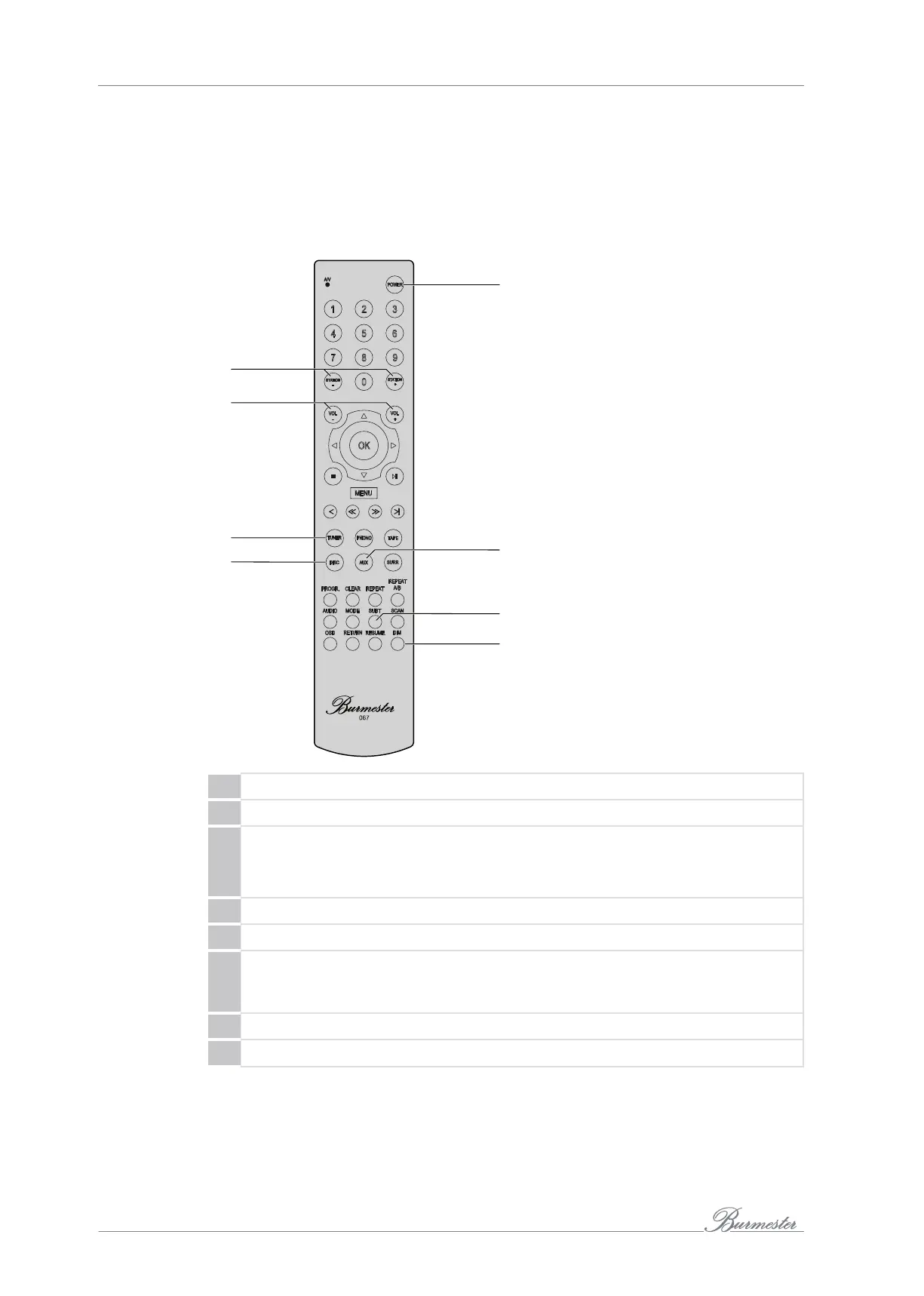
The remote control
The device is delivered with the 067remote control as standard.
The remote control allows you to quickly access some frequently used functions, such
as device power on/off, volume control, as well as signal source selection.
To enable use of the remote control, the device must be switched on or in standby
mode.
26
27
28
25
30
31
32
29
25 Switch the device on or into standby mode.
26 The STATION+ and STATION– buttons can be used to switch through the inputs.
27 The VOL+ and VOL– buttons can be used to adjust the volume:
• Pressing VOL+ increases the volume.
• Pressing VOL– reduces the volume.
28 TUNER corresponds to the TUNER input selection button (6).
29 DISC corresponds to the CD input selection button (6).
30 Pressing the AUX button selects AUX1 as the input source. Pressing the AUX
button repeatedly allows you to switch between the inputs AUX1, AUX2, and
TV.
31 SUBT corresponds to the Smooth button (7).
32 Pressing DIM turns all the LEDs (except the POWER LED) on or off.
All additional buttons on the remote control are irrelevant for the 101integrated
amplifier.



 To Next Page